What Is a Focus Nudge? How Digital Nudges Help You Refocus
Written by Mouhsine
Admin
Published August 27, 2026 · Updated August 28, 2026
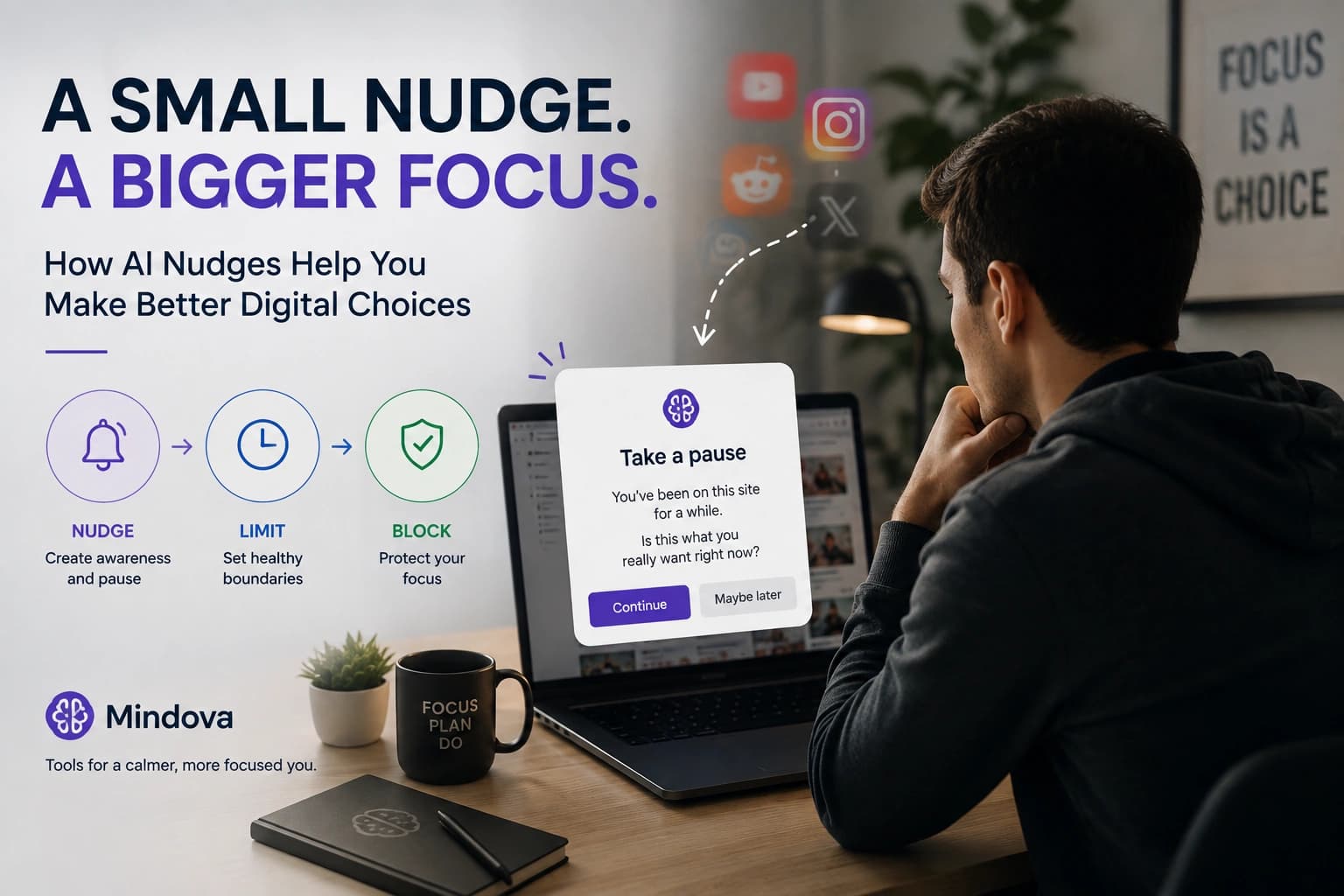
You open your laptop to work on one thing.
A few minutes later, you are on YouTube, Reddit, Instagram, a news site, or another tab you never deliberately decided to visit.
Sometimes distraction is a conscious choice. Often, it is simply a familiar browsing pattern happening faster than you notice it.
A focus nudge is meant to create a small pause inside that pattern.
Instead of automatically continuing toward the distraction, you get a moment to notice what you are doing and decide whether it is actually what you intended.
In this guide, a focus nudge means a contextual digital reminder or piece of friction designed to bring a distracting choice back into awareness without necessarily removing that choice.
That last part matters.
A nudge is not the same thing as a reminder, and it is not the same thing as a website block.
What Is a Nudge?
The idea of a nudge comes from behavioral science and was popularized by Richard Thaler and Cass Sunstein.
In behavioral economics, nudges change the choice architecture around a decision in ways that can influence behavior while preserving the person's available choices. Digital nudging applies the same principle to digital environments such as websites, apps, and interfaces. (wi.uni-muenster.de)
A nudge does not have to say:
You cannot do this.
It can instead create enough friction or context for you to reconsider an automatic decision.
Applied to online distraction, that could mean interrupting the pattern between:
“I feel stuck for a second”
and
“I am suddenly scrolling a feed.”
The goal is not to remove every distracting option from the internet.
It is to make an unconscious choice conscious again.
Focus Nudge vs Reminder vs Website Block
These tools can all support focus, but they solve different problems.
A reminder tells you something
A reminder might tell you:
Start studying at 7:00 PM.
Or:
Finish the report today.
That can help you remember an intention.
But once you begin working, a normal reminder does not necessarily do anything about the distracting websites you open during the next hour.
A nudge influences the choice
A nudge appears around the decision itself.
Its purpose is to slow down an automatic pattern enough for you to reconsider it.
You can still have a choice, but the choice becomes more visible.
A website block creates a boundary
Blocking is stronger.
Instead of encouraging you to reconsider opening a website, a blocker enforces a rule you already decided on.
That makes blockers useful when you do not want to keep renegotiating the same decision.
A useful focus setup does not need to choose one approach for everything.
Sometimes awareness is enough.
Sometimes you need a limit.
Sometimes you want the website unavailable.
Why Digital Nudges Can Help With Automatic Browsing
A lot of distracting browsing starts with very little deliberation.
You finish a paragraph.
A page takes too long to load.
A task becomes uncomfortable.
You switch tabs.
You type the first few letters of a familiar website.
The important moment may happen before you consciously think:
I want to stop working now.
A digital nudge can add friction to that transition.
That does not mean nudges automatically improve everyone's productivity. Research across many kinds of choice-architecture interventions finds positive effects on average, but those effects vary considerably depending on the intervention and behavioral context. In other words, “nudges work” is too broad a claim; design and situation matter. (DOI)
For focus tools, that leads to a simple principle:
Use a nudge where awareness may change the decision. Use a stronger boundary where the decision has already been made.
When a Focus Nudge Makes Sense
When you open a site automatically
Maybe you regularly open a social feed between tasks without making a deliberate decision to take a break.
You do not necessarily need the website banned all day.
You may simply need something that interrupts the automatic sequence.
When a website is both useful and distracting
YouTube is an obvious example.
You might genuinely need a tutorial for work or study.
A complete block can therefore be too restrictive.
The problem is that opening one useful video can easily turn into recommendations, Shorts, comments, or unrelated videos.
In situations like this, a lighter intervention can make more sense than permanently removing access.
When you want to understand your distraction before restricting it
You may know that you lose time online without knowing exactly where.
Before adding aggressive blocking rules everywhere, it can be useful to understand your actual browsing patterns.
Mindova's dashboard includes information such as productive time, distracting time, recent activity, blocked websites, and frequently visited sites. (Mindova)
That gives you evidence for deciding which sites need awareness, limits, or blocking.
When a Nudge Is Probably Not Enough
A nudge preserves choice.
Sometimes that is exactly what you do not need.
When you already know the site should be unavailable
If you repeatedly open the same website during work and there is no legitimate reason to use it during that period, asking yourself whether you really want to open it every time can become unnecessary friction.
You already made the decision.
Block it.
When the site is useful, but you want a ceiling
Some websites do not belong in either extreme.
You do not want unlimited access.
You also do not want zero access.
Mindova supports separate daily limits for individual websites as well as an overall daily distraction limit. (Mindova)
That makes a site limit useful for things like:
- YouTube
- news sites
- social networks you also use professionally
- forums or communities related to your work
Instead of asking yourself whether you should visit the website every time, you decide in advance how much time it deserves.
When you need a protected work period
Sometimes the problem is not one particular website.
You simply want a defined period where distracting browsing is harder.
That is what a Focus Session is for.
In Mindova, you choose the duration of a Focus Session and use website blocking during the period you have set aside for work or study. (Mindova)
What Are Mindova AI Nudges?

Mindova includes AI Nudges as one part of its desktop browser focus system.
Mindova describes AI Nudges as contextual reminders designed to help you notice distracting browsing and return to the task you intended to complete. They can be enabled or disabled from Settings. (Mindova)
That description is deliberately narrower than saying:
“AI knows exactly when you lose focus.”
It does not.
Mindova should not be described as understanding everything happening on your screen or knowing precisely what you are thinking.
According to Mindova's current privacy documentation, AI Nudges may use information about how much time you spend on websites you have identified as distracting. (Mindova)
Think of them as one layer of friction and awareness, not an autonomous coach watching every action you take.
What Mindova AI Nudges Do Not Mean
“AI-powered” can easily imply capabilities that a product does not actually have.
Mindova AI Nudges should not be described as:
- reading your thoughts;
- knowing exactly what task you are completing;
- detecting that you have entered a flow state;
- understanding the contents of your private messages;
- reading your emails to determine whether you are distracted;
- predicting every moment your attention is about to wander;
- blocking native iPhone or Android apps.
Mindova currently operates as a website blocker inside supported desktop browsers including Chrome, Edge, Brave, Opera, and Vivaldi. Native mobile app blocking is not part of the currently public blocker. (Mindova)
This matters because useful productivity software does not need magical claims to be useful.
The feature should be judged on the problem it actually addresses.
Nudges Should Not Become Another Distraction
There is an obvious failure mode with focus reminders:
You start ignoring them.
A prompt that appears too often eventually becomes part of the interface.
Click.
Dismiss.
Continue.
The behavior becomes as automatic as the distraction itself.
That is why the goal should not be:
Give me more reminders.
It should be:
Use the least intrusive intervention that reliably helps.
For one website, that might be no restriction.
For another, awareness might be enough.
For another, a daily limit may work better.
And for the website you know will derail an important work session, blocking may be the simpler solution.
A Practical Focus Setup: Nudge, Limit, or Block?
Instead of applying the same rule to the entire internet, divide distracting websites into three groups.
1. Useful websites you do not normally overuse
Leave them alone.
A productivity system does not become better simply because it controls more things.
2. Useful websites that regularly consume too much time
Give them a boundary.
An Individual Site Limit lets you preserve access while putting a ceiling on how much daily attention the site can take.
For example, a video platform may be necessary for tutorials but not deserve unlimited browsing time.
3. Websites you do not want during focused work
Block them.
If you already know the answer is “I don't want to use this while working,” there is little value in repeatedly asking yourself the question.
For a broader strategy, see how to block distractions without making useful websites unusable.
Use Your Actual Browsing Patterns
People are not always good at estimating where their online time goes.
You may think one social network is your biggest distraction and discover that a news site consumes more time.
You may think you use YouTube mostly for work and find that most visits happen between unrelated tasks.
So before adding more rules, look at what actually happens.
Ask:
- Which sites get the most distracting time?
- Which ones do I open repeatedly for very short visits?
- Which sites are genuinely necessary?
- Which websites would still be useful with a smaller daily allowance?
- Which ones do I almost never need while working?
- When does distracting browsing tend to increase?
Mindova's browsing insights and focus statistics are designed to make these patterns easier to review. (Mindova)
Then change the boundary based on evidence rather than frustration.
What About Privacy?
A focus tool needs some information about browsing activity if it is going to measure website time, enforce limits, or block particular domains.
But that does not mean it needs to read everything inside those pages.
Mindova's Privacy Policy says the extension may process the active website's URL/domain, visit information, time spent, classifications, limits, blocked attempts, and related focus statistics. By default, browsing and focus activity is stored locally on the device. (Mindova)
Mindova is not designed to read the contents of your emails, private messages, chats, passwords, forms, documents, or other private webpage text to create AI Nudges. (Mindova)
Cloud Sync is optional and off by default. It should also not be confused with native cross-device blocking; Mindova's currently public blocker remains a desktop-browser product. (Mindova)
Can Nudges Make You More Productive?
Possibly, but this is where productivity marketing often goes too far.
Research on nudging in general finds that choice-architecture interventions can influence behavior, but the average effect varies by intervention type and context, and published research also contains important limitations and publication-bias concerns. (DOI)
That means we should not say:
AI Nudges will make you productive.
A more defensible claim is:
A well-timed nudge can create a useful decision point when distracting behavior would otherwise remain automatic.
Whether that improves your focus depends on the distraction, the person, the intervention, and what caused the loss of focus in the first place.
What a Focus Nudge Cannot Fix
Browser distraction is only one source of attention problems.
A nudge cannot fix:
- an unclear task;
- unrealistic deadlines;
- lack of sleep;
- an overloaded workload;
- constant interruptions from coworkers;
- native phone apps outside the desktop browser;
- work that genuinely requires frequent context switching;
- a workspace where every notification is treated as urgent.
Sometimes the right answer is not another productivity feature.
Sometimes you need to change the task, environment, expectations, or device habits around it.
Focus Nudges and Doomscrolling Are Not the Same Problem
It is also useful to separate ordinary distracting browsing from doomscrolling.
Opening a social feed because you are procrastinating is not automatically doomscrolling.
Doomscrolling usually refers more specifically to repeatedly consuming negative or distressing online content while finding it difficult to stop.
That behavior can involve different triggers and may need more than a productivity reminder.
If that is the problem you are trying to solve, read What Is Doomscrolling and How Do You Stop It?.
Frequently Asked Questions
What is a focus nudge?
A focus nudge is a small contextual prompt or piece of digital friction designed to make distracting behavior more noticeable and give you an opportunity to return to what you intended to do.
Is “focus nudge” a psychological technique?
The underlying idea comes from behavioral nudging and choice architecture. In this guide, “focus nudge” is the practical term we use for applying those ideas to attention and distracting digital behavior.
What is the difference between a nudge and a reminder?
A reminder mainly communicates information or recalls an intention.
A nudge changes something around the decision itself so the intended choice becomes easier to notice or make.
What is the difference between a nudge and a website blocker?
A nudge generally preserves access and choice.
A blocker enforces a rule that restricts access.
If awareness is enough, a nudge may fit. If you have already decided a site should be unavailable, blocking is usually the clearer tool.
Do AI Nudges automatically know when I lose focus?
No.
Mindova should not be described as detecting your mental state or knowing exactly when you have lost concentration.
Its AI Nudges are contextual reminders associated with distracting browsing, and Mindova says the feature may use time spent on websites identified as distracting. (Mindova)
Does Mindova read my messages or emails to create AI Nudges?
No. Mindova states that it is not designed to read private messages, emails, chat contents, passwords, forms, or other private webpage text to generate its focus nudges. (Mindova)
Can Mindova block phone apps?
Not currently.
Mindova's public blocker operates inside supported desktop browsers. The mobile apps are still in development. (Mindova)
Are AI Nudges better than blocking websites?
Neither is universally better.
They solve different problems.
Use a nudge when awareness and choice are useful. Use a limit when you want controlled access. Use blocking when you have already decided a website should not be available.
Use the Lightest Boundary That Works
The goal of a focus system should not be to make your browser increasingly hostile.
It should help your actions stay closer to your intentions.
Sometimes all you need is a small moment of awareness.
Sometimes you need a time limit.
Sometimes you need a focused work session.
And sometimes you already know the correct answer is simply:
Block the site.
A good focus nudge earns its place when it interrupts an automatic distraction without becoming another distraction itself.
The useful question is not:
How much can I restrict?
It is:
What is the lightest boundary that reliably helps me do what I intended to do?
Mouhsine
Admin
Passionate about helping people achieve peak mental performance through evidence-based strategies and mindful technology use.
Related Articles

How to Focus on Writing Without Digital Distractions
Learn how to stay focused while writing by separating drafting from research, reducing digital distractions, and keeping the online tools you actually need
Creative Block: How to Get Unstuck and Start Creating Again
Feeling creatively stuck? Learn what creative block can look like, how to identify what is stopping you, and practical ways to generate ideas and move forward
How to Avoid Distractions While Working: 10 Practical Strategies
Learn how to avoid distractions while working by reducing digital triggers, managing notifications, limiting distracting websites, and protecting focused work time.
Comments
Be the first to comment.
Ready to protect your focus?
Block distracting sites, set daily limits, and run focus sessions. Mindova is free.