How to Block Facebook on Chrome and Set a Daily Limit 2026
Written by Mouhsine
Admin
Published August 13, 2026 · Updated August 18, 2026
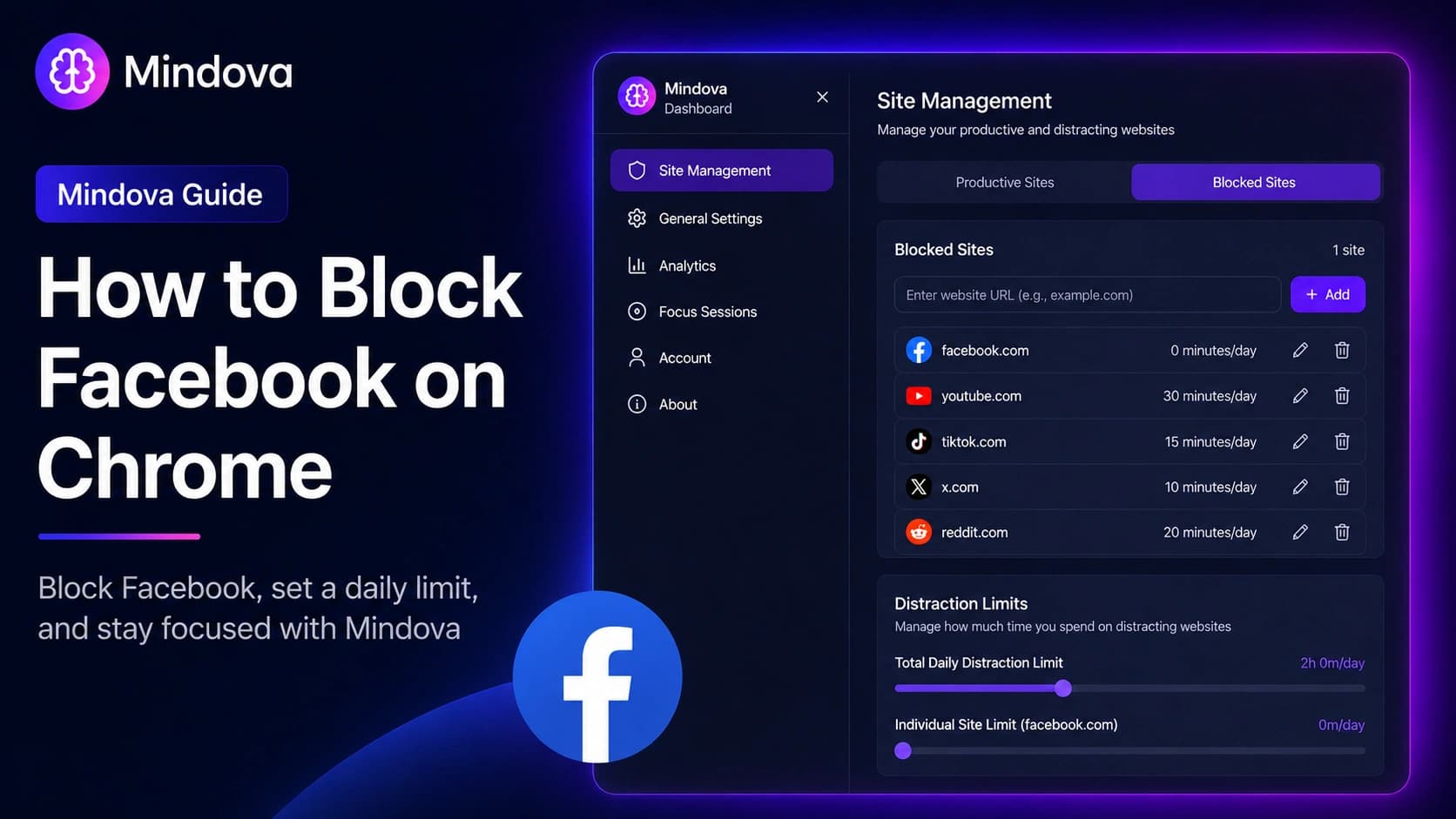
Facebook can be useful for Groups, Marketplace, events, professional communities, and keeping in touch. The problem is when you open it for one specific reason and end up spending much longer in the feed than you intended.
With Mindova, you can add facebook.com to your blocked websites, give Facebook its own daily time limit, or set that limit to zero when you do not want access at all.
Quick answer: Open Site Management → Blocked Sites, add
facebook.com, then choose an Individual Site Limit. Set it to 0 minutes/day to block Facebook on every visit, or choose a higher limit if you still want some daily access.
Important: This guide explains how to restrict access to the Facebook website in your desktop browser. It does not explain how to block another Facebook profile or Page, and it does not block the native Facebook mobile app.
If Facebook is not the only website interrupting your work, see our broader guide to blocking distracting websites and setting different rules for each one.
What we tested
We added facebook.com to Blocked Sites, set its Individual Site Limit to 0 minutes/day, opened Facebook in Chrome, and confirmed that Mindova displayed the Focus Time screen.
Step 1: Install Mindova
Install Mindova in Chrome.
After installation, open the extension and sign in with Google or email.
If this is your first time using Mindova, follow the Mindova Setup Guide.
Step 2: Open Site Management
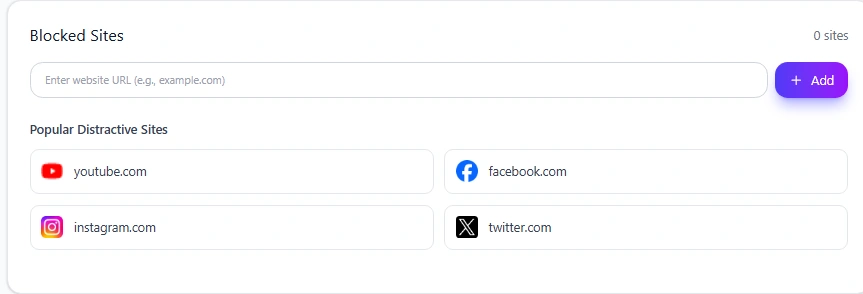
From the Mindova dashboard:
- Select Site Management.
- Open the Blocked Sites tab.
- Find the Enter website URL field.
Facebook currently appears among Mindova's suggested distracting websites, but you can also manually add website domains.
Step 3: Add Facebook to Blocked Sites
Select Facebook from the suggested websites or enter:
facebook.com
Then select Add.
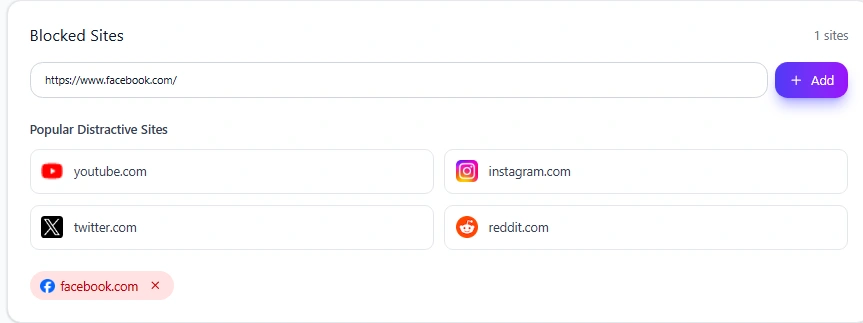
Facebook should now appear in your Blocked Sites list.
Once the site is added, Mindova gives it its own setting under Individual Site Limits.
Step 4: Block Facebook completely or set a daily limit
Mindova gives you two separate controls:
- Individual Site Limits
- Total Daily Distraction Limit
They solve different problems.
Block Facebook on every visit
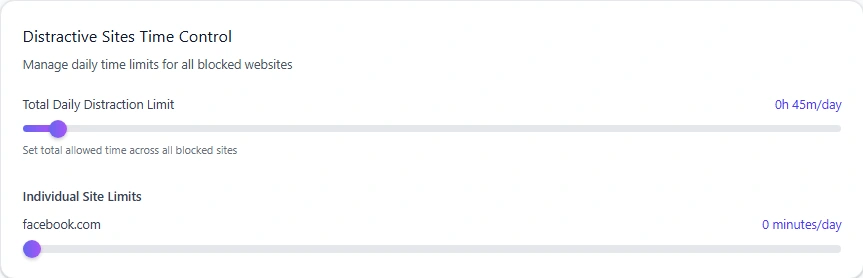
If you do not want Facebook available at all during normal browsing, set its Individual Site Limit to:
0 minutes/day
In Mindova, zero does not mean unlimited.
It means the website is blocked whenever you try to visit it.
This is the strictest per-site setting available.
Give Facebook some daily time
Blocking Facebook completely is not always practical.
You may still use it for:
- Marketplace.
- Groups.
- Events.
- Community discussions.
- Professional pages.
- Keeping in touch with people.
Mindova lets you set a per-site allowance from 0 to 240 minutes per day, in 5-minute steps.
For example, you could allow yourself enough time to check a group or Marketplace listing without leaving Facebook unrestricted for the entire day.
Once the individual allowance has been used, Mindova blocks the site again.
Step 5: Understand the Total Daily Distraction Limit
Facebook's Individual Site Limit controls Facebook specifically.
The Total Daily Distraction Limit works differently.
It creates one combined allowance across all websites you have marked as distracting.
For example, your distracting list might contain:
- Facebook.
- YouTube.
- TikTok.
- X.
- Reddit.
Those sites can contribute toward the same overall daily limit.
Websites that remain Neutral do not count toward that distraction allowance.
This gives you two levels of control:
- A separate limit for Facebook.
- A combined limit for distracting browsing overall.
If other social platforms are part of the same pattern, see our guides to blocking TikTok on Chrome and blocking X on Chrome.
You can also follow our YouTube blocking guide if video browsing is another common distraction.
Step 6: Use a Focus Session when Facebook should be unavailable
A daily limit answers:
How much Facebook do I want today?
A Focus Session answers a different question:
What websites do I actually need during this work period?
Mindova includes a Pomodoro-style Focus Session.
During the work portion of a Focus Session, Mindova blocks websites that are not explicitly classified as productive.
That includes Neutral websites as well as websites already marked distracting.
This makes a Focus Session stricter than ordinary daily-limit browsing.
A practical setup is:
- Add Facebook to Blocked Sites.
- Choose its normal daily limit.
- Mark the websites you genuinely need for work as Productive.
- Start a Focus Session.
- Return to Facebook after the focused work period if you still need it.
This works well when you do not want to block Facebook for the entire day but also do not want it available during focused work.
What happens when your Facebook time runs out?
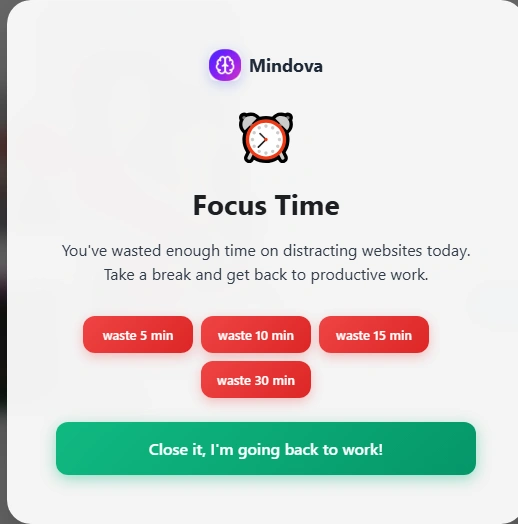
When a website reaches its allowed limit, Mindova interrupts access with its Focus Time screen.
Instead of continuing directly to the site, you have to make another decision.
You can leave the website and return to what you were doing, or deliberately grant yourself additional time.
Mindova records that extra time separately rather than silently resetting your original limit.
That distinction matters.
Mindova creates friction before you continue, but it is not an irreversible lock.
If you genuinely need Facebook, you can choose to continue. If you opened it automatically, the interruption gives you a chance to leave instead.
Should you block Facebook or just limit it?
The best setting depends on what Facebook is for in your day.
Facebook is mostly a distraction
Try an Individual Site Limit of:
0 minutes/day
That removes the website from normal browsing entirely.
If that is unnecessarily strict, switch to a small daily allowance.
You mainly use Facebook Marketplace or Groups
A complete block may interfere with something you genuinely need.
Give Facebook enough time for the specific activity you use it for, then leave when that task is finished.
A daily allowance can work better here than an all-day block.
Facebook is part of your work
If you manage communities, Pages, advertising, customer messages, or professional groups, Facebook may be a work tool as well as a distraction.
In that case, the goal should not automatically be to block it completely.
Use a realistic Individual Site Limit and protect work that does not require Facebook with Focus Sessions.
Can Mindova block only Facebook Reels or the News Feed?
Not with this website-blocking workflow.
Mindova controls access to the Facebook website domain.
It does not currently provide separate rules for:
- Facebook Reels.
- The News Feed.
- Marketplace.
- Groups.
- Individual profiles.
- Individual Pages.
That means there is an important tradeoff.
If you block facebook.com, you are restricting the website rather than selectively hiding one distracting part of Facebook.
If you genuinely need Marketplace or Groups throughout your workday, a daily limit may make more sense than setting Facebook to zero.
What about Messenger?
Facebook and Messenger are not always the same browsing destination.
If you use Facebook through facebook.com, the Facebook rule controls that website.
If you separately use another web domain that you also want to restrict, you can add that domain to Mindova as its own blocked website and give it a separate limit.
This lets you decide which web destinations are actually part of your distraction pattern instead of assuming every Meta service should have the same rule.
Use Analytics to decide whether the limit is working
After using your setup for a while, open Analytics in Mindova.
You can review metrics including:
- Focus Time.
- Productive Time.
- Distracting Time.
- Sites Blocked.
- Productivity Score.
- Streak.
- Most Visited Websites.
- Most Blocked Websites.
- Activity trends.
One distinction is especially important.
Productive Time + Distracting Time does not equal all of your browsing time.
Mindova also records Neutral browsing.
Neutral websites can appear in Most Visited Websites, but they do not count as Productive or Distracting until you classify them.
They also do not push you toward your daily distraction limit.
Use the data to adjust your Facebook rule.
If Facebook still takes more time than you intended, reduce its allowance.
If the limit repeatedly interrupts legitimate Marketplace, Groups, or work activity, increase it.
The useful limit is the one that matches the behavior you actually want to change.
Blocking Facebook is different from blocking a Facebook profile
These are separate actions.
This Mindova workflow controls whether you can access the Facebook website in your browser.
It does not change who can interact with you inside Facebook.
It does not:
- Block another person's Facebook profile.
- Block a Facebook Page.
- Unfriend someone.
- Mute someone.
- Change your Facebook privacy settings.
Those are Facebook account controls rather than browser-level website blocking.
Does this work on Brave, Edge, Opera and Vivaldi?
Yes. Mindova also works on supported Chromium-based desktop browsers, including:
- Microsoft Edge.
- Brave.
- Opera.
- Vivaldi.
The same Mindova workflow applies: add Facebook to Blocked Sites, choose an Individual Site Limit, and use Focus Sessions when you need a stricter work period.
The browser interface around the extension may look slightly different, but the Mindova controls remain the same.
What Mindova does not do in this Facebook workflow
The workflow in this guide does not currently:
- Block the native Facebook mobile app.
- Block a specific Facebook profile.
- Block only Facebook Reels.
- Hide only the News Feed.
- Keep Marketplace available while blocking every other part of Facebook.
- Create an irreversible permanent Facebook lock.
- Block Facebook outside supported browsers.
The live Mindova product covered here is browser-based.
Facebook is still opening: troubleshooting
Make sure Mindova is active
Open the Mindova extension.
Confirm that Extension Status shows:
Active & Protecting
If protection is disabled, your website rules will not be enforced.
Confirm that facebook.com is in Blocked Sites
Open:
Site Management → Blocked Sites
Make sure facebook.com appears in the list.
Check the Individual Site Limit
Look under Individual Site Limits.
If Facebook still has unused time available, the website can remain accessible until that allowance has been consumed.
For an immediate block, set the limit to:
0 minutes/day
Check the Total Daily Distraction Limit
The Total Daily Distraction Limit and Facebook's Individual Site Limit are separate controls.
Review both before assuming that the blocking rule is not working.
Refresh an already-open Facebook tab
If Facebook was already open when you changed the settings, refresh the page.
If necessary, close the tab and open Facebook again.
Check your Focus Session
If you are relying on a Focus Session, make sure the work session is actually active.
Get help
If your settings look correct but Facebook still behaves differently from expected, visit the Mindova Help Center.
Frequently asked questions
How do I block Facebook on Chrome?
Install Mindova, open Site Management → Blocked Sites, add facebook.com, and set an Individual Site Limit.
Set the limit to 0 minutes/day if you want Facebook blocked whenever you try to visit it.
Can I set a daily time limit for Facebook?
Yes. Mindova supports per-site daily limits from 0 to 240 minutes in 5-minute steps.
Does 0 minutes mean Facebook is completely blocked?
A per-site limit of 0 minutes/day means Mindova blocks the website on any visit.
It does not mean unlimited access.
Can I temporarily block Facebook while working?
Use a Focus Session when you want a protected work period.
During the work portion, Mindova blocks websites that are not explicitly marked productive.
Can I block only Facebook Reels?
Not with this workflow. Mindova's rule applies to the Facebook website rather than only the Reels section.
Can I block another person on Facebook with Mindova?
No. Mindova controls website access. Blocking another profile or Page is handled inside Facebook itself.
Can I use Facebook Marketplace while blocking the rest of Facebook?
Mindova does not currently provide section-level Facebook rules.
If Marketplace is important to you, consider giving Facebook a limited daily allowance instead of completely blocking facebook.com.
Does Mindova block the Facebook mobile app?
Not currently. This guide covers the live desktop browser experience.
Does Mindova work on Brave or Edge?
Yes. The same workflow can be used on supported Chromium-based desktop browsers such as Brave and Microsoft Edge.
Mouhsine
Admin
Passionate about helping people achieve peak mental performance through evidence-based strategies and mindful technology use.
Related Articles
How to Block X (Twitter) on Chrome and Set a Daily Limit 2026
Block X (Twitter) on Chrome with a tested browser method. Use Mindova to block x.com or twitter.com, set a daily limit, and stay focused
How to Block Websites on Microsoft Edge: 3 Methods
Block websites on Microsoft Edge with Mindova, Microsoft Family Safety, or Windows. Choose the best method for personal focus, family, or system-wide blocking.
How to Block Online Distractions Without Blocking Work Sites
Block online distractions without losing access to websites you need for work. Learn how to keep essential sites available, limit useful distractions, and block the rest
Comments
Be the first to comment.
Ready to protect your focus?
Block distracting sites, set daily limits, and run focus sessions. Mindova is free.