How to Block Instagram on Chrome and Set a Daily Limit 2026
Written by Mouhsine
Admin
Published August 13, 2026 · Updated October 12, 2026
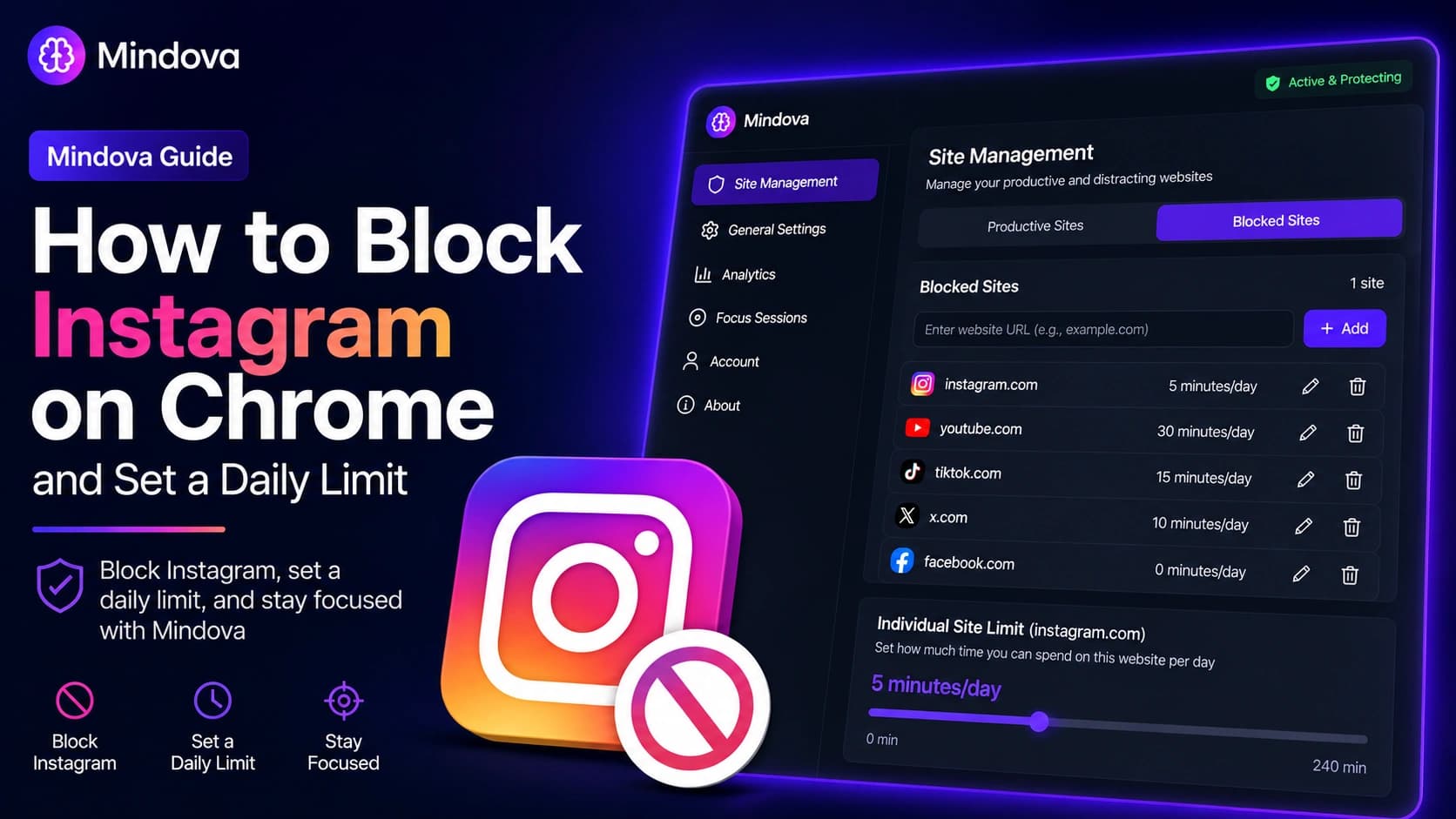
Instagram can be useful for messages, research, professional accounts, and keeping up with people. The problem is when a quick check turns into much more scrolling than you planned.
With Mindova, you can add instagram.com to your blocked websites, block it immediately with a zero-minute limit, or give yourself a small daily allowance.
If you want to block the Instagram website on Chrome without blocking every other site, you can apply the rule specifically to instagram.com.
For this guide, we tested the current Mindova browser extension ourselves. We added Instagram to Blocked Sites, tested 0 minutes/day and 5 minutes/day, and confirmed that Mindova interrupted access to instagram.com.
Quick answer: To block the Instagram website on Chrome with Mindova, open Site Management → Blocked Sites, add
instagram.com, then choose an Individual Site Limit. Set it to 0 minutes/day to block Instagram on every visit, or choose a higher limit if you still want some daily access.
Important: This guide explains how to block the Instagram website in supported desktop browsers. The Mindova browser extension does not block the native Instagram mobile app or individual Instagram features such as Reels. However, Mindova also offers a separate Android app that can restrict selected native apps, including Instagram. The iPhone app is coming soon.
Step 1: Install Mindova
Install the Mindova website blocker extension in Chrome and sign in with Google or email.
7-day free trial for new users. No credit card required to start. View pricing.
If you are using Mindova for the first time, see the Mindova Setup Guide.
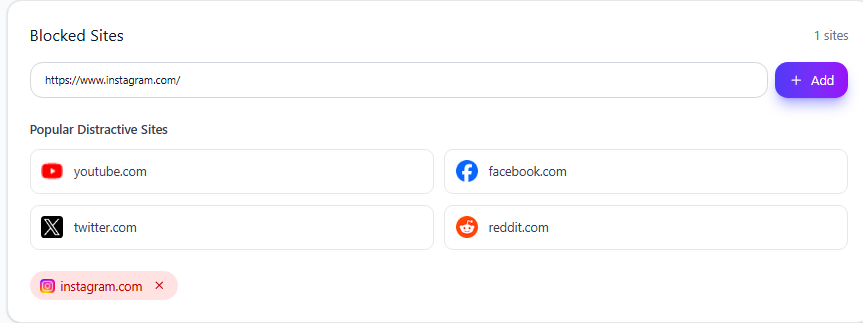
Step 2: Add the Instagram Website to Blocked Sites
Open the Mindova dashboard, then:
- Select Site Management.
- Open Blocked Sites.
- Enter
instagram.com. - Select Add.
Instagram should now appear in your blocked websites.
Step 3: Block Instagram completely or set a daily limit
Once Instagram is added, Mindova creates an Individual Site Limit for it.
Block Instagram immediately
Set the Instagram limit to:
0 minutes/day
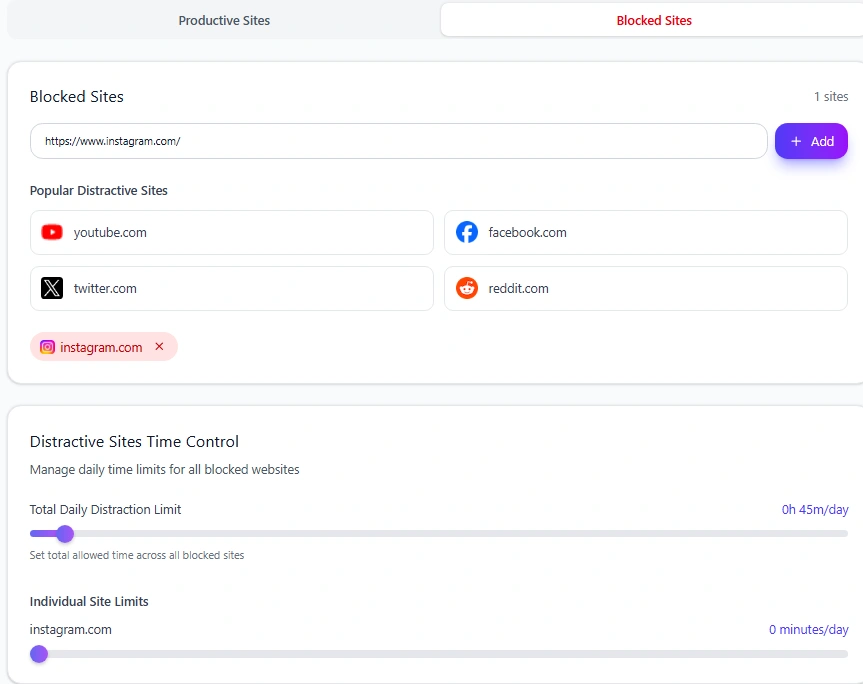
In Mindova, zero does not mean unlimited.
It means Instagram is blocked when you try to visit it.
This is useful if Instagram is almost always a distraction and you do not need routine access during the day.
Allow some Instagram time
You can also give Instagram its own daily allowance.
Mindova supports per-site limits from 0 to 240 minutes/day, in 5-minute steps.
During our test, we changed Instagram to:
5 minutes/day
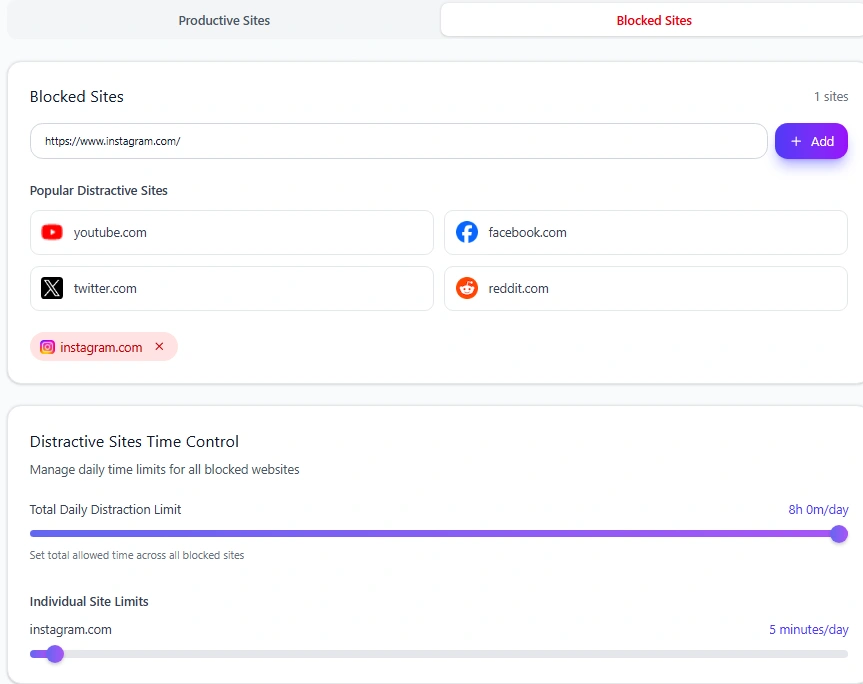
This can be more practical if you use Instagram for messages, research, publishing, or work but still want a clear boundary.
What happens when your Instagram time runs out?
When the restriction is reached, Mindova interrupts access with its Focus Time screen.
We confirmed this directly while opening instagram.com in the browser.
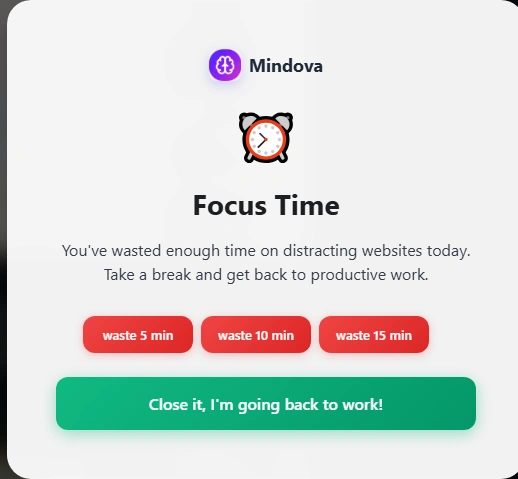
Instead of continuing automatically, you can close Instagram and return to your task or deliberately add extra time.
That distinction is important: Mindova creates friction, but it is not an irreversible lock.
If you genuinely need Instagram, you can continue. If you opened it automatically, the interruption gives you a chance to stop.
Daily Instagram limit vs Total Daily Distraction Limit
These are two different controls.
An Individual Site Limit applies only to Instagram.
The Total Daily Distraction Limit applies across all websites you have marked as distracting.
For example, Instagram, TikTok, YouTube, Facebook, and X can all contribute toward one combined distraction allowance.
Neutral websites do not count toward that total.
If several social platforms are causing the same problem, see our guides to blocking TikTok, blocking X, blocking Facebook, and blocking YouTube.
If Instagram is one of several sites you want to control, our guide to blocking distracting websites shows how to combine full blocks, daily limits, and Focus Sessions.
Use Focus Sessions when you need stricter boundaries
A daily limit controls how much Instagram you allow across the day.
A Focus Session is useful when you want a specific period with fewer interruptions.
During the work portion of a Mindova Focus Session, websites that are not explicitly marked Productive are blocked, including Neutral websites.
A simple setup is:
- Give Instagram its normal daily limit.
- Mark the websites you actually need as Productive.
- Start a Focus Session.
- Return to Instagram after the focused work period if you still need it.
This works well if Instagram is sometimes useful but should not be available while you are studying or doing focused work.
Can Mindova block only Instagram Reels?
Not with the current browser-extension workflow.
Mindova's rule applies to the instagram.com website rather than individual sections.
It does not separately block:
- Reels
- Explore
- Stories
- DMs
- Individual accounts or creators
If you need part of Instagram for work, a small daily allowance may therefore make more sense than blocking the whole website.
What about blocking the Instagram app on Android?
If you use Instagram on your phone, blocking instagram.com in Chrome does not automatically restrict the native Instagram app.
Mindova for Android provides a separate app-blocking workflow. You can select Instagram as a distracting app, assign an individual daily limit, and have Mindova interrupt access when that allowance is used.
During our Android testing, we assigned Instagram a 1-minute daily limit and confirmed that Mindova interrupted access after the time was consumed.
The Android app also includes an overall Daily Distraction Limit, Focus Sessions, and app-usage insights. These controls are separate from the website-blocking steps explained above.
Learn more about Mindova's Android app blocker
Get Mindova for Android on Google Play
Does this work on Brave, Edge, Opera and Vivaldi?
Yes. Mindova also works on supported Chromium-based desktop browsers including:
- Microsoft Edge
- Brave
- Opera
- Vivaldi
The same workflow applies: add instagram.com, choose an Individual Site Limit, and use Focus Sessions when you need stricter focus.
Instagram is still opening
Check these settings first:
Confirm Instagram is in Blocked Sites
Open:
Site Management → Blocked Sites
Make sure instagram.com appears there.
Check the Individual Site Limit
If you want Instagram blocked immediately, set it to:
0 minutes/day
If unused time remains, Instagram can stay available until that allowance is consumed.
Refresh Instagram
If the tab was already open when you changed the setting, refresh it or close the tab and reopen instagram.com.
Make sure Mindova is active
Confirm that the extension shows:
Active & Protecting
If the settings look correct but Instagram still behaves differently, visit the Mindova Help Center.
Frequently asked questions
How do I block Instagram on Chrome?
Add instagram.com to Mindova's Blocked Sites and set its Individual Site Limit to 0 minutes/day.
Can I set a daily limit for Instagram?
Yes. You can choose a per-site limit from 0 to 240 minutes per day.
Can I block only Instagram Reels?
No. The current browser-extension workflow controls the Instagram website as a whole rather than individual sections such as Reels. Mindova's Android app can restrict the native Instagram app, but it does not selectively remove only Reels.
Does Mindova block the Instagram mobile app?
Yes, on Android. Mindova has a native Android app that can restrict selected apps, including Instagram, using daily limits. We tested this functionality with a one-minute Instagram limit.
The browser extension itself only controls the Instagram website in supported desktop browsers. Mindova for iPhone is coming soon.
Can I block Instagram on Brave or Edge?
Yes. The same Mindova website-blocking workflow works on supported Chromium-based browsers including Brave and Microsoft Edge.
Mouhsine
Admin
Passionate about helping people achieve peak mental performance through evidence-based strategies and mindful technology use.
Related Articles
How to Block X (Twitter) on Chrome and Set a Daily Limit 2026
Block X (Twitter) on Chrome with a tested browser method. Use Mindova to block x.com or twitter.com, set a daily limit, and stay focused
How to Block Websites on Microsoft Edge: 3 Methods
Block websites on Microsoft Edge with Mindova, Microsoft Family Safety, or Windows. Choose the best method for personal focus, family, or system-wide blocking.
How to Block Online Distractions Without Blocking Work Sites
Block online distractions without losing access to websites you need for work. Learn how to keep essential sites available, limit useful distractions, and block the rest
Comments
Be the first to comment.
Ready to protect your focus?
Block distracting sites, set daily limits, and run focus sessions. Mindova is free.