Creative Block: How to Get Unstuck and Start Creating Again
Written by Mouhsine
Admin
Published September 7, 2026
Creative block does not always mean you have run out of creativity.
Sometimes you cannot generate an idea. Sometimes you have ideas but reject every one before it develops. Sometimes you have become stuck on one approach. And sometimes the problem is simpler: every difficult moment sends you into email, social media, or another distraction before you have time to work through it.
Those problems feel similar, but they do not need the same solution.
Instead of waiting for inspiration or forcing yourself to work harder, start by identifying what is actually stuck.
Quick answer: Creative block can involve difficulty generating ideas, fixation on one approach, judging ideas too early, an unclear next step, or difficulty staying with the work. Match the response to the problem: generate options before evaluating them, change the constraints when you are stuck on one direction, step away after making a genuine attempt, or reduce unrelated distractions when attention—not ideas—is the problem.
What is creative block?
Creative block is a practical term for a period when generating, developing, or continuing creative work becomes unusually difficult.
It can happen to:
- designers;
- artists;
- musicians;
- marketers;
- developers;
- filmmakers;
- researchers;
- people solving open-ended problems.
It does not have to mean staring at a completely blank page.
You might have plenty of ideas but be unable to choose one.
You might keep returning to the same solution even though it is not working.
You might know the next step but keep avoiding it.
That is why “find more inspiration” is not always a useful answer.
The first step is figuring out what kind of obstacle you are dealing with.
1. Ask what is actually stuck
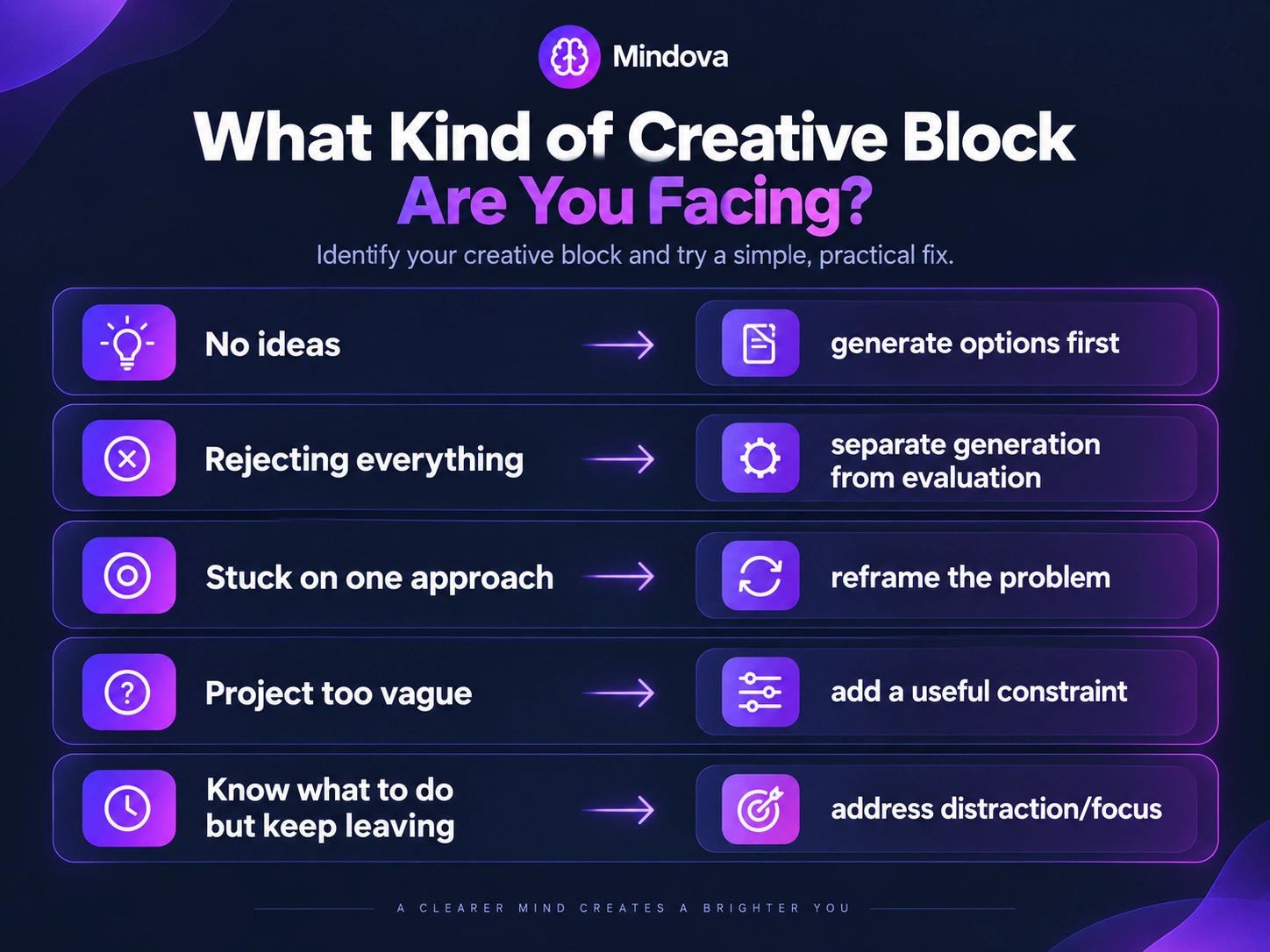
Before looking for another creativity technique, finish this sentence:
I cannot move forward because…
Your answer might be:
“I have no ideas.”
That is primarily an idea-generation problem.
“Everything I come up with feels bad.”
You may be evaluating possibilities before you have generated enough of them.
“I keep trying the same approach.”
You may be fixated on one representation of the problem.
“The project is too vague.”
You may need constraints or a clearer next step.
“I know what to do, but I keep opening something else.”
That may be more of an attention problem than a creativity problem.
Do not use the same remedy for all five.
2. Separate generating ideas from judging them
Creative work often requires two different jobs:
Divergent thinking
Generate possibilities.
Convergent thinking
Evaluate those possibilities and decide what is useful.
Trying to do both at exactly the same moment can make idea generation unnecessarily difficult.
Imagine trying to name a product.
You generate:
North
Loom
Compass
Signal
and immediately respond:
Bad.
Already taken.
Sounds strange.
Too generic.
Within seconds, the generation process has become an evaluation process.
Try separating the stages.
First:
How many plausible directions can I create?
Later:
Which of these deserves further work?
The goal is not to accept bad ideas.
It is to give ideas enough time to exist before demanding that every one of them be the final answer.
3. Change the problem when you keep circling the same answer
Sometimes the problem is not a lack of effort.
You have already spent plenty of time thinking.
You are simply thinking about the problem in the same way.
Research on fixation in problem solving has shown that an initially activated but unhelpful approach can interfere with finding another solution. Experiments by Smith and Blankenship also found an incubation effect: participants sometimes improved more when they returned to initially unsolved problems after a delay rather than continuing immediately.
A practical response is to change the representation of the problem.
Instead of:
“What should this homepage look like?”
ask:
“What must the visitor understand within the first few seconds?”
Instead of:
“What should I write?”
ask:
“What question should this section answer?”
Instead of:
“How do we make this campaign creative?”
ask:
“What is the most predictable version of this campaign, and how could we deliberately do something different?”
Changing the question can open routes that another hour of repeating the same thought does not.
4. Add a useful constraint
An unlimited creative brief sounds freeing.
It can also make starting harder because every possible direction remains open.
Try narrowing something deliberately.
For example:
- explain the idea in one sentence;
- use only three elements;
- create five versions around one theme;
- make a version for one specific audience;
- remove one feature;
- use one format instead of choosing among ten;
- solve only the first part of the problem.
A constraint does not automatically create a better idea.
Its job is to reduce the size of the search space enough that you can begin exploring it.
This also explains why “just be more creative” is such an unhelpful instruction.
Creativity still needs a problem to work on.
5. Use incubation instead of forcing the same approach indefinitely
Sometimes the useful move after working on a difficult problem is to stop working on it for a while.
Researchers call this incubation: setting a problem aside before returning to it.
A meta-analysis of incubation research found an overall positive effect on problem solving, although the benefit varied by task and by what happened during the break. Divergent-thinking tasks tended to benefit more than some other kinds of problems, and highly demanding activities during the break were generally less helpful than lower-demand activities.
This does not prove that your subconscious secretly solves every problem while you are away.
Several explanations for incubation have been proposed, including reduced fixation.
The practical version is simpler:
- Work on the problem seriously first.
- Notice when you are repeating the same unsuccessful approach.
- Put the problem down.
- Do something else for a while.
- Return and look again.
The break is not guaranteed to produce an insight.
It is another way of approaching a problem that continued effort is not moving.
6. Try walking when you need more possibilities
Walking is one of the better-supported practical ideas in this area.
A 2026 systematic review and meta-analysis examined 23 studies involving 1,036 participants.
The researchers found moderate-certainty evidence that walking improved divergent thinking—the ability to generate multiple novel and useful possibilities.
Evidence for an effect on convergent thinking—selecting or identifying the best solution—was much more uncertain.
That distinction matters.
A walk may be particularly useful when your problem is:
“I need more possible directions.”
It does not mean that walking will automatically:
- choose the best idea;
- solve a technical problem;
- verify a fact;
- make a decision for you;
- produce a breakthrough every time.
If you need alternatives, however, walking is a reasonable experiment.
You also do not need to spend an hour doing it.
The research does not establish one universal walking duration that is optimal for creativity.
7. Do not turn every break into more input
The old version of this article treated screens as if they were inherently hostile to creativity.
That does not hold up.
A screen might contain:
- your design software;
- your writing document;
- a digital canvas;
- research;
- a music workstation;
- code;
- a collaborator.
Digital tools can be part of the creative process.
The more useful question is what happens during the break from the problem.
If every pause immediately becomes:
- scrolling a feed;
- reading news;
- watching videos;
- checking email;
- jumping into another demanding task;
then you have not necessarily given yourself much distance from active input.
Research on incubation suggests that the kind of activity during the break can matter, with lower-demand activities sometimes performing better than cognitively demanding ones.
So try a break that does not immediately replace one difficult task with another.
You could:
- walk;
- make coffee;
- tidy something simple;
- shower;
- look outside;
- stretch;
- do a routine household task.
You do not need to call this a “dopamine detox.”
And boredom is not a requirement.
You are simply giving the problem some distance.
8. Capture ideas without demanding that they are good
If a useful possibility appears while you are away from the project, capture it.
A notebook works.
So does a simple notes file.
The point is not to create an elaborate idea-management system.
Write enough that you can recover the thought later.
For example:
“Opening should start with the contradiction, not the background.”
or:
“Try pricing page with comparison before feature list.”
Then continue what you were doing.
Capturing an idea is different from immediately reopening the entire project and evaluating it.
Let generation and evaluation remain separate when that helps.
9. Make the next action smaller when the project feels too large
Sometimes “creative block” is actually a project with no obvious entry point.
Instead of:
“Design the website.”
try:
“Sketch three hero-section structures.”
Instead of:
“Create the campaign.”
try:
“Write ten possible campaign hooks.”
Instead of:
“Work on the video.”
try:
“Choose the first three scenes.”
A smaller next action gives you something concrete to attempt.
You can evaluate the whole project later.
Right now, you need somewhere to start.
10. Know when the problem is focus rather than creativity
Suppose you already have the idea.
You know what needs to happen next.
But every time the work becomes slightly difficult, you open Reddit, YouTube, X, news, or another unrelated site.
More brainstorming may not help.
The problem is not:
“I cannot think of anything.”
It is:
“I am not staying with the thing long enough to develop it.”
That requires a different response.
For writing specifically, see How to Focus on Writing Without Digital Distractions.
For work that needs sustained concentration, see What Is Deep Work and How Do You Practice It?.
And if particular websites repeatedly interrupt your work, see How to Block Distracting Websites.
Creative block is not the same as writer's block
Writer's block is specifically about difficulty starting or continuing writing.
Creative block is broader.
You can experience it while:
- designing;
- illustrating;
- composing music;
- developing a campaign;
- solving a product problem;
- planning a video;
- generating concepts.
If your problem is specifically that you keep leaving a writing document for unrelated browsing, the writing-focus workflow is a better fit than treating the problem as generic creative block.
Where Mindova Fits
Mindova cannot generate your next idea.
It cannot tell you whether your concept is good.
It does not identify the psychological cause of a creative block, and it cannot guarantee that removing distractions will make you more creative.
Its role is narrower.
If you already know that distracting websites repeatedly pull you away from creative work, Mindova can help you create browser boundaries around those sites.
With Mindova, you can:
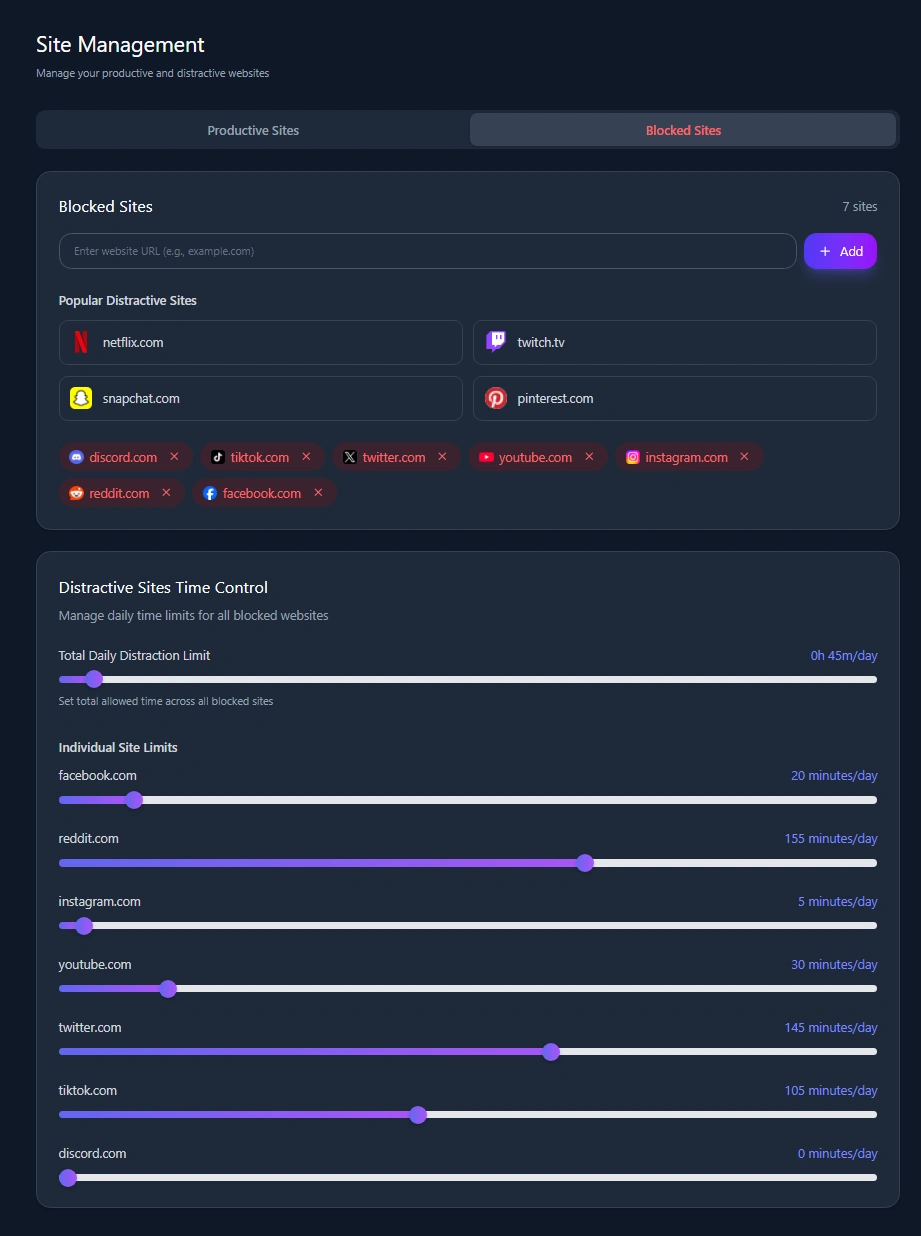
- block selected websites;
- set an Individual Site Limit for a distracting site;
- use a 0-minute Individual Site Limit when you want that site blocked;
- set an Overall Distraction Limit across sites classified as distracting;
- start a timed Focus Session;
- review browsing and focus insights;
- optionally use AI Nudges as contextual reminders that can encourage a return to your intended activity.
That can be useful during the part of creative work where you need to stay with the project rather than automatically leaving it for unrelated browsing.
But a blocker should not prevent you from using the internet when the internet is part of the creative work.
Research, references, tutorials, inspiration, collaboration, and online tools may all be legitimate parts of your process.
Mindova currently works as a desktop Chromium browser extension on supported browsers including Chrome, Edge, Brave, Opera, and Vivaldi.
It does not currently block native mobile or desktop applications.
Frequently asked questions
What causes creative block?
There is no single cause that explains every creative block.
You may be struggling to generate ideas, stuck on one approach, judging possibilities too early, dealing with an unclear problem, or having difficulty staying engaged with the work.
Identify what is actually preventing progress before choosing a technique.
How do you get over creative block?
Start by identifying the bottleneck.
Generate ideas without immediately judging them, add constraints when the problem is too open, change the way you frame a problem when you are fixated, or step away and return later when continued effort is going nowhere.
Should you take a break when creatively stuck?
Sometimes.
Research on incubation suggests that setting a problem aside can improve later problem solving under some conditions, particularly for certain creative tasks. It is not a guarantee that a break will produce an answer.
Does walking improve creativity?
Research published in 2026 found moderate-certainty evidence that walking can improve divergent thinking, or generating multiple ideas. The evidence was much less certain for convergent thinking, where you need to identify or select the best solution.
Does boredom make you more creative?
You do not need to be bored to be creative.
Some incubation research suggests that lower-demand activities can be useful while a problem is set aside, but that does not establish boredom as a necessary ingredient for creativity.
Do screens cause creative block?
Not inherently.
Screens can contain distracting feeds, but they are also where many people write, design, research, compose, edit, code, and collaborate.
The more useful distinction is between digital activity that supports your creative work and digital activity that repeatedly pulls you away from it.
Is creative block the same as burnout?
No single creative-block article can diagnose burnout, and feeling stuck on one creative project does not by itself tell you that you are burned out.
If the problem is broader and involves persistent exhaustion or difficulties across your work rather than one creative task, creative-block techniques may not address the underlying issue.
Can Mindova fix creative block?
No.
Mindova can help reduce access to distracting websites during creative work. It cannot produce ideas, diagnose why you are stuck, or guarantee greater creativity.
Get unstuck by solving the right problem
Creative block is frustrating partly because every form of it can feel like the same thing:
Nothing is moving.
But the solution depends on what has stopped.
If you need ideas, generate before judging.
If you are stuck on one approach, change the question or constraints.
If repeated effort is going nowhere, step away and return later.
If you need more possibilities, try a walk.
If you already know what to do but keep escaping into unrelated browsing, protect the work from those distractions.
The objective is not to force inspiration.
It is to identify the obstacle in front of you and give yourself another route around it.
Mouhsine
Admin
Passionate about helping people achieve peak mental performance through evidence-based strategies and mindful technology use.
Related Articles

How to Focus on Writing Without Digital Distractions
Learn how to stay focused while writing by separating drafting from research, reducing digital distractions, and keeping the online tools you actually need
How to Avoid Distractions While Working: 10 Practical Strategies
Learn how to avoid distractions while working by reducing digital triggers, managing notifications, limiting distracting websites, and protecting focused work time.
Time Blocking: How to Plan Your Day and Protect Your Focus
Learn how time blocking works, how to build a realistic daily schedule, use buffers and task batching, protect focus time, and adjust when plans change.
Comments
Be the first to comment.
Ready to protect your focus?
Block distracting sites, set daily limits, and run focus sessions. Mindova is free.