Digital Minimalism: A Practical Guide to Using Technology More Intentionally
Written by Mouhsine
Digital Minimalist
Published August 26, 2026
Digital minimalism is not about owning fewer devices, deleting every social media account, or trying to live as if the internet does not exist.
It is about becoming much more selective.
Instead of asking, “How can I spend less time online?” you ask a better question:
Which technologies genuinely make my life better, and how do I want to use them?
That shift matters. You can spend three hours online doing focused work, learning a language, talking to someone you care about, or mindlessly moving between feeds. The screen time may look similar. The value is not.
A practical digital minimalist keeps the technology that serves a clear purpose, removes what does not, and puts boundaries around tools that are useful but easy to overuse.
Quick answer: Digital minimalism means deliberately choosing the technology that supports what you value, removing low-value digital noise, and setting boundaries around tools that are useful but easy to overuse.
What digital minimalism actually means
Digital minimalism was popularized by author and computer science professor Cal Newport, who describes it as a philosophy for becoming more intentional about which digital tools deserve your time and attention.
The central idea is not simply to use less technology. It is to carefully choose the technologies that strongly support what matters to you, while clearing away lower-value digital noise. (Cal Newport)
In practice, that means:
- keeping tools that provide real value;
- removing low-value digital noise;
- deciding how useful-but-distracting tools fit into your life;
- making deliberate use easier than automatic use.
A maps app might deserve unrestricted access because it solves a clear problem.
You may want Instagram because it helps you keep up with particular friends, but not want the Explore feed consuming an hour every evening.
You may need YouTube for tutorials while also knowing that recommendations can turn one useful video into an unplanned viewing session.
Digital minimalism makes room for those distinctions.
Digital minimalism is not a digital detox
A digital detox is usually temporary.
You might stop using social media for a week, remove distracting apps for a month, or spend a weekend away from screens.
Digital minimalism is different because it is intended to become your normal way of using technology.
A detox can still be useful. It can expose habits that are difficult to notice while you are inside them. But after the break ends, you still need to decide what comes back and under what rules.
If you specifically want a temporary reset from social platforms, our social media detox guide covers that job.
Digital minimalism asks the longer-term question:
What should my relationship with technology look like after the reset?
Step 1: Audit what is actually taking your attention
Do not start by deleting things.
Start with evidence.
For several days, notice which digital behaviors happen because you chose them and which happen automatically.
Look for patterns such as:
- opening the same site whenever work becomes difficult;
- checking a feed without remembering why you opened it;
- reaching for your phone during every small pause;
- switching tabs repeatedly without completing anything;
- responding to notifications the moment they appear;
- keeping dozens of tabs open because you might need them later.
Your phone's built-in usage reports can help you see which apps consume the most time. On desktop, browsing activity can help you identify websites you repeatedly return to.
If you use Mindova, its browsing and focus insights can help you review where your browser time is going and which sites keep appearing in your routine.
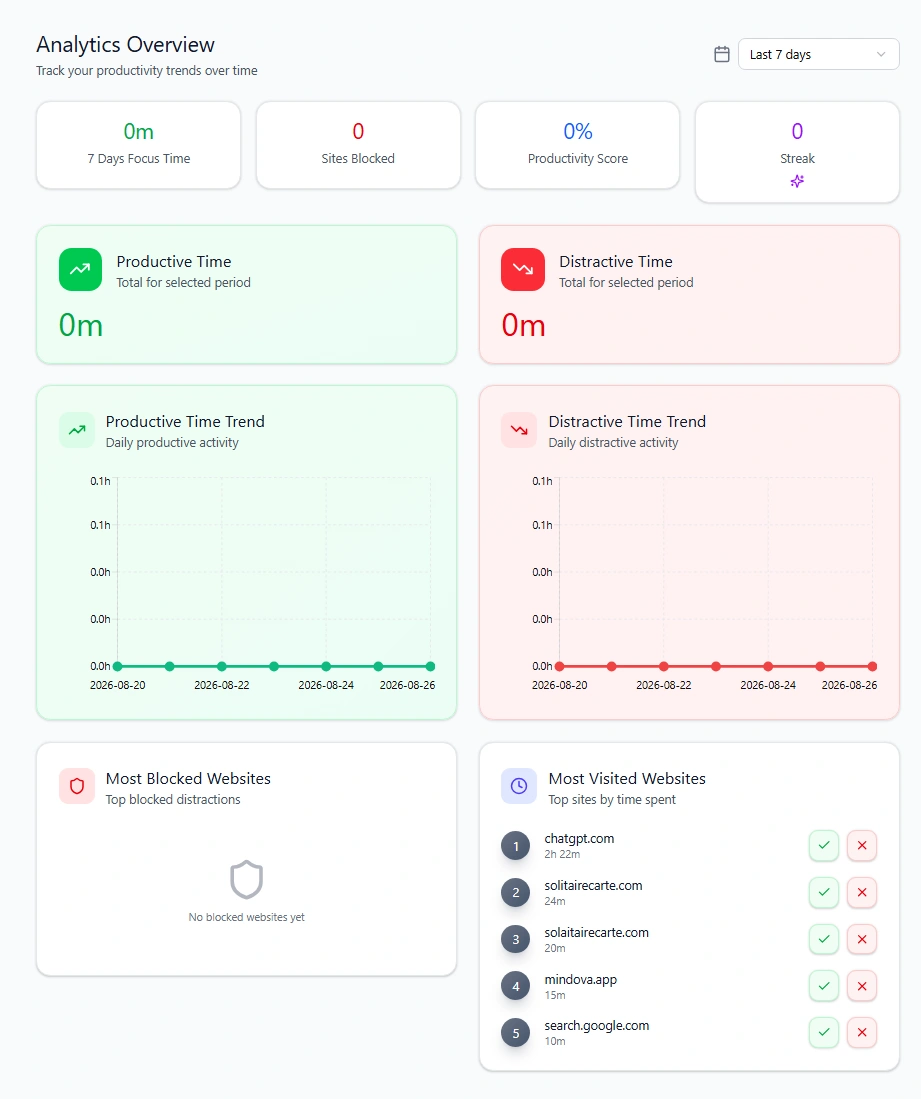
But total time is only part of the picture.
A website you intentionally use for 45 minutes may be less of a problem than one you open for two minutes twenty times a day.
The useful question is:
What repeatedly pulls me away from what I intended to do?
Step 2: Decide what each technology is for
Now give important tools a job.
Instead of:
I use YouTube.
Try:
I use YouTube for tutorials, music, and two channels I deliberately follow.
Instead of:
I need Instagram.
Try:
I keep Instagram because I use it to message friends who live abroad.
Instead of:
Reddit is useful.
Try:
I use two technical communities on Reddit when I am researching specific problems.
The more precise the purpose, the easier it becomes to identify everything that does not belong.
A useful tool does not need to disappear just because part of it is distracting.
That distinction becomes one of the most important parts of digital minimalism.
Step 3: Remove the obvious low-value clutter
Some digital clutter requires no complicated decision.
If you have not used an app in months, remove it.
If an extension no longer serves a purpose, uninstall it.
If a newsletter goes straight to archive every week, unsubscribe.
If a notification has never required immediate action, turn it off.
If an account consistently makes your experience worse and provides nothing useful, unfollow it.
The objective is not to create a perfectly clean digital life. It is to stop paying attention to things that have not earned it.
Every unnecessary item you remove is one fewer decision competing for you later.
Step 4: Declutter your digital workspace
Digital clutter is not limited to apps.
Your browser and desktop can become environments full of unfinished decisions.
Twenty-seven tabs. Three chat windows. An unread badge. Downloads everywhere. Documents you cannot find. Five pinned sites asking to be checked.
Each item is small. Together they create constant background noise.
Start with your browser tabs
Keep the tabs required for the current task visible.
For everything else:
- close it if you do not need it;
- bookmark or save it if it genuinely matters later;
- group related tabs when they belong to a separate project.
Avoid keeping a tab open merely because closing it feels like losing something.
A tab is not a task manager.
Clean the surfaces you see every day
You do not need a beautiful desktop.
You need one that does not constantly compete with your current task.
Remove unused shortcuts. File loose documents. Clear downloads you no longer need. Reduce pinned browser items to the ones you actually use.
When you need sustained concentration, giving the current task most of the screen can also remove several visual invitations to switch.
The point is not aesthetic minimalism.
It is reducing unnecessary decisions.
Step 5: Turn notifications back into exceptions
Notifications are useful when something genuinely deserves immediate attention.
The problem is when every service gets that privilege.
Review them category by category.
Direct communication from important people may deserve alerts. Calendar reminders may deserve them. A security warning probably does.
A recommendation from a social network probably does not.
Neither does:
- “You may know this person”
- “Someone posted for the first time in a while”
- “Trending now”
- promotional email alerts
- engagement reminders
You can still use the service.
You are simply deciding that you will open it, rather than allowing it to decide when you look.
Step 6: Treat useful-but-distracting technology differently
One of the biggest mistakes in digital decluttering is dividing everything into only two categories:
Allowed or deleted.
Real life is messier.
YouTube can teach you something and distract you.
Reddit can answer a technical question and consume an afternoon.
Instagram can maintain friendships and encourage automatic checking.
You do not necessarily need to eliminate these tools.
You may need a boundary around them.
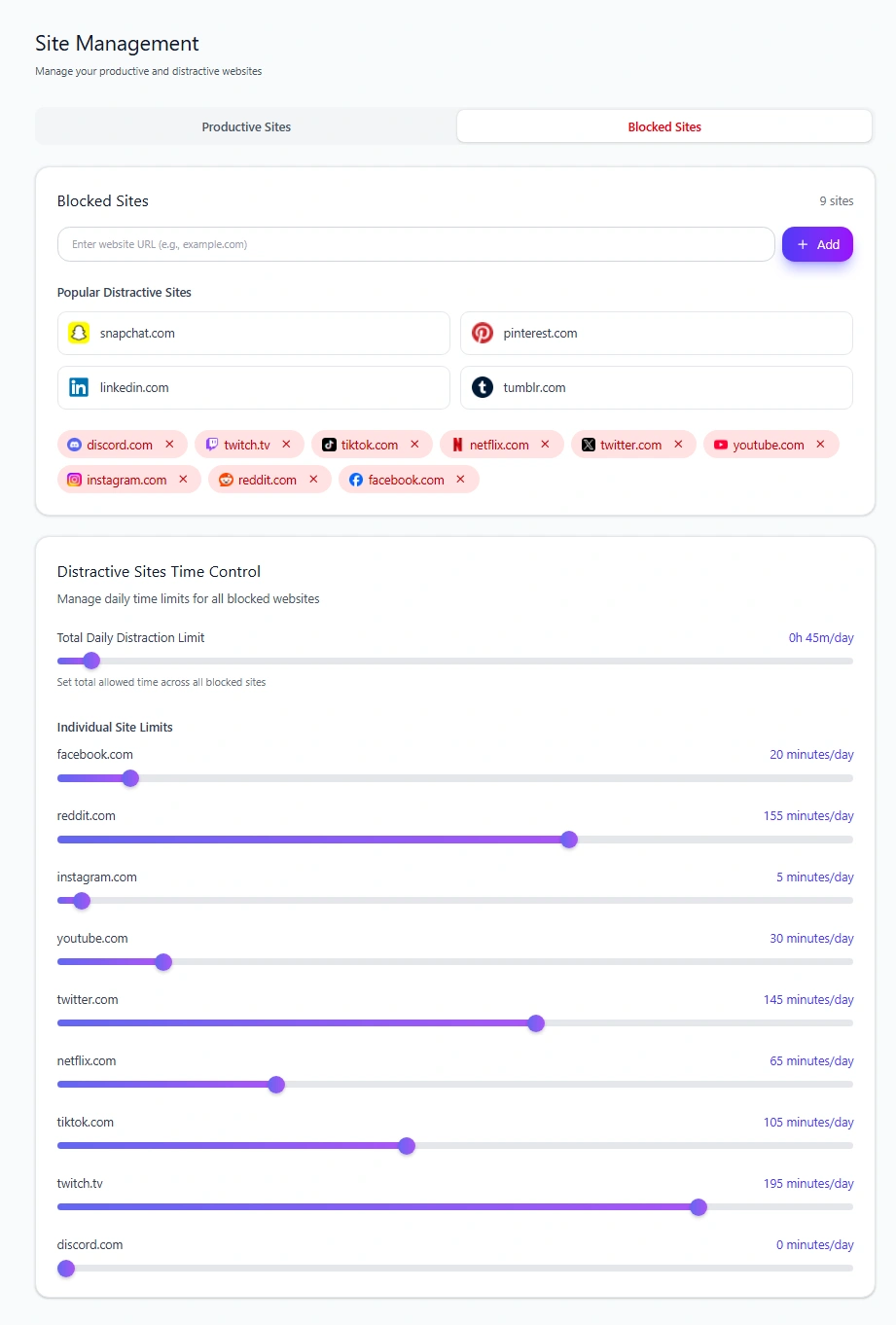
For browser-based distractions, one approach is a daily allowance rather than a permanent block.
With Mindova, an individual website can have its own daily limit. A site that should not be available can use a 0-minute daily limit, while a useful-but-distracting site can keep a limited amount of daily access.
For example, you might decide that YouTube is useful enough to keep but not useful enough to have unlimited browser access during the day.
That can be more sustainable than pretending the site is either completely good or completely bad.
For a deeper walkthrough, see how to block distractions without blocking the websites you need for work.
What we tested
We tested Individual Site Limits in the current Mindova browser extension rather than relying only on product descriptions.
Two behaviors are particularly useful for digital minimalism:
- Setting an Individual Site Limit to 0 minutes/day blocks that website by default.
- Giving the same website a higher daily allowance keeps it available until the configured time has been used.
For example, a useful-but-distracting website can remain accessible with a limited daily allowance instead of being permanently unavailable.
That distinction lets you choose between removing access and putting a boundary around access, depending on the role the site actually has in your life.
Step 7: Give social media a specific purpose
Social media deserves its own review because it often combines several different jobs inside one product:
- messaging;
- professional networking;
- entertainment;
- news;
- communities;
- following friends;
- endless recommendations.
Do not decide whether “Instagram” or “Facebook” is good or bad as a whole.
Decide what you want the platform to do.
If Instagram stays because you care about a handful of people, shape your use around those people.
If Reddit stays because particular communities help with your work, go to those communities intentionally instead of treating the front page as the product.
If Facebook is useful for a group or event but the feed is not, that is useful information.
Some practical boundaries include disabling nonessential notifications, removing shortcuts that encourage reflexive checking, unfollowing low-value accounts, and limiting browser access when a platform repeatedly becomes an automatic distraction.
If you want to reduce one specific platform rather than rethink your entire digital setup, see our guide to using Facebook less.
For broader browser distraction management, see how to block distracting websites.
Step 8: Make automatic access slightly less automatic
A surprisingly useful digital-minimalist principle is adding friction.
You do not always need an impossible-to-bypass barrier.
Sometimes you need one extra moment between impulse and action.
Examples include:
- removing a social app from the home screen;
- logging out of a website you open automatically;
- moving your phone away from your workspace;
- keeping distracting bookmarks out of the browser toolbar;
- setting a website limit;
- using a blocking or delay screen that interrupts an automatic visit.
The goal is not to make every decision for you.
It is to give intentional decisions a better chance to happen before an old habit takes over.
Step 9: Replace what you remove
Removing digital habits creates empty space.
If you do not decide what that space is for, another feed can quietly occupy it.
Ask what the old behavior was doing for you.
If you checked social media because you were bored, have something else available for short gaps.
If YouTube was how you decompressed after work, replace it with something that actually leaves you feeling rested.
If notifications created the feeling of connection, initiate direct conversations instead.
Possible replacements do not have to be ambitious.
A walk, a book, music, exercise, a hobby, calling someone, or simply doing nothing for five minutes can all be more intentional than opening the nearest feed.
The replacement matters because sustainable minimalism is not built only by removing things.
It is built by making room for something better.
Step 10: Create a few device-free boundaries
Not every digital boundary needs software.
Some of the simplest ones are physical.
You might choose:
- no phone at meals;
- no phone in bed;
- no feeds during the first part of the morning;
- one room where the phone usually stays outside;
- one activity you intentionally do without another screen running beside it.
You do not need all of these.
Choose the boundary that solves a problem you actually have.
A rule that survives normal life is more useful than ten strict rules you abandon after three days.
Step 11: Review the system instead of chasing perfection
Digital minimalism is maintenance, not a purge you complete once.
New apps appear.
Useful tools become distracting.
Old habits return.
Your priorities change.
Once in a while, review:
What am I using?
Why is it still here?
Is it behaving the way I intended?
If the answer changes, change the system.
That might mean removing something completely.
It might mean adding a daily limit.
It might mean deciding that something you once considered distracting now has a legitimate role.
Minimalism should make technology more useful, not turn technology management into another obsession.
Where Mindova fits into digital minimalism
Mindova covers the desktop-browser boundary part of a digital-minimalist setup.
On supported desktop browsers, it can help you:
- block distracting websites;
- set Individual Site Limits;
- use Focus Sessions;
- review browsing and focus insights.
Mindova currently supports Chromium-based desktop browsers including Chrome, Microsoft Edge, Brave, Opera, and Vivaldi.
It does not currently block native iPhone or Android apps.
For mobile app restrictions, use the controls available on your device, such as Apple's Screen Time or Android's Digital Wellbeing.
Frequently asked questions
What is digital minimalism?
Digital minimalism is an approach to technology in which you deliberately keep digital tools that support things you value, reduce low-value digital noise, and create boundaries around technology that is useful but easy to overuse.
Who popularized digital minimalism?
Author and computer science professor Cal Newport popularized the term and later developed the philosophy in his book Digital Minimalism: Choosing a Focused Life in a Noisy World. (Cal Newport)
How does digital minimalism work?
You identify which technologies genuinely support things you value, remove low-value digital clutter, and change how you use tools that are valuable but easy to overuse.
The goal is not necessarily less screen time. It is more deliberate use.
Is digital minimalism the same as a digital detox?
No.
A digital detox is generally a temporary break or reset.
Digital minimalism is a longer-term approach to deciding which technologies deserve a place in your life and how you want to use them.
Does digital minimalism mean deleting social media?
No. You can remove social media completely, but you can also keep specific platforms for clearly defined purposes and change how you access them.
What is a digital declutter?
A digital declutter is the practical cleanup part of digital minimalism.
It can include removing unused apps and extensions, cleaning browser tabs and files, reducing notifications, unsubscribing from low-value email, and simplifying the digital environments you use every day.
Should I block distracting websites completely?
Not always.
If a site provides no useful value during your day, a complete block may make sense.
If it is useful but easy to overuse, a daily allowance can preserve access while creating a clearer boundary.
Can Mindova block apps on my phone?
Not currently.
Mindova's public blocker works on supported desktop browsers. For native app restrictions on iPhone or Android, use the device's built-in controls or another tool designed for mobile app management.
Use technology on purpose
Digital minimalism is not a competition to see how little technology you can tolerate.
It is a way to stop letting digital tools occupy your attention by default.
Keep what genuinely helps.
Remove what does not.
Put boundaries around the things that are valuable in the right amount and distracting in the wrong amount.
Then use the space you recover for something you actually chose.
That is a much more useful goal than simply trying to spend fewer hours looking at a screen.
Mouhsine
Digital Minimalist
Passionate about helping people achieve peak mental performance through evidence-based strategies and mindful technology use.
Related Articles

Digital Detox: What Is It, and Does It Actually Help?
Learn what a digital detox really is, what research says about its benefits, and how to reduce distracting technology without quitting every screen.

How to Temporarily Deactivate Facebook Without Deleting Your Account
Learn how to temporarily deactivate Facebook on mobile or desktop, what happens to your profile and Messenger, and how to reactivate your account later.

Digital Detox Retreats: Cost, Benefits, and Are They Worth It?
What happens at a digital detox retreat, how much does one cost, and is it worth paying for? Compare retreat types, evidence, downsides, and at-home alternatives.
Comments
Be the first to comment.
Ready to protect your focus?
Block distracting sites, set daily limits, and run focus sessions. Mindova is free.