What Is Doomscrolling? Why It Happens and How to Stop
Written by Mouhsine
Admin
Published August 27, 2026 · Updated August 28, 2026
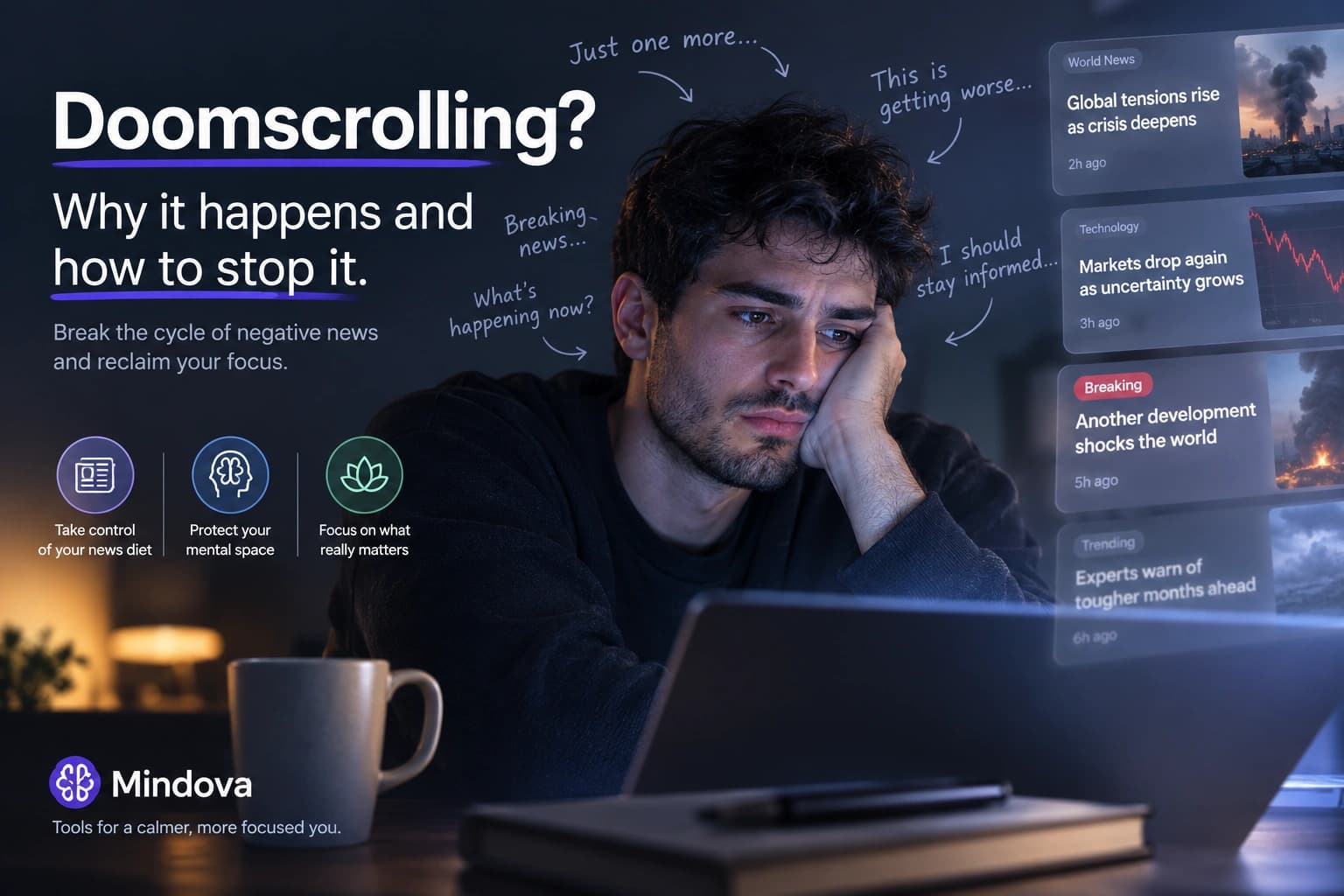
You open a news site to check one update.
A few minutes later, you are reading another alarming headline, then another thread, then another reaction to the same event.
You notice that the scrolling is making you tense or distracted.
But you keep going.
That pattern is commonly called doomscrolling.
Doomscrolling means repeatedly consuming negative, alarming, or distressing online content for longer than you intended, often even when continuing to scroll is making you feel worse. It commonly happens on news sites and social feeds, where there is always another update available. (Cleveland Clinic)
The important distinction is that doomscrolling is not simply “using the internet too much.”
You can scroll recipes, football clips, memes, or travel videos for an hour without doomscrolling.
Doomscrolling specifically involves the repeated pull toward negative or threatening information.
What Does Doomscrolling Mean?
The word combines doom with scrolling.
It became especially common during periods of intense online news consumption, but the behavior itself is simple to recognize:
You want to understand something worrying.
You look for another update.
That update creates another question.
You keep searching.
The internet rarely gives you a natural point where it says:
You now know enough. Stop here.
Instead, the next headline, post, comment, or video is immediately available.
Research published in a 2026 scoping review describes doomscrolling as habitual or compulsive consumption of negative online content and highlights features such as infinite scrolling and algorithmic content delivery as factors that may help sustain the behavior. (ScienceDirect)
Doomscrolling vs Mindless Scrolling
Doomscrolling and mindless scrolling can overlap, but they are not the same thing.
Mindless scrolling means browsing without much intention or awareness.
The content could be:
- funny videos;
- shopping;
- sports;
- celebrity news;
- memes;
- social posts;
- almost anything else.
Doomscrolling is narrower.
The content itself tends to be negative, worrying, upsetting, or threatening.
For example, opening Instagram and watching random Reels for forty minutes may be mindless scrolling.
Repeatedly refreshing updates about a war, disaster, economic crisis, crime story, political conflict, or health scare while becoming increasingly distressed is much closer to doomscrolling.
That distinction matters because the solution is not always simply:
Spend less time online.
Sometimes the more useful question is:
Why do I keep returning specifically to negative information?
Why Do We Doomscroll?
There is no single cause that explains doomscrolling for everyone.
Research suggests that several things can interact: attention to negative information, uncertainty, habit, emotional state, and the design of digital feeds. (ScienceDirect)
Negative information can be hard to ignore
Humans tend to pay close attention to information that may signal danger or threat.
That makes sense.
If something could affect your health, safety, finances, family, or future, ignoring it completely would not always be useful.
The problem starts when:
“I need to know what happened”
quietly turns into:
“Maybe one more update will finally make me feel certain.”
Sometimes it does.
Often, it does not.
Uncertainty encourages repeated checking
When an important situation is unresolved, checking again can feel productive.
Maybe there has been an update.
Maybe someone finally knows what happens next.
Maybe the situation changed.
Research has found a relationship between doomscrolling and intolerance of uncertainty, suggesting that difficulty tolerating unresolved situations may be one factor behind repeated negative-news consumption. (ScienceDirect)
But more information does not always create more certainty.
Sometimes every answer produces another question.
Infinite feeds remove the stopping point
A newspaper has a final page.
A television program eventually ends.
An infinite feed does not.
Scroll down and there is another post.
Refresh and there is another update.
Open the comments and there is another argument.
That matters because stopping is no longer built into the experience.
You have to decide actively when enough is enough.
Checking can become automatic
Not every doomscrolling session starts with a deliberate decision.
You may be:
- bored;
- stuck on difficult work;
- waiting for something;
- tired;
- lying in bed;
- worried about an event.
You open a familiar site almost automatically.
Then one alarming headline pulls you into the next.
Cleveland Clinic notes that repeated news and social-media checking can become habitual enough that people may start doing it whenever they have a spare moment. (Cleveland Clinic)
Signs You May Be Doomscrolling
Reading bad news does not automatically mean you are doomscrolling.
A better question is what happens after you already have the information you needed.
Some common signs include:
- repeatedly refreshing the same story for updates;
- losing track of how long you have been reading;
- consuming upsetting content even though you want to stop;
- checking news or social feeds immediately after waking;
- scrolling negative content late at night;
- feeling increasingly anxious, tense, angry, or drained while continuing;
- struggling to return to work or another activity;
- checking “just in case” even when nothing meaningful has changed.
Several of these patterns are also highlighted in current clinical guidance on doomscrolling. (Cleveland Clinic)
The central difference is intention.
Staying informed has a purpose.
Doomscrolling often continues after the useful part has ended.
Is Doomscrolling Bad for Your Mental Health?
Research increasingly finds relationships between doomscrolling and poorer psychological well-being.
The 2026 scoping review identified associations with anxiety, depression, stress, emotional exhaustion, and lower resilience across the existing literature. (ScienceDirect)
But there is an important limitation.
Much of this research is cross-sectional.
That means researchers can observe that doomscrolling and distress occur together, but that does not automatically prove that doomscrolling alone caused the distress.
For example:
Someone who already feels anxious may check negative news more often.
Repeated negative-news exposure may also reinforce distress.
Both could happen together.
So the responsible conclusion is not:
Doomscrolling causes anxiety and depression.
It is:
Frequent doomscrolling is associated with psychological distress and poorer well-being, but the direction and strength of that relationship are still being studied.
The 2026 review itself emphasizes that the evidence base remains relatively small and that stronger longitudinal and experimental research is needed. (ScienceDirect)
What Does Doomscrolling Do to Dopamine?
This is where online advice often becomes misleading.
You may see claims that scrolling:
- “drains dopamine”;
- “destroys your dopamine system”;
- creates a permanent dopamine deficit;
- requires a “dopamine detox.”
That is an oversimplified description of neuroscience.
Dopamine participates in several processes involving motivation, learning, salience, reward-related behavior, and attention to important events. It is not simply a tank of “pleasure chemical” that gets emptied every time you scroll. (PubMed)
There is therefore no good basis for explaining doomscrolling as:
scroll → dopamine spike → dopamine runs out → detox required
Digital feeds can absolutely reinforce repeated checking.
But you do not need a pseudoscientific dopamine reset to change that behavior.
A better approach is to change the cues, boundaries, and habits that keep the scrolling loop going.
How to Stop Doomscrolling
You do not necessarily need to quit the internet or stop reading the news.
The goal is to create a stopping point where the feed does not provide one for you.
1. Decide what you are actually checking
Before opening the news, give the visit a purpose.
Instead of:
“I'm going to see what's happening.”
Try:
“I want to know whether there has been an official update about X.”
Now the browsing session has an ending.
Once you have the answer, you can leave.
This is much easier than asking yourself to stop when your goal was undefined from the beginning.
2. Set specific news-checking windows
Instead of monitoring events continuously, choose specific periods when you deliberately check the news.
For example:
- once in the morning;
- once after work;
- a 15-minute window at lunch.
You are not refusing to stay informed.
You are separating being informed from being continuously exposed.
Current clinical advice on doomscrolling similarly recommends setting boundaries around when, where, and for how long you consume news.
3. Reduce the number of ways bad news reaches you
If the same story reaches you through:
- breaking-news alerts;
- X;
- Reddit;
- YouTube;
- Instagram;
- browser notifications;
- several news apps;
then you are being invited back into the same loop repeatedly.
Turn off alerts that do not require an immediate response.
Choose a smaller number of sources you trust.
You usually do not need twelve versions of the same event to understand that it happened.
4. Notice what happens immediately before you scroll
The news may not be the original problem.
Ask:
What was I doing immediately before I opened the feed?
Maybe you were stuck on a difficult task.
Maybe you were bored.
Maybe you were worried.
Maybe you were avoiding something uncomfortable.
Maybe opening Reddit or a news site has simply become your default action between tasks.
That distinction matters.
If you opened the feed because writing became difficult, another twenty headlines will not make the paragraph easier.
If general online distraction is the bigger problem, this guide to blocking digital distractions without relying only on willpower goes deeper into creating stronger browser boundaries.
5. Give distracting sites a time boundary
Some websites are not completely useless.
You may genuinely need:
- YouTube;
- Reddit;
- X;
- news sites;
- forums;
- social media for work.
That makes a permanent block unnecessarily restrictive.
Instead, decide how much access the site deserves.
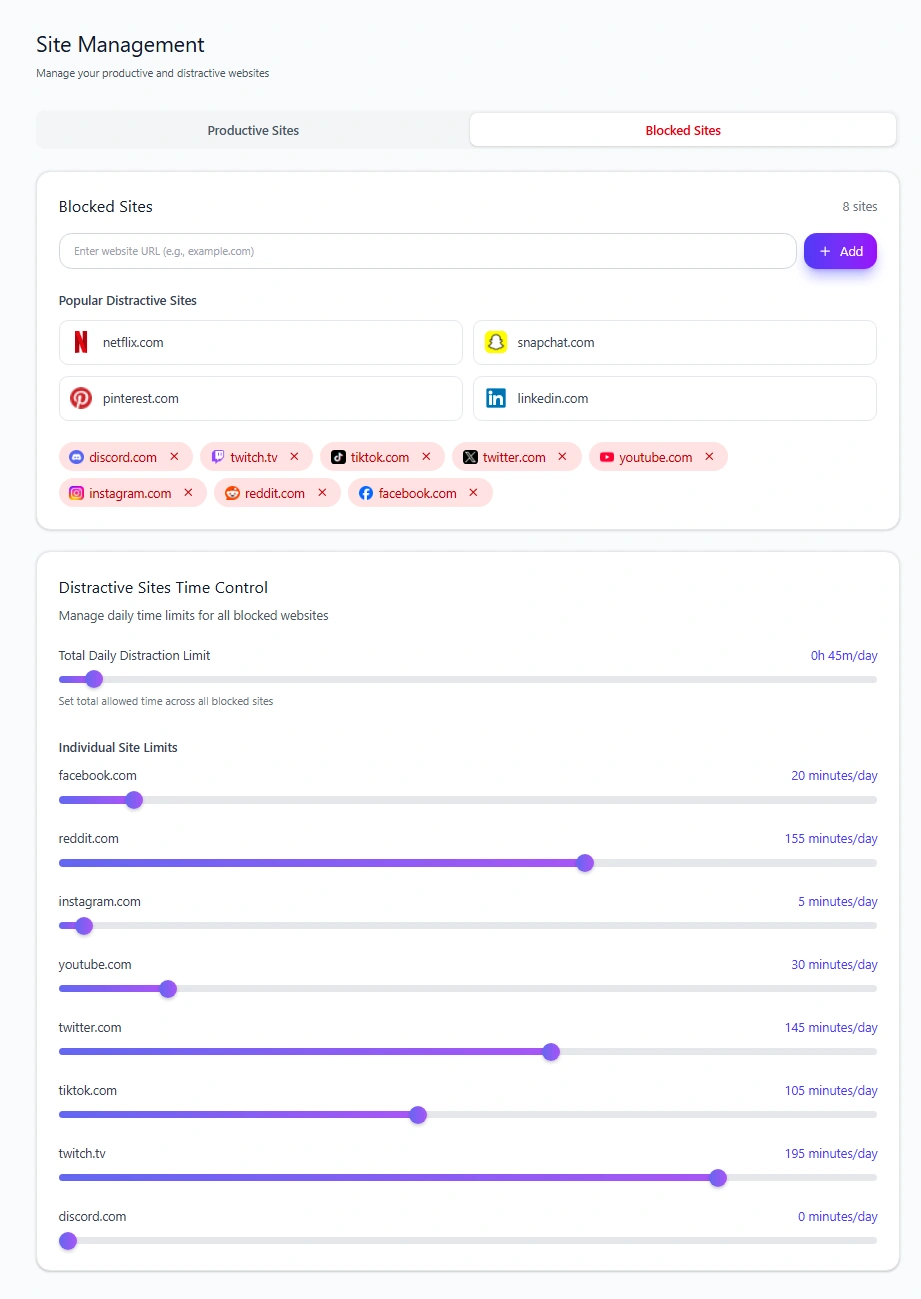
Mindova supports individual daily limits for websites as well as an overall daily distraction limit. (Mindova)
In our current hands-on testing of Mindova, setting an Individual Site Limit to 0 minutes blocked the website, while a higher allowance kept it accessible until its configured daily time was used.
That gives you three practical options:
Useful and controlled: give the site a daily allowance.
Not needed today: use a 0-minute limit.
Needed during some periods but not others: use a Focus Session while you work.
You can see the current setup workflow in the Mindova setup guide.
6. Protect the time when you are supposed to be doing something else
Sometimes the problem is not how much news you consume during an entire day.
The problem is checking it during the exact hour when you wanted to work, study, write, or code.
That is where a Focus Session makes more sense.
Mindova's Focus Sessions use a timer to create a defined period where distracting websites can be kept out of the way. (Mindova)
A daily limit answers:
How much of this site do I want today?
A Focus Session answers:
Do I need this site during the next 45 minutes?
Those are different problems.
7. Use a nudge when awareness may be enough
Not every distraction needs a hard block.
Sometimes you simply need to notice that you opened something automatically.
Mindova's optional AI Nudges are contextual reminders designed to help users notice distracting browsing and return to the task they intended to complete. (Mindova)
If you want to understand when that lighter intervention makes sense — and when a limit or hard block is better — read what a focus nudge is and how digital nudges work.
A nudge should not be treated as a cure for doomscrolling.
It is simply one possible interruption between an automatic habit and another scrolling session.
8. Replace the scroll with a specific next action
“Don't doomscroll” leaves an empty space.
Give that moment somewhere else to go.
Close the tab and:
- return to the next sentence you were writing;
- stand up and get water;
- take a short walk;
- write down the question you were trying to answer;
- message the person you were actually thinking about;
- move to a task that has a clear next step.
The replacement does not need to be productive.
It simply needs to be deliberate.
9. Take a broader social media break if the smaller boundaries are not enough
Sometimes the problem is no longer one news site.
The entire cycle of feeds, notifications, comments, and recommendations has become exhausting.
A temporary break can help you see what changes when constant social input disappears.
Our social media detox guide covers how to structure a temporary break without treating it as a permanent lifestyle rule.
If you are looking for a longer-term approach to deciding which technology deserves a place in your life at all, that is a different intent again. See the digital minimalism guide.
How to Stay Informed Without Doomscrolling
Stopping doomscrolling does not mean ignoring important events.
The goal is to separate useful information from endless exposure.
Try this simple rule:
Choose the source. Choose the question. Choose the stopping point.
Instead of opening a feed and seeing where it takes you:
- Decide what you need to know.
- Go to a reliable source.
- Read enough to answer the question.
- Leave.
You do not need every reaction.
You do not need every prediction.
You do not need every update the moment it is published.
Being informed and being continuously connected are not the same thing.
How to Stop Doomscrolling at Night
Night can make doomscrolling particularly difficult to stop.
You are tired.
There are fewer competing activities.
And “five more minutes” can quietly become forty.
If this happens regularly, build the boundary before you are already in bed.
You might:
- check important news earlier;
- turn off nonessential alerts;
- charge your phone away from the bed;
- avoid opening social feeds after a chosen time;
- block or limit the websites that repeatedly keep you scrolling.
Clinical guidance also notes that doomscrolling can interfere with sleep and recommends stronger boundaries when late-night scrolling becomes a repeated pattern.
Can Mindova Help Stop Doomscrolling?
Mindova can help with one part of the problem: distracting websites inside your desktop browser.
It currently supports:
- website blocking;
- Individual Site Limits;
- an overall distraction limit;
- timed Focus Sessions;
- browsing and focus insights;
- optional AI Nudges.
Mindova works in supported desktop Chromium browsers including Chrome, Edge, Brave, Opera, and Vivaldi. It does not currently block native iPhone or Android apps. (Mindova)
That distinction is important.
If most of your doomscrolling happens inside native phone apps, Mindova's current desktop browser extension will not solve that part of the behavior.
If it happens on Reddit, X, YouTube, Instagram, news sites, or other websites in your desktop browser, limits and focus boundaries can make those feeds harder to fall into automatically.
Mindova also does not need to read the contents of your private messages, emails, chats, forms, or other private webpage text to provide its focus functionality. Browsing and focus activity is stored locally by default, while Cloud Sync is optional and off by default. (Mindova)
Frequently Asked Questions
What is doomscrolling?
Doomscrolling is repeatedly consuming negative, alarming, or distressing online content for longer than you intended, often even when continuing makes you feel worse.
What is an example of doomscrolling?
You might open a news site to check one update about a crisis, then spend the next hour refreshing headlines, reading reactions, watching related videos, and searching for more negative updates even though you already know the main facts.
Is doomscrolling the same as scrolling too much?
No.
Excessive or mindless scrolling can involve any kind of content.
Doomscrolling specifically involves repeated consumption of negative or distressing information.
Why is doomscrolling so hard to stop?
There is no single reason. Negative information can attract attention, uncertainty can encourage repeated checking, digital feeds provide few natural stopping points, and checking can become habitual. Current research identifies factors such as intolerance of uncertainty, rumination, habit formation, and platform design as potentially relevant. (ScienceDirect)
Does doomscrolling cause anxiety?
Research finds an association between heavier doomscrolling and anxiety, stress, and poorer well-being.
But much of the existing evidence is correlational, so it is more accurate to say doomscrolling and psychological distress are related than to claim that doomscrolling alone causes anxiety in everyone.
Does doomscrolling damage your brain?
There is not good evidence for the simplistic claim that ordinary doomscrolling literally “damages your brain.”
Research is instead examining relationships with stress, anxiety, well-being, compulsive behavior, uncertainty, and problematic social-media use. (ScienceDirect)
Does doomscrolling drain dopamine?
That description oversimplifies how dopamine works.
Dopamine is involved in multiple processes related to motivation, salience, learning, and reward-related behavior. It is not simply a supply that gets emptied by scrolling and restored by a “dopamine detox.”
How do I stop doomscrolling without quitting the news?
Give news consumption a purpose and an ending.
Use specific checking windows, choose a smaller number of reliable sources, turn off unnecessary alerts, and stop once you have the information you actually needed.
Can AI nudges stop doomscrolling?
A nudge may help interrupt automatic browsing, but it is not a complete solution.
For persistent doomscrolling, time limits, blocking, fewer notifications, defined news windows, and changing the triggers that start the scrolling session may be more useful.
Can Mindova stop doomscrolling on my phone?
Not currently.
Mindova's publicly available blocker works inside supported desktop browsers and does not currently block native iPhone or Android apps. (Mindova)
You Do Not Need Every Update
Doomscrolling often starts from a reasonable intention.
You want to understand what is happening.
You want to be prepared.
You want the next piece of information that will finally make the situation feel clear.
The difficulty is that an endless feed can always offer you one more update.
Stopping does not mean you stopped caring.
It means deciding that, for now, you know enough.
If a particular website repeatedly pulls you back into the loop, choose the lightest boundary that works:
Give it a limited daily allowance if you still need access.
Block it when you do not.
Use a Focus Session when you want a protected period away from the feed.
And use a nudge when a small moment of awareness may be enough to interrupt the automatic habit.
The goal is not to avoid reality.
It is to stay informed without letting an endless feed decide when you are allowed to stop.
Mouhsine
Admin
Passionate about helping people achieve peak mental performance through evidence-based strategies and mindful technology use.
Related Articles

Digital Detox: What Is It, and Does It Actually Help?
Learn what a digital detox really is, what research says about its benefits, and how to reduce distracting technology without quitting every screen.

How to Temporarily Deactivate Facebook Without Deleting Your Account
Learn how to temporarily deactivate Facebook on mobile or desktop, what happens to your profile and Messenger, and how to reactivate your account later.

Digital Detox Retreats: Cost, Benefits, and Are They Worth It?
What happens at a digital detox retreat, how much does one cost, and is it worth paying for? Compare retreat types, evidence, downsides, and at-home alternatives.
Comments
Be the first to comment.
Ready to protect your focus?
Block distracting sites, set daily limits, and run focus sessions. Mindova is free.