30-Day Social Media Detox Challenge: A Practical Day-by-Day Plan
Written by Mouhsine
Admin
Published August 27, 2026

Deleting Instagram for a month is easy to understand.
Figuring out what should happen on Day 4, Day 13, or Day 27 is harder.
That is where many social media challenges become vague. They tell you to “use your phone less,” disappear for 30 days, and hope that something changes.
This challenge works differently.
You are going to use the month as an experiment: measure how you use social media now, identify what triggers automatic checking, reduce the easiest forms of access, test stronger boundaries, and decide what deserves to come back at the end.
You do not have to delete every account or stop every platform.
And 30 days is not a scientifically proven period that “resets” your attention or brain. Research on social media abstinence does not support treating a particular number of days as a magic threshold.
Think of 30 days as a useful structure for running the experiment long enough to notice patterns.
Quick answer: For the next 30 days, track your current social media use, identify your biggest triggers, reduce automatic access, replace scrolling habits, test stronger boundaries, and finish by deciding which platforms should return and under what rules.
If you are still deciding whether a social media break makes sense for you, start with our broader social media detox guide.
Before Day 1: Decide What Your Challenge Includes
Do not begin by deleting everything.
First decide what counts as social media for you.
Your list might include:
- TikTok
- X
- Snapchat
- YouTube
- another feed you repeatedly scroll
Not every service needs the same rule.
You may need LinkedIn for work.
YouTube may be useful for tutorials but distracting when you reach the home feed.
Instagram may be the platform you want completely unavailable.
Create three simple categories.
Pause
Platforms you want to stop using during part or all of the challenge.
Limit
Platforms that are useful but need a clearer boundary.
Keep
Platforms that have a defined role and are not currently causing a problem.
You can change these categories later.
The point is to avoid starting with a dramatic rule you cannot explain.
Set One Personal Outcome to Track
Social media minutes are useful, but they should not be the only measure.
Choose one thing you actually care about.
For example:
- pages read each day;
- focused work sessions completed;
- workouts completed;
- time spent on a personal project;
- how often you check social media during work;
- whether you use your phone in bed.
Pick one or two, not ten.
This challenge is about learning what changes when social media stops filling every available gap.
Days 1–7: Notice the Habit
The first week is mostly observation.
You cannot build useful boundaries until you know what you are trying to change.
Day 1: Record Your Baseline
Open the screen-time report on your phone.
On iPhone, Screen Time can show app and website use, pickups, and notifications. Android's Digital Wellbeing provides similar information about screen time, app opens, and notifications.
Write down:
- total social media time;
- your top three platforms;
- the platform you open most automatically.
Do not try to produce a perfect spreadsheet.
You need a baseline you can compare with Day 29.
Screenshot: iPhone Screen Time or Android Digital Wellbeing showing social media usage.
Suggested alt: Screen time report used to measure social media use before a 30-day detox
Day 2: Notice When You Reach for a Feed
Today, focus on when social media appears.
Common triggers include:
- waking up;
- waiting in line;
- finishing a task;
- getting stuck on difficult work;
- eating;
- going to bed;
- receiving a notification;
- feeling bored for thirty seconds.
Each time you notice an automatic check, ask:
What happened immediately before I opened this?
The answer is often more useful than the screen-time total.
Day 3: Find Your Biggest Problem Platform
Do not choose the app you feel most guilty about.
Choose the one your actual behavior points to.
Maybe TikTok gets the most minutes.
Maybe Instagram gets fewer minutes but interrupts your work repeatedly.
Maybe YouTube is where every other social media break ends up migrating.
Identify one primary problem platform.
You will use it for several experiments later in the month.
Day 4: Separate Intentional Use From Automatic Use
Every social platform session is not equally valuable.
There is a difference between:
Open Reddit → search for an answer → read it → leave.
and:
Open Reddit → front page → another post → comments → twenty minutes disappear.
Today, notice which visits have a purpose before they begin.
A simple test:
Could I describe what I am opening this platform to do in one sentence?
If not, it is probably an automatic check.
Day 5: Turn Off Nonessential Social Notifications
Review notifications from your social apps.
Keep the ones that genuinely need to interrupt you.
Turn off the ones designed mainly to bring you back:
- recommendations;
- trending alerts;
- suggested accounts;
- engagement reminders;
- “someone posted” notifications.
You are not preventing yourself from using social media.
You are changing who starts the interaction.
Day 6: Remove One Shortcut
Choose the platform you open most automatically.
Add one small piece of friction:
- remove it from your phone's home screen;
- log out in your browser;
- remove the bookmark;
- unpin the browser tab;
- remove a saved shortcut.
Do not underestimate one extra step.
The purpose is to make automatic checking slightly less automatic.
Day 7: Review Your First Week
Look back at Days 1–6.
Answer four questions:
- Which platform gets the most time?
- Which platform gets the most automatic checks?
- What trigger appears most often?
- Which social media use is genuinely useful?
Now update your Pause / Limit / Keep list if needed.
Days 8–14: Reduce Automatic Access
Week 2 turns what you noticed into actual boundaries.
Day 8: Finalize Your Pause, Limit, and Keep List
Make the rules concrete.
Instead of:
Use Instagram less.
Try:
Instagram is paused for the rest of the challenge.
Instead of:
Don't watch too much YouTube.
Try:
YouTube stays available because I need tutorials, but casual browser use gets a limit.
A rule you can describe clearly is easier to test.
Day 9: Set Mobile Boundaries
Mindova does not currently block native mobile apps, so use the controls available on your phone for mobile behavior.
Depending on your device, Apple's Screen Time or Android's Digital Wellbeing can help you review usage and set app-level limits.
For a platform in your Pause category, you may decide to:
- remove the app;
- log out;
- temporarily deactivate the account where appropriate;
- use your phone's built-in controls.
For Limit, choose a boundary that still leaves the function you need.
Day 10: Close the Desktop-Browser Loophole
Deleting an app from your phone does not help much if you simply type the same site into your laptop.
Review your desktop browser.
Which social media sites are still one click away?
For websites you do not want available, create a browser boundary.
Mindova can handle this part on supported desktop browsers.
If you want the full setup process, see how to block distracting websites.
What We Tested
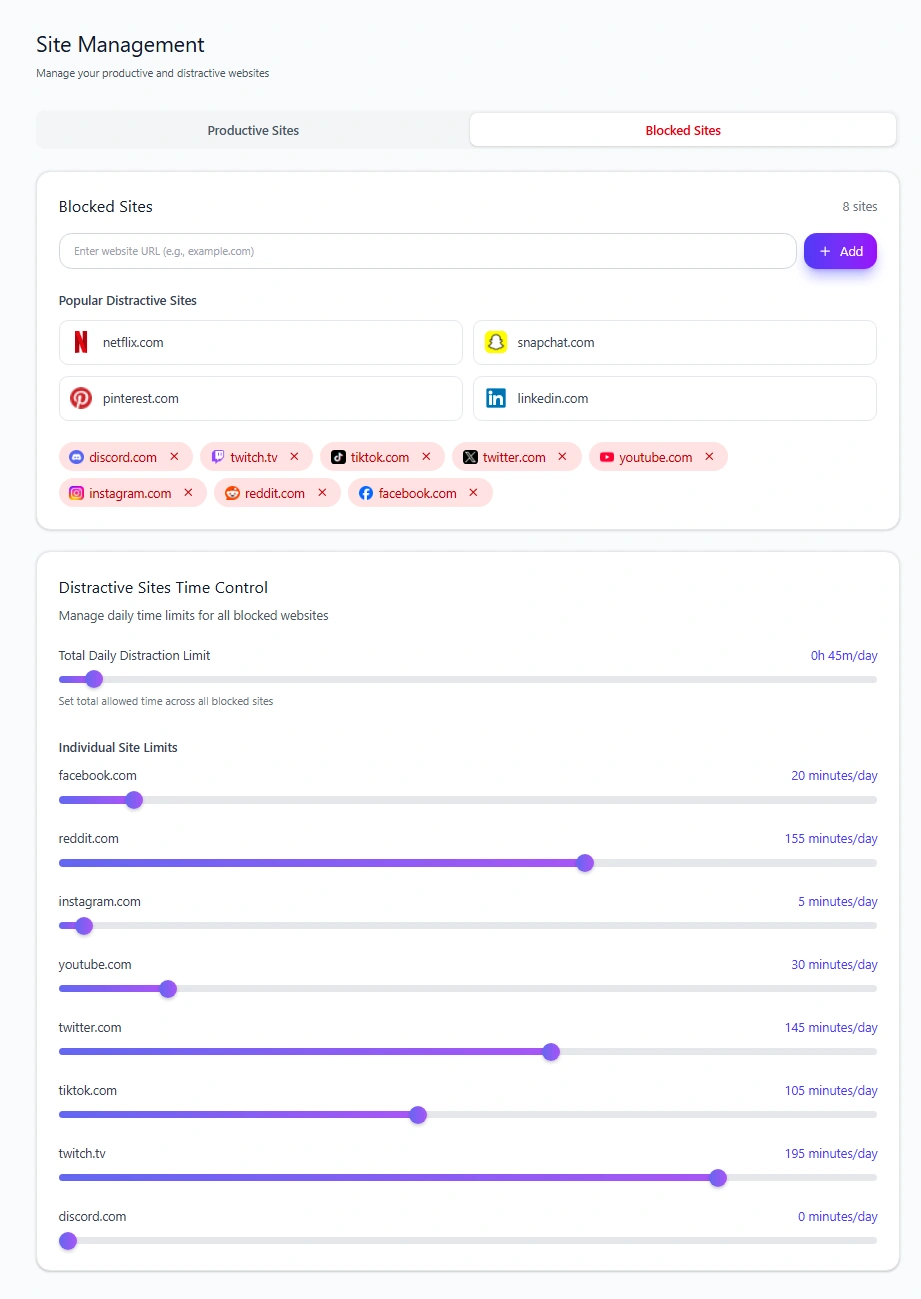
We tested instagram.com in the current Mindova browser extension with two different Individual Site Limits.
With 0 minutes/day, Instagram was blocked.
With 5 minutes/day, Instagram remained available until that daily allowance was used.
That gives you two different types of boundary:
Pause: use a 0-minute limit.
Limit: give the website a small daily allowance.
The same principle is useful during this challenge when a platform is useful enough to keep but not useful enough to have unlimited browser access.
Mindova's current public product controls websites in supported desktop browsers. It does not block the native Instagram, TikTok, Facebook, or other social media apps on your phone.
Screenshot: Mindova Site Management showing Instagram with an Individual Site Limit.
Suggested alt: Mindova Instagram daily limit during a social media detox challenge
Day 11: Protect the First Part of Your Morning
For one day, do not open social media immediately after waking.
You do not need a complicated morning routine.
Just create a gap between waking up and the first feed.
Use that time normally:
- shower;
- eat;
- walk;
- read;
- start work;
- talk to someone.
Notice whether social media usually enters your day because you chose it or because your phone was already there.
Day 12: Protect One Focused Task
Choose one task today that matters.
For the duration of that task:
- close social tabs;
- silence unnecessary notifications;
- move the phone away;
- keep only the websites required for the work.
You are testing a simple question:
Does this task feel different when a feed is not continuously available beside it?
Do not worry about how many minutes of productivity you “gained.”
Notice the experience.
Day 13: Replace One Scrolling Trigger
Return to the trigger you identified in Week 1.
Choose one alternative.
For example:
Bored in a queue: read something saved for later.
Stuck on work: write the next tiny action instead of opening a feed.
After dinner: take a short walk.
Before bed: keep a book nearby.
Want connection: message one person directly.
You only need one replacement today.
Day 14: Try One Full Feed-Free Day
If your circumstances allow it, spend today without the platforms in your Pause category.
If you need social media for work, keep only the specific functional use you defined.
Do not turn the day into a test of suffering.
Notice:
- when you instinctively reach for a platform;
- whether you switch to another feed;
- what fills the empty moments;
- which platform you actually miss.
Days 15–21: Test Stronger Boundaries
You now know enough about your behavior to make Week 3 more specific.
Day 15: Look for Migration
Check your usage again.
Did reducing Instagram increase YouTube?
Did TikTok disappear but Reddit grow?
Did you stop checking feeds on your phone and start doing it on desktop?
This is distraction migration.
It does not mean you failed.
It means the habit may be broader than one platform.
Update your boundaries accordingly.
Day 16: Tighten Your Biggest Weak Point
Choose the platform or moment that still causes the most trouble.
Make one boundary stronger.
Examples:
- change a desktop website from a daily allowance to a complete block;
- remove the mobile app;
- log out;
- move the phone farther away during work;
- disable another notification category.
Change one thing.
You want to learn what works, not make your devices unusable.
Day 17: Separate Communication From Feeds
Ask why you keep each social platform.
If the answer is “my friends are there,” consider whether you need the entire feed to keep that connection.
Try using the platform only for the communication you actually value.
Open a specific conversation.
Reply.
Leave.
This distinction becomes especially important when social media has a legitimate role in your life but the feed itself is the problem.
Day 18: Create a Work-Use Rule
If you need social media professionally, write down exactly what work use includes.
Example:
I can open LinkedIn to reply to messages and publish work, but I don't browse the home feed afterward.
Or:
I can use Instagram to post and respond to customer messages, then I leave.
Avoid:
Social media is allowed when I need it for work.
That rule has no boundary.
Day 19: Try Deliberate Checking Instead of Continuous Checking
Today, experiment with opening social media because you decided to, not because a notification or moment of boredom triggered it.
Before opening a platform, state the purpose:
I am checking messages.
I am looking up this account.
I am watching this specific video.
When that task is complete, close it.
The important change is not the clock.
It is beginning the visit with an intention.
Day 20: Protect One Offline Activity
Pick one ordinary activity and keep social media out of it.
Examples:
- eating dinner;
- walking;
- exercising;
- reading;
- spending time with someone;
- watching a movie without a second screen.
You do not need a “digital detox lifestyle.”
You are testing what one activity feels like without a feed running beside it.
Day 21: Do the Mid-Challenge Review
You are three weeks in.
Compare your current usage with Day 1.
Do not ask only:
Did the number go down?
Also ask:
- Is checking less automatic?
- Which platform was easiest to reduce?
- Which one keeps returning?
- Did use migrate elsewhere?
- Which boundary feels sustainable?
- Which rule feels unnecessarily strict?
Keep what is working.
Change what is not.
Days 22–28: Build the Version You Can Keep
The final full week is not about becoming stricter.
It is about designing what happens after the challenge.
Day 22: Remove One Thing You Did Not Miss
Look at the platforms, accounts, notifications, or shortcuts you removed.
Which one have you barely thought about?
Consider leaving it gone.
Not everything has to return simply because Day 30 arrives.
Day 23: Clean Up a Platform You Plan to Keep
Choose one platform that still earns a place.
Make it lighter.
You might:
- unfollow accounts you no longer value;
- mute noisy accounts;
- leave unnecessary groups;
- remove unnecessary notifications;
- clean your subscriptions;
- remove shortcuts that push you toward the feed.
You are not trying to perfect the algorithm.
You are making the platform better match the reason you decided to keep it.
Day 24: Review Your Notifications Again
After three weeks, you have better information.
Which notifications did you miss?
Which ones did you forget existed?
Keep only the alerts that proved useful.
If nothing bad happened when a notification disappeared, that tells you something.
Day 25: Create One Device-Free Boundary
Pick a boundary that could survive beyond the challenge:
- no phone at meals;
- no phone in bed;
- no social media during your first focused task;
- one room where your phone normally stays outside;
- one recurring activity without a feed beside it.
Choose one.
Permanent rules work better when they solve a real problem.
Day 26: Decide Which Platforms Deserve Mobile Access
A useful platform does not automatically deserve a permanent place in your pocket.
Ask:
Do I need this platform available everywhere I go?
You might keep a service available only from a desktop browser.
That extra friction can turn a reflex into an intentional visit without forcing you to leave the platform completely.
Day 27: Decide Which Websites Need a Browser Boundary
Now review the desktop side.
For each social website, choose:
- unlimited;
- limited;
- blocked.
Mindova's Individual Site Limits can help with the last two options in supported desktop browsers.
Do not copy someone else's limits.
The correct rule depends on what the site is actually for in your life.
Day 28: Write Your Post-Challenge Rules
Keep this short.
For example:
Instagram stays off my phone.
Reddit stays available for research, but not as an automatic break.
Social notifications stay off except direct messages.
YouTube remains available with a browser limit.
My phone stays outside the bedroom.
Five useful rules are better than twenty rules you will stop following.
Day 29: Compare the Result With Your Baseline
Return to the information you collected on Day 1.
Compare:
- total social media use;
- your top platforms;
- how often you open them;
- your original personal outcome;
- the trigger you identified in Week 1.
But do not force the result to look positive.
Maybe your social media time fell dramatically.
Maybe it barely changed.
Maybe Instagram disappeared and YouTube absorbed the difference.
Maybe the biggest improvement was simply checking less during work.
All of those results teach you something.
Do Not Overinterpret Your Mood
Social media detox claims often promise dramatic improvements in happiness, anxiety, focus, or life satisfaction.
The research is not that simple.
Recent reviews of social media restriction and abstinence have produced mixed results. Some find small improvements in well-being, while others find no significant overall effect on specific measures such as positive affect, negative affect, or life satisfaction.
So do not judge your challenge against a promise that everyone should feel transformed.
Judge it against the behavior you wanted to understand.
Day 30: Decide What Deserves to Come Back
Today is not:
Reinstall everything.
Go platform by platform.
Did I Miss It?
Not:
Was I tempted to open it?
Did it provide something you genuinely missed?
What Was It Actually Useful For?
Connection?
Work?
Learning?
Entertainment you genuinely enjoy?
What Part Caused the Problem?
The entire platform?
Notifications?
The home feed?
Mobile access?
Unlimited time?
Automatic checking?
What Rule Would Preserve the Value Without Restoring the Old Habit?
Possible outcomes:
Keep it paused.
You discovered you do not need it.
Bring it back with limits.
The platform has value, but unlimited access does not.
Desktop only.
You keep the service without carrying it in your pocket all day.
Bring it back normally.
Your experiment showed it was not actually a problem.
That is allowed too.
The goal was never to prove social media is bad.
It was to make the choice deliberate again.
What If You Slip During the 30-Day Challenge?
Do not restart at Day 1 because you opened Instagram on Day 17.
Instead ask:
What triggered it?
Maybe you were bored.
Maybe you needed a legitimate message and ended up scrolling afterward.
Maybe the browser became the loophole after you removed the mobile app.
Maybe your rule was simply unrealistic.
Write down what happened.
Repair the boundary.
Continue with the next day.
The challenge is an experiment in understanding your habits, not a purity test.
One slip can actually give you useful information if you examine it.
What If You Need Social Media Every Day for Work?
Do not pretend you can quit a tool your job requires.
Separate the work function from the feed.
Define exactly what is allowed:
- publishing;
- replying to customer messages;
- checking a specific group;
- researching a specific account;
- professional networking.
Then leave when that task is complete.
If desktop access is sufficient for your job, removing unnecessary mobile access can also make personal checking less automatic.
Should You Do Another 30 Days?
Maybe.
But repeating the challenge forever is not the objective.
By Day 30, you should have enough information to build simpler long-term rules.
If you want a broader explanation of temporary social media breaks, read How to Take a Social Media Break.
If you are ready to think beyond a temporary challenge and decide how technology should fit into your life long term, continue with our digital minimalism guide.
Where Mindova Fits Into the Challenge
Mindova can help with the desktop-browser side of your social media boundaries.
The current public extension supports:
- website blocking;
- Individual Site Limits;
- Focus Sessions;
- browsing and focus insights.
It works on supported desktop browsers including Chrome, Microsoft Edge, Brave, Opera, and Vivaldi.
Mindova does not currently block native iPhone or Android apps.
Use your phone's built-in controls or another mobile solution for app-level restrictions, and use Mindova where the distraction happens in your desktop browser.
Frequently Asked Questions
Does a 30-Day Social Media Detox Reset Your Brain?
There is no good evidence that exactly 30 days produces a special neurological “reset.”
Treat 30 days as a practical challenge format, not a scientifically proven recovery period.
Do I Have to Quit All Social Media for 30 Days?
No.
You can pause one platform, several platforms, or combine complete pauses with limits on platforms you still need.
The challenge should match the behavior you are trying to change.
Can I Still Use Social Media for Work?
Yes.
Define exactly what counts as required work use and separate it from casual feed browsing.
What Happens If I Break the Challenge?
Continue.
Identify what triggered the slip, adjust the boundary if necessary, and move on to the next day.
Should I Delete My Social Media Accounts?
Not necessarily.
Removing an app, logging out, blocking browser access, using device limits, or temporarily deactivating an account can all create distance without permanently deleting it.
Can Mindova Block Instagram or TikTok on My Phone?
No.
Mindova currently blocks websites in supported desktop browsers. It does not currently block native mobile apps.
The Goal Is Not 30 Perfect Days
A useful social media challenge does not end with a badge for avoiding Instagram for exactly one month.
It ends with better information.
You know what you open automatically.
You know which triggers send you toward a feed.
You know which platforms actually provide value.
You know which boundaries help and which ones only make you frustrated.
And you know what happened to the time when social media stopped claiming it by default.
That gives you something more useful than a streak:
a set of rules you chose because you tested them on your own life.
Mouhsine
Admin
Passionate about helping people achieve peak mental performance through evidence-based strategies and mindful technology use.
Related Articles

Digital Detox: What Is It, and Does It Actually Help?
Learn what a digital detox really is, what research says about its benefits, and how to reduce distracting technology without quitting every screen.

How to Temporarily Deactivate Facebook Without Deleting Your Account
Learn how to temporarily deactivate Facebook on mobile or desktop, what happens to your profile and Messenger, and how to reactivate your account later.

Digital Detox Retreats: Cost, Benefits, and Are They Worth It?
What happens at a digital detox retreat, how much does one cost, and is it worth paying for? Compare retreat types, evidence, downsides, and at-home alternatives.
Comments
Be the first to comment.
Ready to protect your focus?
Block distracting sites, set daily limits, and run focus sessions. Mindova is free.