8 Best Website Blockers for Focus in 2026 (Compared)
Written by Mouhsine
Admin
Published August 18, 2026 · Updated October 11, 2026
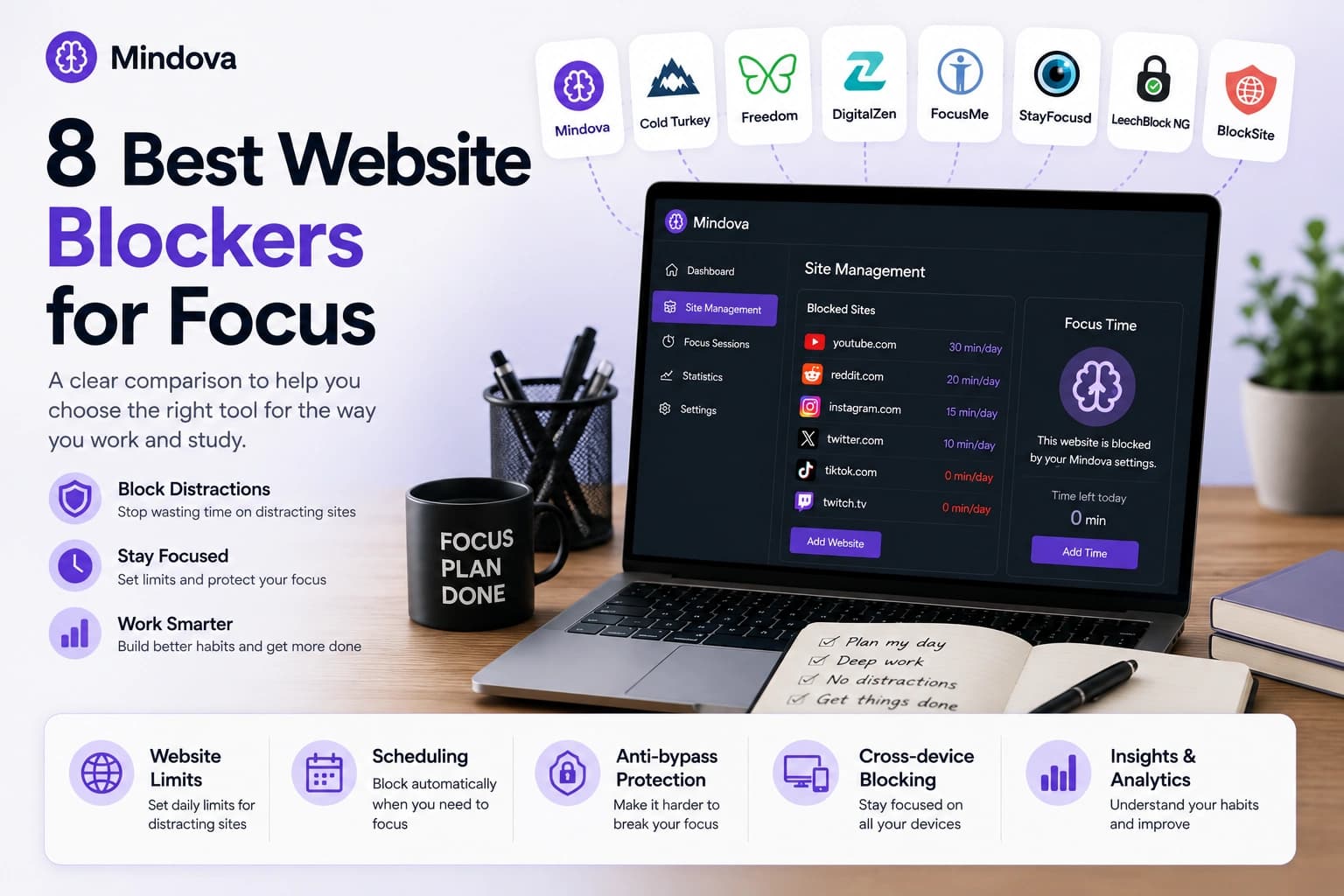
The best website blocker is not necessarily the one that blocks the most.
If your main problem is opening YouTube or Reddit while working, a lightweight browser extension may be enough. If you regularly disable your own restrictions, you may need a stricter desktop blocker. And if blocking a website on your laptop only makes you pick up your phone, a multi-device tool may make more sense.
Those are very different problems.
This guide compares eight website blockers for different types of focus:
- Mindova
- Cold Turkey Blocker
- Freedom
- DigitalZen
- FocusMe
- StayFocusd
- LeechBlock NG
- BlockSite
We have not ranked them from first to eighth. Instead, each tool is matched with the use case where its current feature set makes the most sense.
How we researched this comparison: Mindova is our own product, so we tested its browser extension directly. For this October 2026 update, we also included our hands-on Android app-limit test with Instagram. We did not retest the competing products for this update. For the other blockers in this guide, we verified features using their official websites, documentation, pricing pages, and extension listings on August 18, 2026. Selected pricing and platform details were rechecked on September 19, 2026. We did not hands-on test those products unless explicitly stated. Features, availability, and pricing can change.
Quick comparison
| Website blocker | Best for | Scope | Scheduling | Stronger anti-bypass controls | Free plan / trial |
|---|---|---|---|---|---|
| Mindova | Website limits + Android app limits | Browser + Android | No | No hard-lock mode | 7-day free trial |
| Cold Turkey | Strict desktop blocking | Desktop + browser | Pro | Strong | Yes |
| Freedom | Multi-device blocking | Desktop + mobile | Premium | Locked Mode | Limited free tier |
| DigitalZen | Flexible desktop-level control | Desktop + browser | Yes | Premium controls | Yes |
| FocusMe | Advanced customization | Desktop + browser + Android | Yes | Strong | 14-day trial |
| StayFocusd | Controlling distracting parts of websites | Browser | Yes | Challenge / Nuclear Option | Yes |
| LeechBlock NG | Advanced free browser rules | Browser | Yes | Password / lockdown options | Yes |
| BlockSite | Easy scheduled blocking across multiple devices | Desktop + browser + mobile | Yes | Password-based controls | Free + paid features |
How we compared the blockers
We focused on eight practical questions:
- What can it block? Websites only, or desktop/mobile apps too?
- Where does it work? Inside a browser or across the operating system?
- Can you set usage limits?
- Can restrictions run automatically on a schedule?
- How difficult is it to change or bypass an active restriction?
- Which platforms are supported?
- Is there a useful free plan or trial?
- Who benefits most from the product's particular approach?
We deliberately do not give the tools arbitrary scores out of ten.
A product with fewer features can still be the better choice if those are exactly the features you need.
1. Mindova — best for simple website limits with Android app blocking
Mindova is a good fit when you want to limit distracting websites in supported desktop browsers and control selected Android apps without setting up a more complex desktop-level blocker.
You can add distracting websites individually and give different sites different daily allowances.
For example:
- YouTube → 30 minutes/day
- Reddit → 20 minutes/day
- TikTok → 0 minutes/day
Setting an Individual Site Limit to 0 minutes/day blocks the website when you try to visit it.
A larger allowance lets the site remain available until that time has been used.
We tested this directly by setting youtube.com to 30 minutes/day.
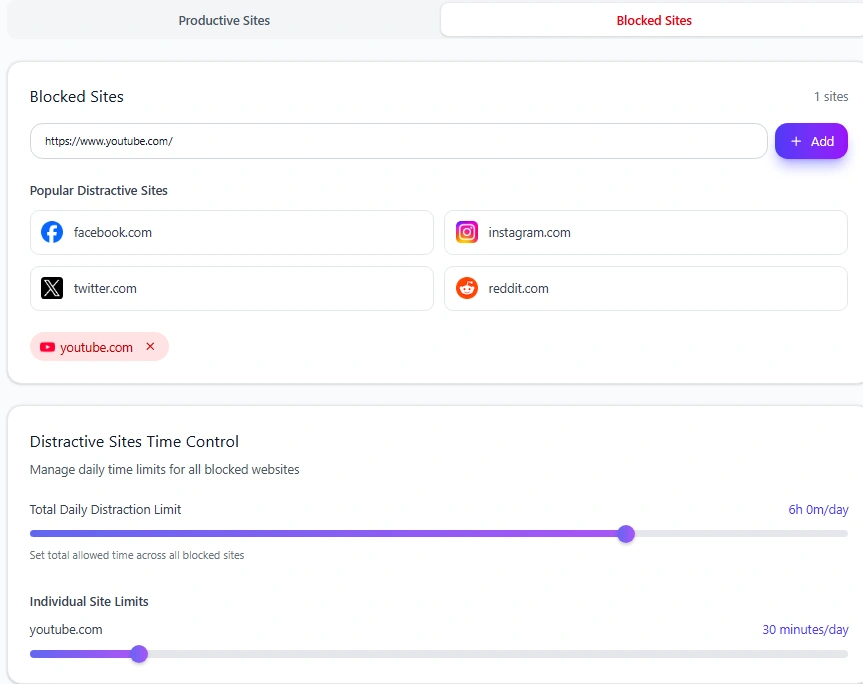
YouTube remained accessible while time was available. Once the allowance was used, Mindova interrupted access with its Focus Time screen.
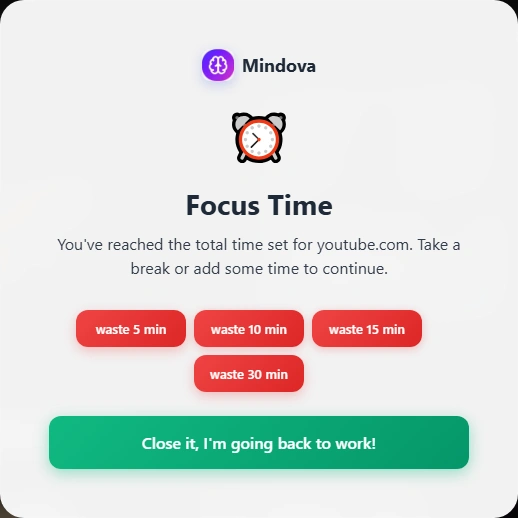
If either platform is one of your main distractions, see our guides to blocking YouTube and blocking Reddit.
Mindova also includes Productive and Distracting website classification, Focus Sessions, and browsing/focus analytics.
Mindova now has a native Android app for restricting selected distracting apps, assigning individual app limits, setting an overall Daily Distraction Limit, and reviewing app usage. In our Android test, Mindova interrupted access to Instagram after its one-minute daily allowance was used. You can see the Android workflow in our Mindova app blocker guide.
What it does well
- Individual daily website limits
- 0-minute immediate blocking
- Different limits for different websites
- Productive and Distracting site organization
- Focus Sessions
- Browsing and focus insights
- Native Android app blocking and individual app limits
- Daily Distraction Limit for selected Android apps
- Supported mobile and desktop activity insights
- Straightforward browser-based setup
Main tradeoffs
Mindova combines browser-based website blocking with native Android app blocking, but its desktop extension is not a system-wide desktop blocker.
It does not currently provide:
- native Windows or macOS application blocking;
- a publicly available iPhone app;
- recurring blocking schedules;
- a hard Locked Mode;
- system-wide desktop blocking outside supported browsers.
If you need to restrict Steam, desktop games, or other native Windows or macOS applications, a desktop system-level blocker may be a better fit. Mindova can restrict selected native apps on Android, but iPhone support is not yet publicly available.
Platforms
Chrome and supported Chromium-based desktop browsers including Edge, Brave, Opera, and Vivaldi, plus a native Android app. Mindova for iPhone is coming soon.
Pricing
New users can try Mindova free for 7 days with no credit card required to start. Continued access after the trial requires a Monthly or Annual plan.
Current pricing is $4.99/month or $39.99/year. See Mindova pricing for the current plan details.
Best for: People who want simple website limits on desktop, native app limits on Android, Focus Sessions, and activity insights without a more complex desktop blocking setup.
2. Cold Turkey Blocker — best for strict desktop blocking
Cold Turkey is designed for people who want considerably stricter restrictions.
Its website controls can target domains, URLs, searches, wildcard patterns, and other web content. The Pro version adds desktop application blocking, scheduling, allowances, and additional locking options.
Where Cold Turkey particularly stands out is resistance to impulsively changing a block.
Its locking options are designed to make active restrictions harder to casually disable.
What it does well
- Detailed website blocking
- Desktop application blocking with Pro
- Scheduled blocks
- Website allowances
- Stronger locking options
- Ability to create highly restrictive desktop setups
Main tradeoffs
The stricter setup can be more than somebody needs if the problem is simply spending too much time on two or three websites.
Its official desktop support is focused on Windows and macOS rather than native mobile blocking.
Platforms
Windows and macOS.
Free option
A free version is available, with advanced functionality reserved for Pro.
Best for: People who know that a lightweight blocker will simply be disabled when temptation appears.
Official source: Cold Turkey features
3. Freedom — best for blocking across multiple devices
Freedom addresses one of the biggest weaknesses of browser-only blocking:
You can block a distraction on your computer and immediately continue it on your phone.
Freedom is built around blocking sessions that can cover websites and applications across multiple devices.
That makes it especially relevant when the distraction follows you from one screen to another.
Premium functionality also includes more advanced scheduling and Locked Mode.
What it does well
- Website blocking
- Application blocking
- Desktop and mobile coverage
- Multi-device sessions
- Custom blocklists
- Recurring scheduled sessions
- Locked Mode on supported plans
Main tradeoffs
Freedom is a broader system than you need if your only problem is limiting a few websites in one desktop browser.
The additional device coverage and session management are useful when you actually need them, but they add complexity compared with a simple extension.
Platforms
Desktop and mobile platforms, including Windows, macOS, iOS, and Android.
Free option
A limited free tier is available, with broader functionality in Premium.
Best for: People whose distractions move between their computer and phone.
Official source: Freedom features
4. DigitalZen — best for flexible desktop-level control
DigitalZen combines website blocking with desktop-oriented focus and enforcement features.
Its current free Basic offering includes website blocking and focus-related functionality, while Premium expands the system with desktop application blocking and stronger anti-procrastination controls.
It sits between a lightweight browser extension and a highly restrictive desktop blocker.
What it does well
- Website blocking
- Daily allowances
- Automated scheduling
- Focus/Pomodoro functionality
- Optional desktop application blocking
- Stronger locking controls in higher tiers
- Desktop support across several operating systems
Main tradeoffs
DigitalZen offers more enforcement and scheduling functionality than a browser-first tool such as Mindova, but that also means a more involved setup.
If you only want:
add website → choose limit → continue working
you may not need the additional controls.
Platforms
Windows, macOS, and Linux.
Free option
A free Basic plan is available, with broader controls in Premium.
Best for: Desktop users who want website limits, scheduling, and optional stronger enforcement.
Official source: DigitalZen pricing
5. FocusMe — best for advanced customization
FocusMe offers one of the broadest configuration systems in this comparison.
It can control websites and desktop applications, create detailed time budgets, run different types of schedules, and apply different levels of protection to active plans.
Its scheduling options can include regular weekly rules, Pomodoro-style cycles, manual focus sessions, and longer multi-day setups.
What it does well
- Website blocking
- Desktop application blocking
- Detailed time budgets
- Weekly schedules
- Pomodoro workflows
- Multiple focus plans
- Different protection levels
- Advanced rule customization
Main tradeoffs
FocusMe's flexibility also makes it more complex.
Someone who wants to block three websites may not need a system designed for detailed schedules, several plans, and multiple enforcement mechanisms.
Platforms
Windows, macOS, Linux, and Android.
Free option
FocusMe offers a 14-day free trial with no credit card required, followed by paid plans for continued access.
Best for: Power users who want detailed control over websites, applications, schedules, and enforcement.
Official source: FocusMe documentation
6. StayFocusd — best for controlling distracting parts of websites
StayFocusd is interesting because sometimes the website itself is not the problem.
You may need YouTube for tutorials but want to avoid Shorts and recommendations.
Or you may need Instagram for work but not want to spend time scrolling Reels.
StayFocusd's current browser functionality goes beyond basic domain blocking and can also target distracting elements inside supported websites.
That creates a different approach from a blocker that simply decides whether an entire domain is available.
What it does well
- Website time limits
- Website blocking
- Scheduled restrictions
- Usage insights
- Stricter temporary blocking
- Controls for distracting elements on certain platforms
Main tradeoffs
StayFocusd is browser-oriented rather than a system-level desktop application blocker.
Its feature-level controls are also a different philosophy from Mindova's current domain-level approach.
For example, Mindova currently does not selectively block only YouTube Shorts or Instagram Reels while allowing the rest of the platform.
Platforms
Primarily browser-based.
Free option
Yes.
Best for: People who need a website but want to remove or restrict some of its most distracting parts.
Official source: StayFocusd
7. LeechBlock NG — best free option for advanced browser rules
LeechBlock NG is a free browser blocker with unusually deep rule configuration.
You can create multiple groups of websites and give different groups their own schedules, blocking periods, or time allowances.
That makes it possible to build rules such as:
- block a site completely during work hours;
- allow only a certain amount of time per hour;
- use different restrictions on weekdays and weekends;
- temporarily activate a stricter lockdown.
What it does well
- Multiple groups of website rules
- Time allowances
- Scheduled blocks
- Lockdown functionality
- Wildcards and exceptions
- Password or access-code protection
- Broad browser support
Main tradeoffs
Its flexibility comes with a more technical and less guided setup than some newer productivity products.
It also remains a browser blocker rather than a system-level desktop application blocker.
Platforms
Firefox, Chrome, Edge, and Chromium-based browsers such as Brave, Opera, and Vivaldi.
Free option
Yes.
Best for: People who want detailed browser rules without paying for a full desktop blocking system.
Official source: LeechBlock NG
8. BlockSite — best for easy scheduled blocking across browser, desktop, and mobile
BlockSite is another well-established option for people who want a more guided blocking experience.
Its browser, desktop, and mobile products focus on blocking distracting sites and apps, creating scheduled restrictions, and running dedicated focus periods.
That makes it relevant for somebody who wants something easier to configure than a power-user tool but broader than a browser-only setup on one computer.
What it does well
- Website blocking
- Scheduled blocking
- Focus-oriented blocking modes
- Browser, desktop, and mobile availability
- Password-based restriction options
- A relatively accessible setup for everyday users
Main tradeoffs
Some of BlockSite's functionality is split between free and paid features.
It also occupies a crowded middle ground: users wanting maximum desktop enforcement may prefer something such as Cold Turkey or FocusMe, while someone who only needs simple browser limits may not need its broader feature set.
Platforms
Browser extensions, a desktop app, and mobile apps.
Free option
A free version is available, with additional paid features.
Best for: People who want an approachable blocker with scheduling and controls across browser and mobile, with a desktop app also available.
Official source: BlockSite
Cold Turkey vs FocusMe: What's the Difference?
Cold Turkey and FocusMe both go beyond lightweight browser extensions, but they emphasize different kinds of control.
Cold Turkey is a strong fit when the main priority is stricter desktop enforcement and making an active block harder to casually change. FocusMe is more configurable, with detailed plans, schedules, time budgets, and different protection options.
Both can control websites and desktop applications. The practical choice depends on whether you value a stricter blocking workflow or a more customizable set of rules.
If you only need to limit a few distracting websites in your browser, either product may provide more control than you actually need.
Which website blocker should you choose?
There is no single answer.
Start with where your distraction actually happens.
Choose Mindova if…
You want to manage distracting websites in your desktop browser and selected apps on Android with:
individual daily limits + simple blocking + Focus Sessions + mobile and desktop activity insights.
You do not need native Windows or macOS app blocking, recurring schedules, or a hard Locked Mode.
Choose Cold Turkey if…
You regularly undo your own restrictions and need much stricter desktop enforcement.
Choose Freedom if…
You block a distraction on your computer and immediately continue it on your phone.
Choose DigitalZen if…
You want desktop-level blocking, scheduling, and optional stronger anti-procrastination controls.
Choose FocusMe if…
You want to customize almost every part of your blocking workflow.
Choose StayFocusd if…
The website itself is useful, but specific features inside it are the distraction.
Choose LeechBlock NG if…
You want detailed browser rules and schedules without paying for a full desktop blocker.
Choose BlockSite if…
You want an accessible blocker that combines scheduled blocking with browser, desktop, and mobile availability.
Can Blocking Distracting Websites Actually Help?
A website blocker does not create concentration for you, but it can remove easy access to a distraction you already know tends to pull you away from a task.
That distinction matters.
If you repeatedly open Reddit, YouTube, Instagram, or another site without intending to spend much time there, blocking it during a work period removes one of the easiest escape routes. If the website is also useful for work or study, a daily allowance can be more practical than blocking it completely.
A blocker also will not solve every reason you lose focus. Fatigue, an unclear task, interruptions, or getting stuck on difficult work can still break concentration.
The useful question is therefore not simply whether blocking works. It is whether a specific website is one of the predictable distractions you want to make less accessible.
For practical setup steps, see our guide to blocking distracting websites.
Browser extension or desktop blocker?
This is one of the most important decisions in the comparison.
A browser-based website blocker controls activity inside supported browsers.
That can be enough when your problem looks like:
“I keep opening YouTube, Reddit, Instagram, or X while I should be working.”
Mindova's desktop extension, StayFocusd, and LeechBlock NG fit into this category. Mindova also has a separate native Android app for blocking selected phone apps, but the extension does not block desktop applications.
A desktop or system-level blocker can control more than browser tabs.
Depending on the product and plan, it may also restrict:
- desktop applications;
- games;
- messaging software;
- additional browsers;
- other activity outside your main browser.
Cold Turkey, DigitalZen, and FocusMe go further in this direction.
Freedom covers several types of devices, including iPhone. Mindova covers supported desktop browsers and Android through its separate products; their platform coverage and blocking controls are not identical.
The more powerful option is not automatically the better option.
Choose the scope that matches the distraction you actually have.
Should you choose the strictest website blocker?
Not necessarily.
Stronger restrictions make sense when you regularly override your own limits.
But unnecessary restrictions can also interfere with legitimate work.
YouTube is a common example.
You may need it for:
- tutorials;
- lectures;
- product demonstrations;
- training;
- technical explanations.
Blocking YouTube for the entire workday may solve the distraction while creating another problem.
A daily allowance can create a middle ground.
In our Mindova test, we assigned YouTube a 30-minute Individual Site Limit.
The website remained usable until the allowance was consumed.
After that, Mindova interrupted access.
If some of the websites distracting you are also necessary for your job, read our guide to blocking distractions without blocking the websites you need for work.
Free Website Blockers vs Free Trials: What Do You Actually Get?
Several products here offer either a free plan, a free version, or a limited-time trial, but those options are not equivalent.
A free blocker may include basic website blocking while reserving features such as:
- desktop app blocking;
- recurring schedules;
- stronger locks;
- multi-device controls;
- advanced analytics;
for a paid plan.
Mindova gives new users a 7-day free trial with no credit card required to start. Continued access after the trial requires a Monthly or Annual plan.
StayFocusd and LeechBlock NG remain browser-focused free options.
Cold Turkey, Freedom, DigitalZen, and BlockSite provide free access with different restrictions or paid upgrades.
FocusMe offers a 14-day free trial rather than a permanently free desktop plan.
Instead of asking only:
Is it free?
ask:
Does the free version or trial include the specific control I need?
If all you need is to limit several distracting websites in your browser, paying for system-level application blocking may not provide much additional value.
If you need Android app limits, Mindova now offers those alongside desktop website blocking. For desktop application blocking, iPhone support today, recurring schedules, or stronger enforcement, compare the other products' supported features and plans.
A simple way to choose
Before installing anything, answer these four questions.
1. Where does the distraction happen?
Only in your browser?
Or also in apps and on your phone?
2. Do you need useful websites to remain accessible?
A website can be both useful and distracting.
If so, look for time limits or more selective controls rather than only complete blocking.
3. Do you regularly disable your own restrictions?
If yes, stronger anti-bypass features may matter more than analytics or design.
4. Do you need automatic schedules?
If you want restrictions to activate every weekday at the same time, choose a tool with recurring scheduling.
If you prefer manually choosing when to focus, scheduling may not matter.
Final comparison
There is no universal best website blocker for focus.
Mindova combines straightforward website limits in desktop browsers with native Android app limits, Focus Sessions, and supported mobile and desktop activity insights.
Cold Turkey is better suited to people who want stricter desktop enforcement.
Freedom makes more sense when distractions need to be controlled across computers and mobile devices.
DigitalZen combines desktop blocking with scheduling and stronger optional controls.
FocusMe offers extensive customization for users who want detailed rules.
StayFocusd is particularly useful when you want to control distracting elements inside websites rather than lose access to the entire domain.
LeechBlock NG provides advanced browser-rule customization for free.
BlockSite offers an approachable combination of scheduled blocking and browser, desktop, and mobile availability.
The best starting point is not the product with the longest feature list.
It is the one that matches where you actually lose focus.
If distracting websites are the main problem, start with our guide to blocking distracting websites and staying focused.
7-day free trial for new users. No credit card required to start. View pricing.
Mouhsine
Admin
Passionate about helping people achieve peak mental performance through evidence-based strategies and mindful technology use.
Related Articles
How to Block X (Twitter) on Chrome and Set a Daily Limit 2026
Block X (Twitter) on Chrome with a tested browser method. Use Mindova to block x.com or twitter.com, set a daily limit, and stay focused
How to Block Websites on Microsoft Edge: 3 Methods
Block websites on Microsoft Edge with Mindova, Microsoft Family Safety, or Windows. Choose the best method for personal focus, family, or system-wide blocking.
How to Block Online Distractions Without Blocking Work Sites
Block online distractions without losing access to websites you need for work. Learn how to keep essential sites available, limit useful distractions, and block the rest
Comments
Be the first to comment.
Ready to protect your focus?
Block distracting sites, set daily limits, and run focus sessions. Mindova is free.