How Much Screen Time Is Too Much for Adults? (And How to Tell)
Written by Mouhsine
Admin
Published November 5, 2026 · Updated November 10, 2026
Most adults have looked at their weekly screen time report and wondered: is this normal, or is it too much? The honest answer is that there is no official limit for adults. But there are useful benchmarks, and there are clear signs that your screen time has become a problem.
Quick answer: There is no official screen time guideline for adults. A commonly cited benchmark comes from Stanford Lifestyle Medicine, which defines excessive screen time as more than 2 hours a day outside work. It is a benchmark, not an official clinical cutoff. For comparison, working-age internet users (16 to 64) spent about 6 hours 37 minutes a day online in 2023 data from DataReportal. Your screen time is too much when it regularly hurts your sleep, work, relationships, or mood, whatever the number.
Is There an Official Screen Time Limit for Adults?
No. Health organizations publish screen time guidelines for children, but there are currently no guidelines for how much screen time adults should have each day or week.
That does not mean any amount is fine. It means you have to judge it yourself, using two things:
- The type of screen time: work, intentional leisure, or automatic checking.
- The effect it has on your life: sleep, focus, relationships, mood, and health.
Screen Time Benchmarks for Adults
These are the most useful reference points. None of them is an official rule, but together they give you a realistic picture.
| Benchmark | What it means | Source |
|---|---|---|
| ~6 h 37 min a day | Average time online for internet users aged 16 to 64 worldwide, all devices (2023 data; internet use, not total screen time) | Health.com |
| 2 hours a day | Recreational screen time outside work or study, above which Stanford Lifestyle Medicine considers it excessive | Stanford Lifestyle Medicine |
| 30 minutes a day of social media | In a 2018 University of Pennsylvania study, students with depressive symptoms who cut social media to 30 minutes a day for three weeks reported less depression and loneliness | Time |
| 3 to 4 hours a day without screens | Recommended screen-free time per day by pediatrician and researcher Dimitri Christakis | Time |
| 1 hour before bed | Stop using screens at least an hour before sleep | Time |
The most practical one is the 2-hour recreational benchmark: it ignores the screen time your job requires and focuses on the part you actually control.
Not All Screen Time Is the Same
Before you judge your number, split it into three types:
| Type | Examples | How to think about it |
|---|---|---|
| Work or study | Writing, coding, calls, research | Usually not the problem. Take breaks and protect your eyes and posture. |
| Intentional leisure | A movie you chose, a game with friends, a video call with family | Fine in moderation. You decided to do it and you enjoy it. |
| Automatic checking | Opening Instagram, TikTok, X, YouTube, or news "for a second" | This is where "too much" usually comes from. |
Ten hours a day can be reasonable for someone who works on a computer and spends one hour on leisure. Four hours can be too much if almost all of it is scrolling you regret.
Signs Your Screen Time Is Too Much
Your screen time is probably too high if several of these are true for you:
- You regularly sleep later than you want because of your phone.
- You check your phone within minutes of waking up and right before sleeping.
- You lose track of time on apps and feel worse afterward.
- You have trouble focusing on one task without checking your phone.
- People close to you say you are often on your phone when you are together.
- You unlock your phone dozens of times a day without a clear reason.
- You have eye strain, headaches, or neck and back pain after long sessions.
- You try to cut back, but your usage goes back up within days.
If several of these sound familiar, especially the ones that affect your sleep, work or relationships, your screen time is likely too much for you, even if your total looks "average." This is a self-check, not a diagnostic test.
Calculate What Your Screen Time Adds Up To
A daily number feels small. Over a year, it is not. Use our free screen time calculator to see what your daily distracting screen time adds up to per week, month, and year, and how much time you could reclaim by cutting back.
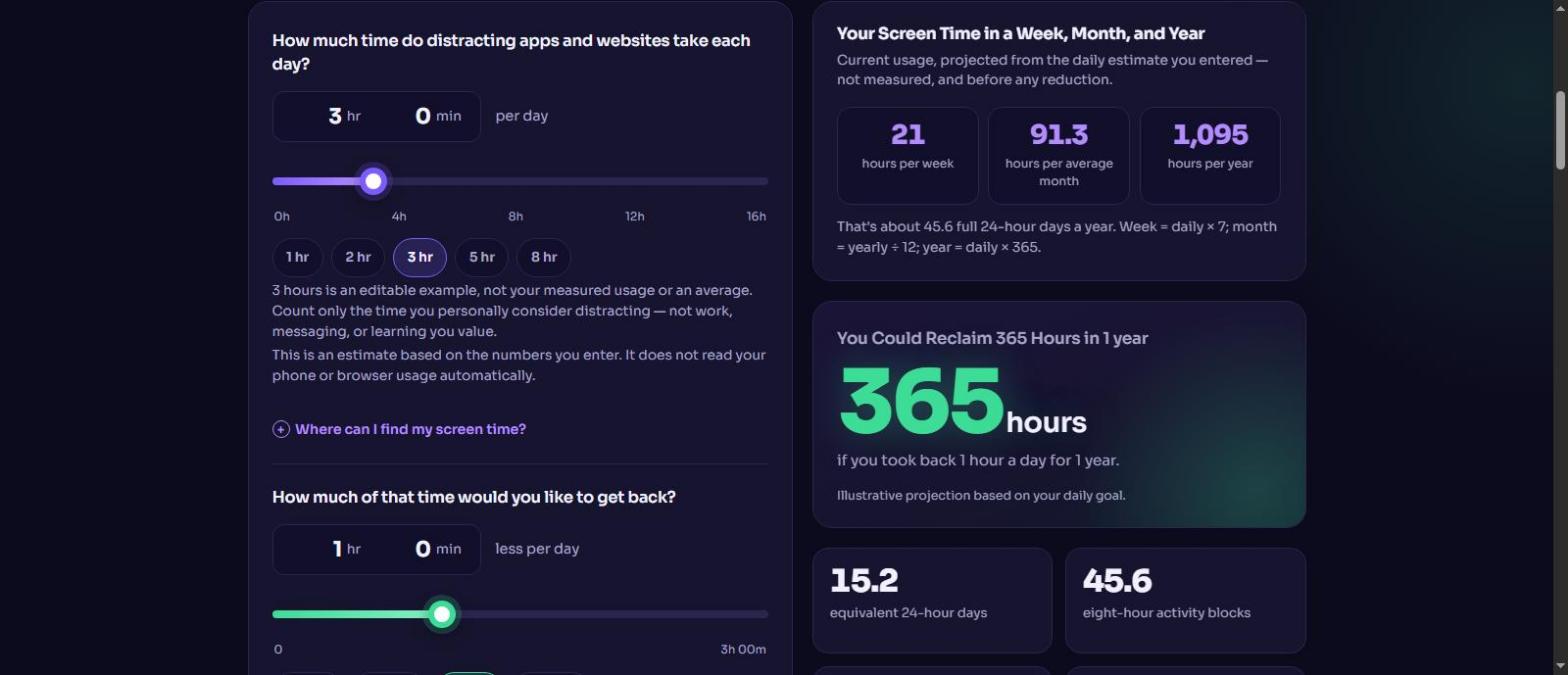
For example, 3 hours a day of distracting screen time adds up to 1,095 hours a year, about 45 full days. Cutting just 1 hour a day gives you back 365 hours a year.
Not sure what your daily number is? See how to check your screen time on Android, or open Settings → Screen Time on iPhone.
Is 4, 7, or 10 Hours of Screen Time Too Much?
Is 4 hours of screen time bad?
Not necessarily. If most of it is work, study, or leisure you chose, 4 hours is below the average time online for working-age internet users. If most of it is social media or automatic checking, it is above the 2-hour recreational benchmark and worth reducing.
Is 7 hours of screen time bad?
Seven hours is a little above the average time online for working-age internet users (about 6 hours 37 minutes a day in 2023 data). Whether it is a problem depends on how much is outside work. If 5 of those hours are scrolling, it is too much. If 6 are work, focus on breaks and on the remaining hour.
Is 10 hours of screen time bad?
Ten hours is high, especially if a large part is outside work. Check which apps make up that time and start by limiting the top two or three.
What Too Much Screen Time Can Do
Research on adults is still developing, and many studies show associations rather than proof of cause. But reviews and experts point to several common effects:
- Eyes and body: eye strain, neck and shoulder pain, and back pain are among the physical effects described in a 2023 review on the hazards of excessive screen time. The American Academy of Ophthalmology recommends the 20-20-20 rule: every 20 minutes, look at something 20 feet away for 20 seconds (Stanford Lifestyle Medicine).
- Sleep: light and stimulation from screens late at night can delay melatonin and make it harder to fall asleep (Stanford Lifestyle Medicine).
- Mental health: higher screen time is associated with higher levels of depression in some research (Health.com), and reducing social media helped some young adults feel less lonely and depressed (Time).
- Sitting time: long screen sessions often replace movement, which raises risks linked to sitting too much (Health.com).
If you are worried about your mental or physical health, talk to a healthcare professional.
How to Bring Your Screen Time Down
You do not need to quit your phone. Start with the screen time you control:
- Measure: check your real numbers for a normal week.
- Focus on your top 2 or 3 apps: they usually make up most of your leisure screen time.
- Remove triggers: turn off non-essential notifications and move distracting apps off your home screen.
- Set daily limits: use Digital Wellbeing or Screen Time, or one shared limit with Mindova.
- Protect screen-free times: the first hour after waking, meals, and the hour before bed.
For the full step-by-step plan, see how to reduce screen time. To compare tools, see the best apps to limit screen time.
How Mindova Can Help
Mindova helps you see and limit the screen time you want to cut.
- Android app: daily limits for distracting apps, one overall Daily Distraction Limit across all of them, Focus Sessions, and app usage insights. Get Mindova on Google Play.
- Browser extension: block distracting websites or give each one a daily limit in Chrome, Edge, Brave, Opera, and Vivaldi, with Focus Sessions and browsing insights.
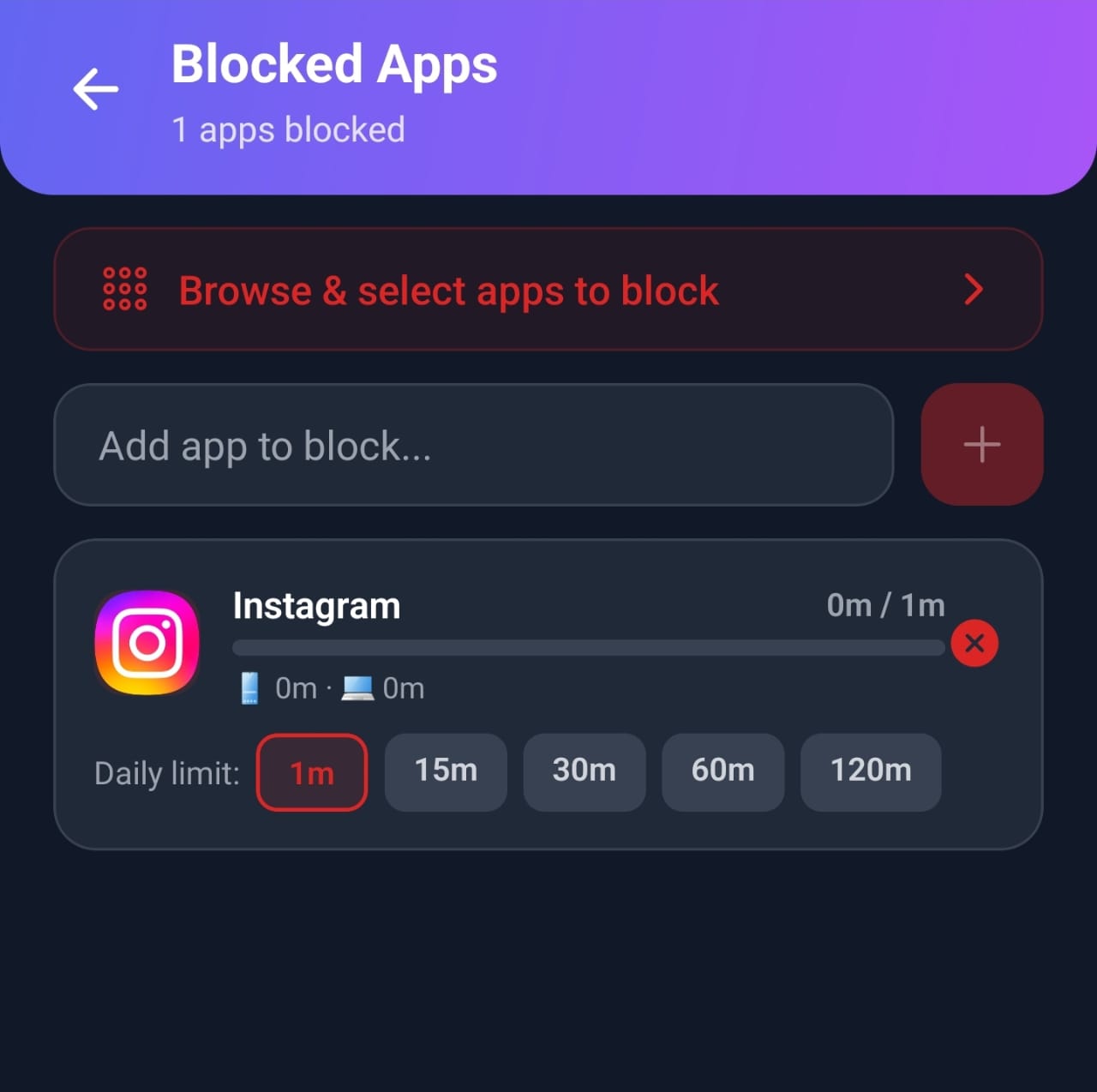
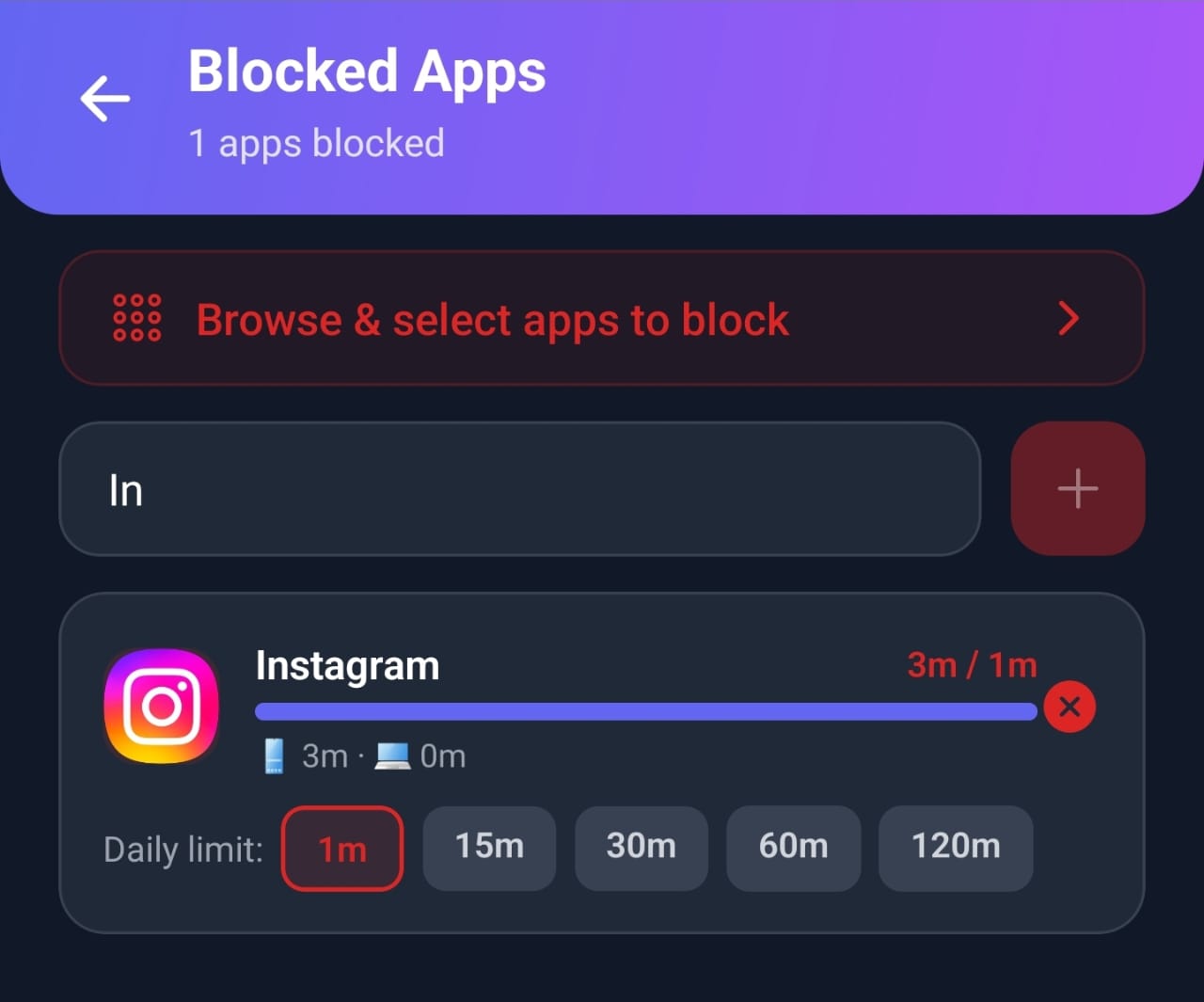
When we tested Mindova with Instagram and a one-minute daily limit, it showed the limit as reached after one minute of use and interrupted access to the app.
Mindova has a Free plan with no credit card required (up to 3 blocked apps or sites and 10 Focus Sessions a month). Mindova Pro removes the limits for $4.99/month or $39.99/year, and you can try Pro free for 7 days. See Mindova pricing.

Block distractions. Stay focused with Mindova.
Block distracting websites and apps, set limits, and protect your focus time across your browser and phone.
Free plan, no credit card • Try Pro free for 7 days
Frequently Asked Questions
How much screen time is too much for adults?
There is no official limit. One benchmark, from Stanford Lifestyle Medicine, is about 2 hours a day of recreational screen time outside work. More important is whether your screen time hurts your sleep, work, relationships, or mood.
What is a healthy amount of screen time for adults?
For leisure, staying around 2 hours a day or less is a reasonable goal. Work screen time is different: focus on breaks, posture, and eye care rather than cutting hours.
What is the average screen time for adults?
There is no single official figure. In 2023 data, working-age internet users (16 to 64) worldwide spent about 6 hours 37 minutes a day online across all devices (DataReportal). That measures internet use, not total screen time, and newer surveys may differ.
Does work screen time count?
It counts toward your total, but it is not the main problem. Judge your screen time mainly by your leisure and automatic-checking time.
How much social media is too much?
There is no official limit, but a University of Pennsylvania study found benefits when students limited social media to about 30 minutes a day for three weeks (Time).
How can I tell if my screen time is too high?
Look at its effects: if your phone regularly cuts into your sleep, focus, or time with people, or you feel worse after using it, it is too high for you.
Find Your Number, Then Decide
There is no universal "right" amount of screen time. Check your real usage, separate work from automatic checking, and use the screen time calculator to see what your leisure time adds up to. If that number is more than you want, pick your top app and give it a daily limit this week.
Less scrolling. More focused time.
Use Mindova to block distracting websites and apps, set daily limits, and create protected time for studying, working, or deep focus.
- Browser ExtensionChrome, Edge, Brave, Opera & Vivaldi
- Android AppBlock and limit distracting apps on Android.
- iPhone AppControl distracting apps and protect your focus on iPhone.


Start free — no credit card needed. Try Pro free for 7 days whenever you like.
Mouhsine
Admin
Passionate about helping people achieve peak mental performance through evidence-based strategies and mindful technology use.
Related Articles
Digital Wellbeing App: What It Is and How to Use It (2026 Guide)
What Android's Digital Wellbeing app does, where to find it, and how to use App timers, Focus mode, Bedtime mode, Pause Point, and the App limits PIN.

Digital Detox: What Is It, and Does It Actually Help?
Learn what a digital detox really is, what research says about its benefits, and how to reduce distracting technology without quitting every screen.
How to Reduce Screen Time: A Practical Plan That Actually Works
Learn how to reduce screen time on your phone and computer: check your real usage, add friction, set app limits, and replace the habit. A step-by-step plan.
Comments
Be the first to comment.