How to Reduce Screen Time: A Practical Plan That Actually Works
Written by Mouhsine
Admin
Published November 5, 2026 · Updated November 10, 2026
You pick up your phone to check one message. Twenty minutes later you are still scrolling, and you are not sure how you got there. At the end of the week, your screen time report says something you would rather not see.
Most advice on how to reduce screen time says "use your phone less." That is the goal, not a plan. This guide gives you a plan: find out where your time actually goes, make the worst apps harder to open, set limits that hold, and give the free time somewhere to go.
Quick answer: To reduce screen time, first check your real usage in Digital Wellbeing (Android) or Screen Time (iPhone). Then turn off non-essential notifications, move distracting apps off your home screen, set a daily limit on the two or three apps that take most of your time, keep your phone out of the bedroom, and replace scrolling with a specific offline activity. Cut down gradually, by about 15 to 30 minutes a week, instead of going cold turkey.
Is Your Screen Time Actually Too High?
There is no official screen time limit for adults like there is for young children. Scripps Health notes that many adults spend over seven hours a day looking at screens, and that whether this is unhealthy depends on how and why you use them.
A better question than "how many hours?" is what kind of hours?
| Type of screen time | Examples | Should you cut it? |
|---|---|---|
| Work or study | Writing, coding, video calls, research | Rarely the problem. Protect it instead. |
| Intentional leisure | A movie you chose, a call with family, a game with friends | Usually fine in moderation. |
| Automatic checking | Opening Instagram, TikTok, X, or news "for a second" | This is where most people should cut. |
If your total is high but most of it is work, you need breaks and better focus, not a detox. If a big part is automatic checking, the steps below will help most. For benchmarks and warning signs, see how much screen time is too much for adults. If negative news is a big part of your scrolling, see what doomscrolling is and how to stop it.
Want to see what your daily number adds up to? Our free screen time calculator shows your screen time per week, month, and year, and how much time you could reclaim by cutting back.
What Research Says Actually Works
You do not need willpower alone. In a randomized study by the Healthy Screens research team (Olson et al., 2022), people who applied small "nudges" to their phone settings and environment reduced their screen time, felt less addicted to their phone, and slept better. The strategies they tested, starting with the easiest:
- Reduce notifications.
- Turn on screen time tracking.
- Keep your phone away while sleeping.
- Set your screen to grayscale.
- Hide social media apps.
- Make your phone less accessible.
- Make your phone harder to unlock.
- Lower screen brightness.
- Move phone tasks to a computer.
- Leave your phone at home when you can.
The plan below turns these into six steps you can follow in order.
Step 1: Check Where Your Screen Time Really Goes
You cannot reduce what you do not measure. Most people underestimate their usage and guess the wrong apps.
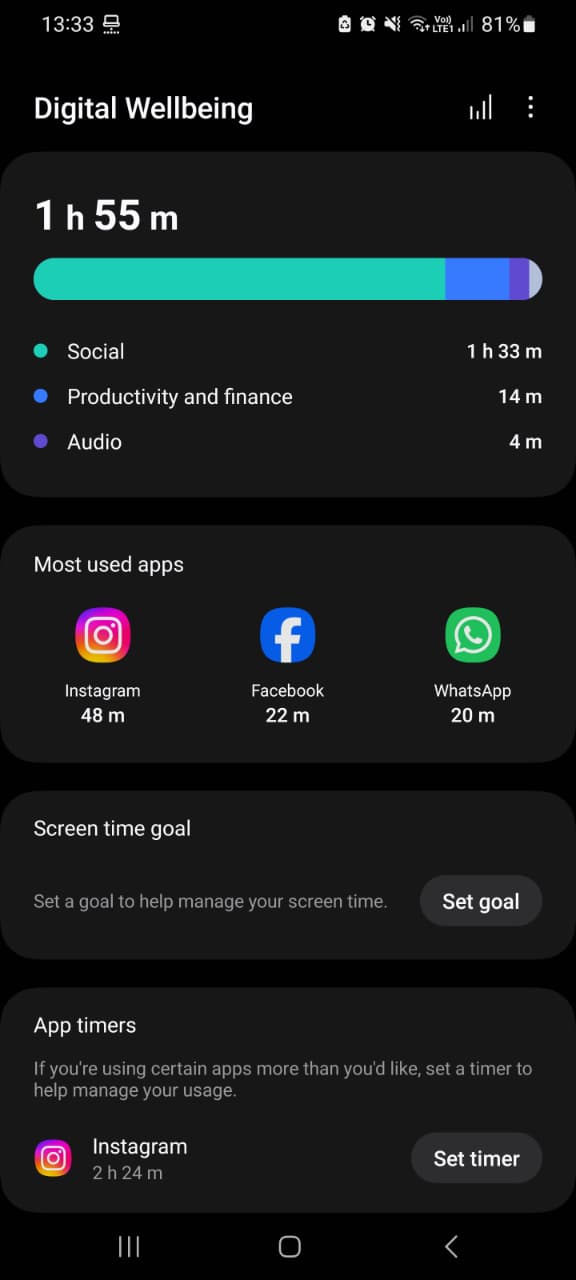
On Android: open Settings → Digital Wellbeing & parental controls. The dashboard shows your screen time today, the apps you used most, how many times you unlocked your phone, and how many notifications you received. For step-by-step instructions on Pixel and Samsung phones, see how to check screen time on Android.
On iPhone: open Settings → Screen Time → See All App & Website Activity to see daily and weekly usage by app.
On your computer: browser time is easy to miss. The Mindova browser extension shows your browsing and focus insights, so you can see how much time goes to distracting websites during the day.

Write down three numbers for a normal day:
- Total screen time.
- The three apps or sites that take the most time.
- How many times you unlock your phone.
Those three apps are where you will focus. You do not need to fix everything at once.
Step 2: Remove the Triggers That Pull You Back
Much screen time starts with a cue, not a decision: a notification, a red badge, an icon you see every time you unlock your phone.
- Turn off non-essential notifications. Keep calls, messages from real people, calendar, and anything work-critical. Turn off likes, recommendations, "people you may know," and news alerts.
- Move distracting apps off your home screen. Put them in a folder on the last page, or remove the icon and open them only from search.
- Turn on grayscale. A black-and-white screen makes feeds less rewarding. On most Android phones it is under Digital Wellbeing → Bedtime mode or Accessibility → Color correction; on iPhone, Accessibility → Display & Text Size → Color Filters.
- Log out of social media in your browser. One extra step is often enough to stop an automatic visit.
Step 3: Set Daily Limits on Your Top Apps
Friction helps, but a limit is what actually stops a "quick check" from becoming an hour. Use the three apps you found in Step 1.
Option A: Built-in limits (free)
- Android: in Digital Wellbeing, tap an app and set an App timer. When the time is used, the app is paused until midnight. See our Digital Wellbeing guide for Focus mode, Bedtime mode, and the App limits PIN.
- iPhone: in Screen Time → App Limits, add a limit for an app or a category like Social.
Built-in timers work, but they are easy to turn off in a weak moment, and each app has its own separate timer.
Option B: One limit across all your distracting apps
The common problem with app timers: you limit Instagram, then switch to TikTok, then YouTube. Mindova for Android lets you mark apps as distracting, give each one its own daily limit, and set one Daily Distraction Limit shared by all of them. To compare other options, see the best apps to limit screen time on Android, iPhone, and computer, or our list of the best app blockers for Android.
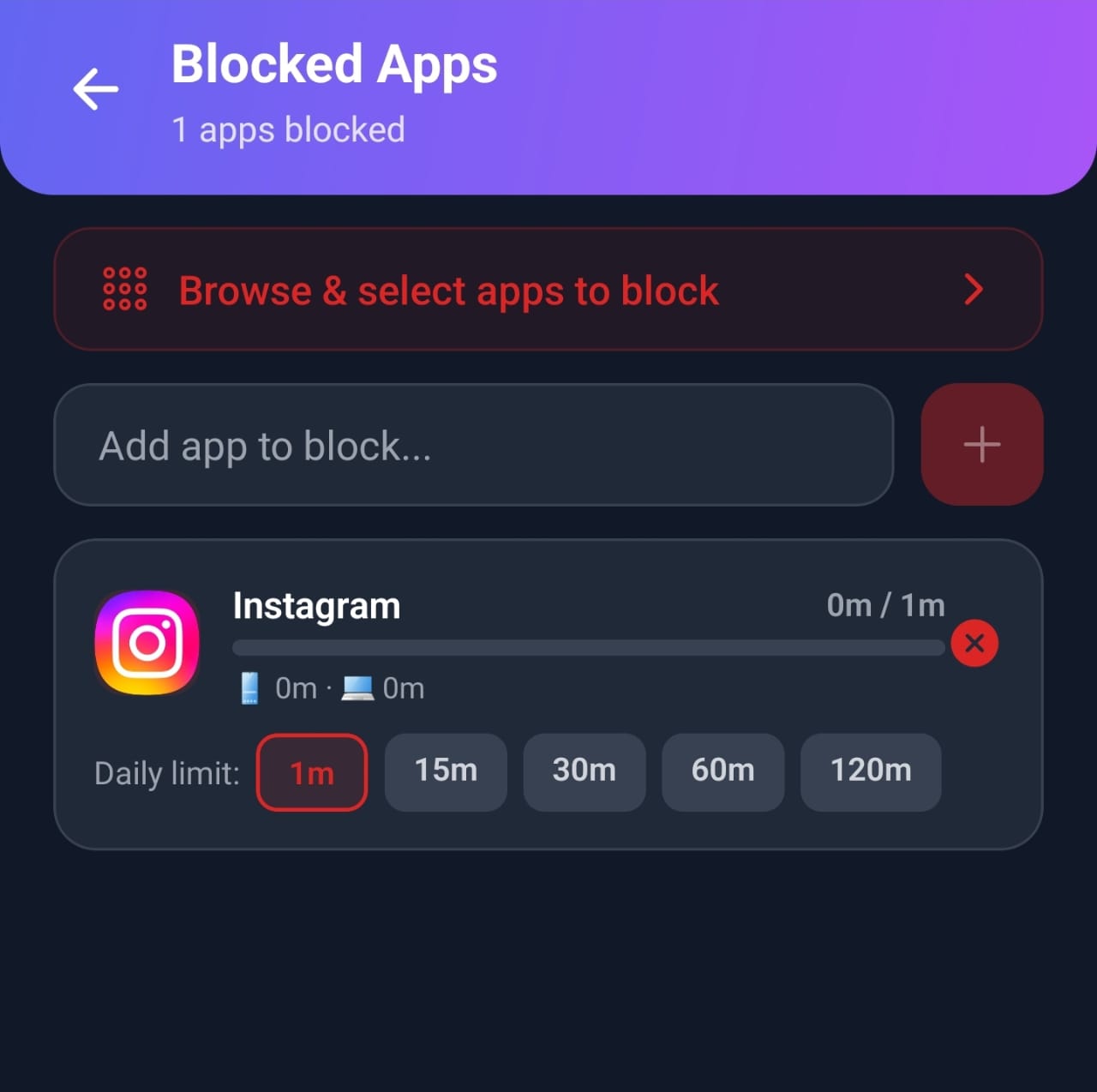
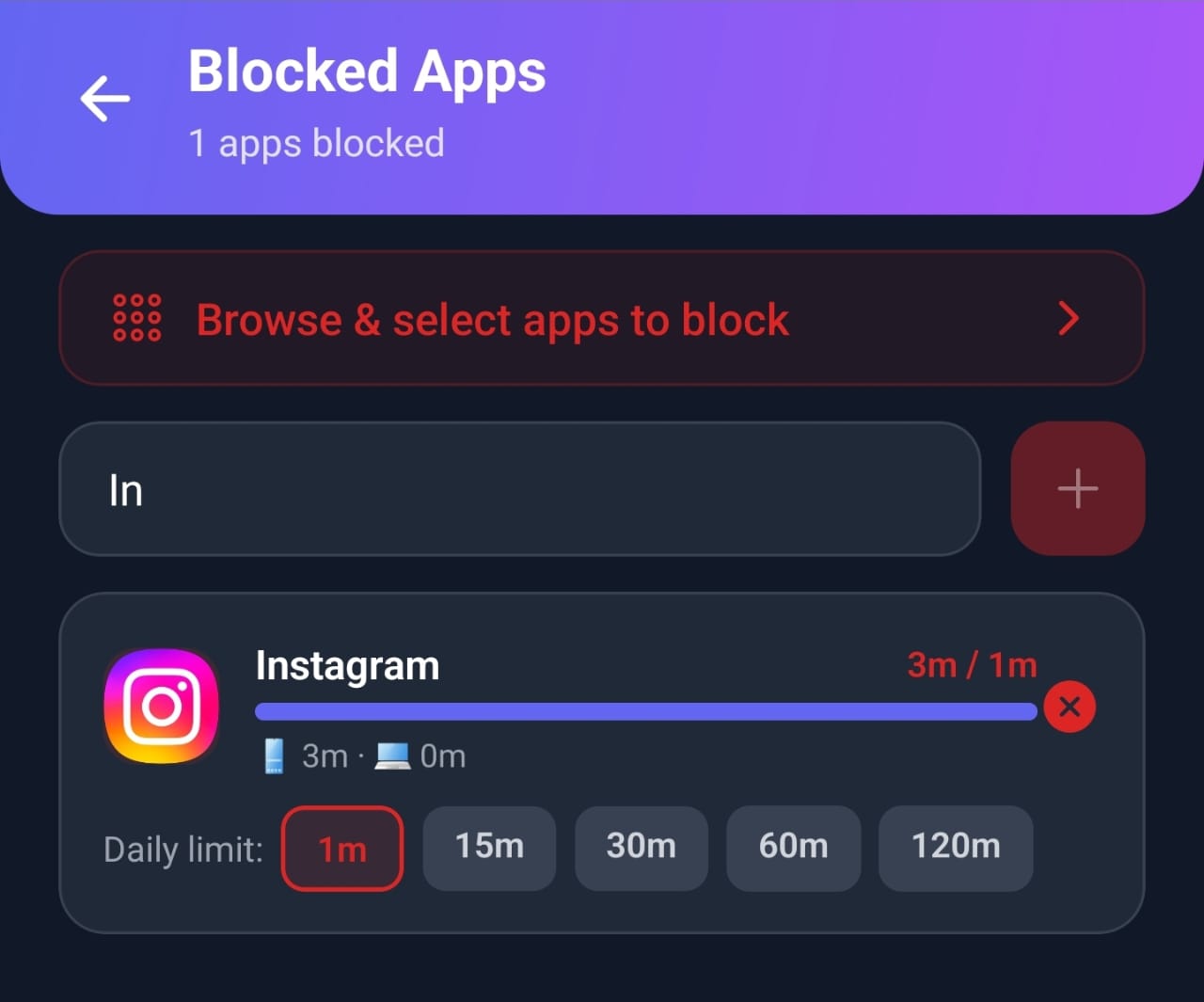
When we tested it, we gave Instagram a one-minute daily limit. After one minute of use, Mindova showed the limit as reached and interrupted access to the app.
Step-by-step guides: how to block Instagram on Android, how to block TikTok on Android, and how to block any app on Android.
On your computer
If YouTube, Reddit, or news sites eat your evenings on a laptop, a phone limit will not help. The Mindova browser extension lets you block distracting websites or give each one a daily time limit in Chrome, Edge, Brave, Opera, and Vivaldi.
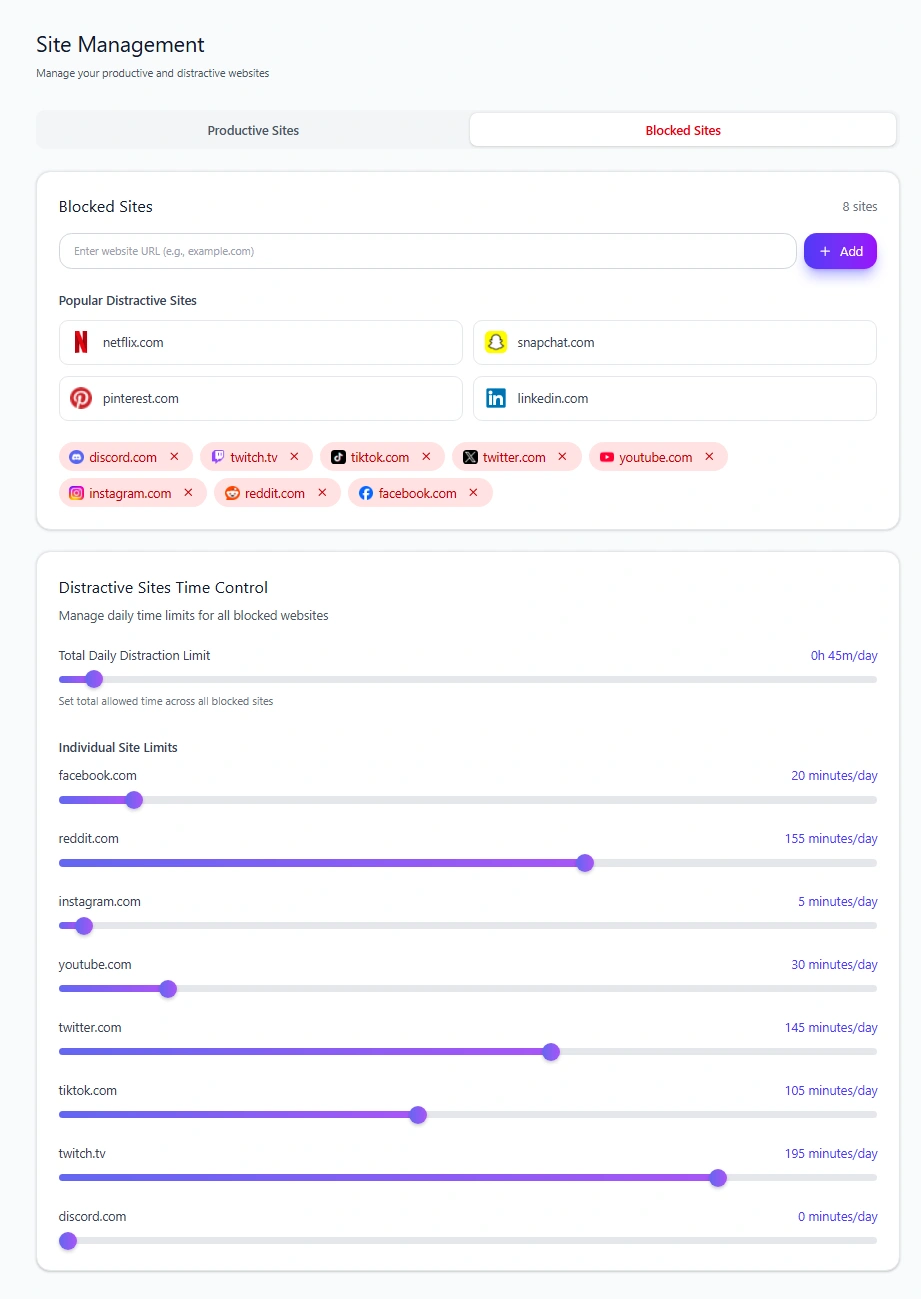
See how to block distracting websites for the full setup.
Step 4: Create Phone-Free Times and Places
Limits handle how much. Phone-free zones handle when.
- The bedroom: charge your phone in another room and use a cheap alarm clock. This one change removes both late-night and first-thing-in-the-morning scrolling.
- Meals: no phones at the table, especially with other people.
- The first and last hour of the day: start and end the day without a feed.
- Focused work: put your phone in a drawer or another room during your most important task. See our guide to deep work for how to protect those sessions.
Step 5: Replace the Habit, Do Not Just Remove It
When you remove scrolling, you leave an empty moment. If nothing fills it, you will reach for your phone again. Pick replacements for the exact moments you usually scroll:
| When you usually scroll | Try instead |
|---|---|
| Waiting in line or on transport | A podcast, an e-book on a dedicated reader, or just looking around |
| In bed before sleep | A physical book next to the bed |
| During work breaks | A short walk, water, stretching |
| After dinner | A walk, a call with a friend, a hobby within reach |
| When you feel bored or stuck | Write down the next small step of the task you are avoiding |
Keep the replacement visible and easy: a book on your pillow works better than a plan to "read more." Need more ideas? Here are 100 things to do instead of scrolling, sorted by how much time you have.
Replace phone jobs with single-purpose tools
Your phone is also your alarm clock, notebook, camera, and e-reader, so every small task becomes a chance to start scrolling. Moving some of those jobs to simple tools removes the trigger:
- a basic alarm clock, so your phone can stay out of the bedroom;
- a paper notebook for to-do lists and quick notes;
- an e-reader for books, with no feeds or notifications;
- a wristwatch, so checking the time does not mean unlocking your phone.
Wirecutter's writers describe the analog tools that helped them reduce screen time if you want product ideas.
Step 6: Cut Down Gradually and Track Progress
Going from eight hours to two overnight rarely lasts. Reduce by about 15 to 30 minutes a week, and check your Digital Wellbeing or Screen Time numbers once a week, not every day. To stay motivated, enter your daily reduction in the calculator and see how much time you could reclaim over a year.
A simple 4-week plan:
- Week 1: measure, turn off notifications, move apps off the home screen.
- Week 2: add daily limits to your top two apps.
- Week 3: make the bedroom phone-free.
- Week 4: add limits to your third app and lower the first two limits a little.
If you want a bigger reset, try a short break from social media first. Our social media detox guide and the 30-day social media challenge show how.
How to Reduce Screen Time on Specific Apps
The same principle works for every app: find it in your usage report, remove the trigger, and set a limit.
- Instagram: turn off notifications, hide the app, and set a daily limit. See how to block Instagram on Android or on Chrome.
- TikTok: the endless feed makes timers especially useful. See how to block TikTok on Android.
- YouTube: turn off autoplay and limit the site on your computer. See how to block YouTube on Chrome.
- News and doomscrolling: check news at set times instead of all day. See how to stop doomscrolling.
How to Reduce Screen Time as a Student
Students often need screens for studying, so the goal is to separate study time from distraction time.
- Study with your phone in another room, and use a Focus Session to block distracting sites on your laptop.
- Use short, timed study blocks with real breaks away from the screen.
- Set daily limits for social apps so breaks do not turn into hours.
For more, see how to focus while studying.
Reducing Screen Time With ADHD
Endless, novel content can be especially hard to put down when attention and impulsivity are already a daily challenge. External structure usually works better than willpower: fewer notifications, apps hidden from the home screen, short daily limits, and timed focus sessions. If attention problems affect your daily life, talk to a healthcare professional.
Protect Your Eyes and Body During Necessary Screen Time
Some screen time cannot be cut, especially at work. Make it easier on your body:
- Follow the 20-20-20 rule: every 20 minutes, look at something about 20 feet (6 meters) away for 20 seconds.
- Stand up and move every 30 to 60 minutes.
- Stop screens about an hour before bed when you can.
How Mindova Can Help You Reduce Screen Time
Mindova will not decide what is worth your time. It helps you keep the boundaries you set.
- Android app: daily limits for distracting apps, one overall Daily Distraction Limit, Focus Sessions, and usage insights.
- Browser extension: website blocking, Individual Site Limits, an overall distraction limit, Focus Sessions, browsing insights, and optional AI Nudges.
Mindova has a Free plan with no credit card required (up to 3 blocked sites or apps and 10 Focus Sessions a month). Mindova Pro removes the limits for $4.99/month or $39.99/year, and you can try Pro free for 7 days. See Mindova pricing.

Block distractions. Stay focused with Mindova.
Block distracting websites and apps, set limits, and protect your focus time across your browser and phone.
Free plan, no credit card • Try Pro free for 7 days
Frequently Asked Questions
What is the best way to reduce screen time?
Measure your real usage, turn off non-essential notifications, set daily limits on your top two or three apps, keep your phone out of the bedroom, and replace scrolling with a specific offline activity.
How much screen time is too much for adults?
There is no official limit for adults. What matters most is how much of your screen time is automatic checking or scrolling you regret, and whether it affects your sleep, work, or relationships.
Is 7 hours of screen time a day OK?
It depends on what those hours are. Seven hours that include a full workday on a computer is very different from seven hours of social media. Look at your leisure and automatic-checking time first.
Is 10 hours of screen time bad?
Ten hours is a lot, especially if most of it is outside work. Check which apps make up that time, and start by limiting the top two or three.
How can I reduce screen time without deleting apps?
Turn off notifications, move apps off your home screen, and set daily limits with Digital Wellbeing, Screen Time, or an app blocker like Mindova. The apps stay installed, but they stop opening without limit.
What is the 20-20-20 rule?
Every 20 minutes of screen use, look at something about 20 feet away for 20 seconds. It reduces eye strain during long screen sessions.
Start With One App This Week
You do not need to change everything at once. Check your screen time today, pick the one app that takes the most time, turn off its notifications, and give it a daily limit. Next week, add one more change.
If you want help keeping those limits, try Mindova or add Mindova to your browser.
Less scrolling. More focused time.
Use Mindova to block distracting websites and apps, set daily limits, and create protected time for studying, working, or deep focus.
- Browser ExtensionChrome, Edge, Brave, Opera & Vivaldi
- Android AppBlock and limit distracting apps on Android.
- iPhone AppControl distracting apps and protect your focus on iPhone.


Start free — no credit card needed. Try Pro free for 7 days whenever you like.
Mouhsine
Admin
Passionate about helping people achieve peak mental performance through evidence-based strategies and mindful technology use.
Related Articles
How Much Screen Time Is Too Much for Adults? (And How to Tell)
There is no official screen time limit for adults. Learn the benchmarks experts use, the signs your screen time is too high, and how to calculate your own number.
Digital Wellbeing App: What It Is and How to Use It (2026 Guide)
What Android's Digital Wellbeing app does, where to find it, and how to use App timers, Focus mode, Bedtime mode, Pause Point, and the App limits PIN.

Digital Detox: What Is It, and Does It Actually Help?
Learn what a digital detox really is, what research says about its benefits, and how to reduce distracting technology without quitting every screen.
Comments
Be the first to comment.