Best Apps to Limit Screen Time in 2026 (Android, iPhone, and Computer)
Written by Mouhsine
Admin
Published November 5, 2026 · Updated November 10, 2026
Most screen time apps promise the same thing: less time on your phone. But they work in very different ways. Some only show you numbers. Some make you wait a few seconds before an app opens. Some set a daily limit, and some block apps completely during focus time.
The best app for you depends less on features and more on how you lose time. This guide compares the best apps to limit screen time on Android, iPhone, and your computer, grouped by the way they work.
Quick answer: If you only need a simple daily timer, start with the free built-in tools: Digital Wellbeing on Android and Screen Time on iPhone. If you open apps automatically, a pause app like ScreenZen or one sec works well. If you jump between several apps, Mindova (Android + computer) lets you set one daily limit across all of them. For strict blocking across every device, look at Freedom or AppBlock.
Disclosure: Mindova is our product. We tested Mindova ourselves. Information about the other apps comes from their official websites and app store listings at the time of writing. Features and prices change, so check the latest version before you subscribe.
Do You Actually Need a Screen Time App?
Not always. Many people on Reddit report that third-party apps were no better than the settings already on their phone. That is true when your goal is simple:
- You only want to limit one or two apps → a built-in timer is enough.
- You mostly want awareness → your phone's usage report is free. See how to check screen time on Android.
A dedicated app becomes useful when the built-in tools fail you:
- You tap "Ignore limit" or turn the timer off every time.
- You limit one app and simply switch to another.
- Your distraction moves from your phone to your laptop.
- You need a pause before opening an app, not a block after an hour.
The 4 Types of Screen Time Apps
| Type | How it works | Best for | Examples |
|---|---|---|---|
| Tracking | Shows where your time goes | Awareness, first step | Digital Wellbeing, Screen Time, StayFree |
| Friction | Adds a pause or a question before an app opens | Breaking automatic opening | ScreenZen, one sec |
| Daily limits | Stops access after a set amount of time per day | Keeping useful apps without losing hours | Mindova, Digital Wellbeing, StayFree |
| Blocking | Blocks apps on a schedule or during sessions | Work and study hours, strict control | AppBlock, Freedom, Forest, Opal |
Many apps mix two or more types. The table below shows each app's main strength.
Best Apps to Limit Screen Time Compared
| App | Main approach | Devices | Free option |
|---|---|---|---|
| Digital Wellbeing | Tracking + app timers | Android (built in) | Free |
| Screen Time | Tracking + app limits | iPhone (built in) | Free |
| Mindova | Daily limits across apps + focus sessions | Android + desktop browsers | Free plan + Pro |
| ScreenZen | Friction (pauses, open limits) | Android, iPhone | Free (donations) |
| one sec | Friction (a short intervention) | Android, iPhone | Free for one app + paid |
| StayFree | Tracking + limits | Android, iPhone, Chrome, Firefox | Free + premium |
| AppBlock | Scheduled blocking + strict mode | Android, iPhone | Free + paid Pro |
| Opal | Focus sessions + analytics | iPhone, Android | Limited free + paid |
| Forest | Gamified focus sessions | Android, iPhone | Free with paid upgrades |
| Freedom | Blocking across all devices | Phone, tablet, computer | Free plan + Premium |
1. Digital Wellbeing (Android): Best Free Starting Point
Digital Wellbeing is built into most Android phones. You can see your screen time, unlocks, and notifications, then set an App timer for any app. When the time is up, the app is paused until midnight. It also includes Focus mode and Bedtime mode, and it can show and limit websites you visit in Chrome.
Best for: limiting one or two apps for free.
Limitations: easy to turn off in a weak moment unless you set an App limits PIN (on phones that offer it); each app has its own separate timer.
Step-by-step: how to check screen time on Android and how to block apps on Android.
2. Screen Time (iPhone): Best Free Option on iPhone
Apple's Screen Time shows your daily and weekly usage and lets you set App Limits and Downtime. Turn on Block at End of Limit and set a Screen Time passcode so the limit is harder to ignore.
Best for: iPhone users who want simple limits without installing anything.
Limitations: without a passcode, the "Ignore Limit" option makes it easy to keep scrolling.
3. Mindova: Best for One Daily Limit Across All Your Distracting Apps
Mindova works on Android, iPhone, and as a browser extension for Chrome, Edge, Brave, Opera, and Vivaldi. Its main idea: you limit Instagram, then open TikTok, then YouTube. Instead of separate timers, Mindova lets you give each distracting app its own limit and one Daily Distraction Limit shared by all of them.
On Android:
- individual daily limits for selected apps;
- one Daily Distraction Limit across all distracting apps;
- Focus Sessions for protected work or study time;
- app usage and focus insights.
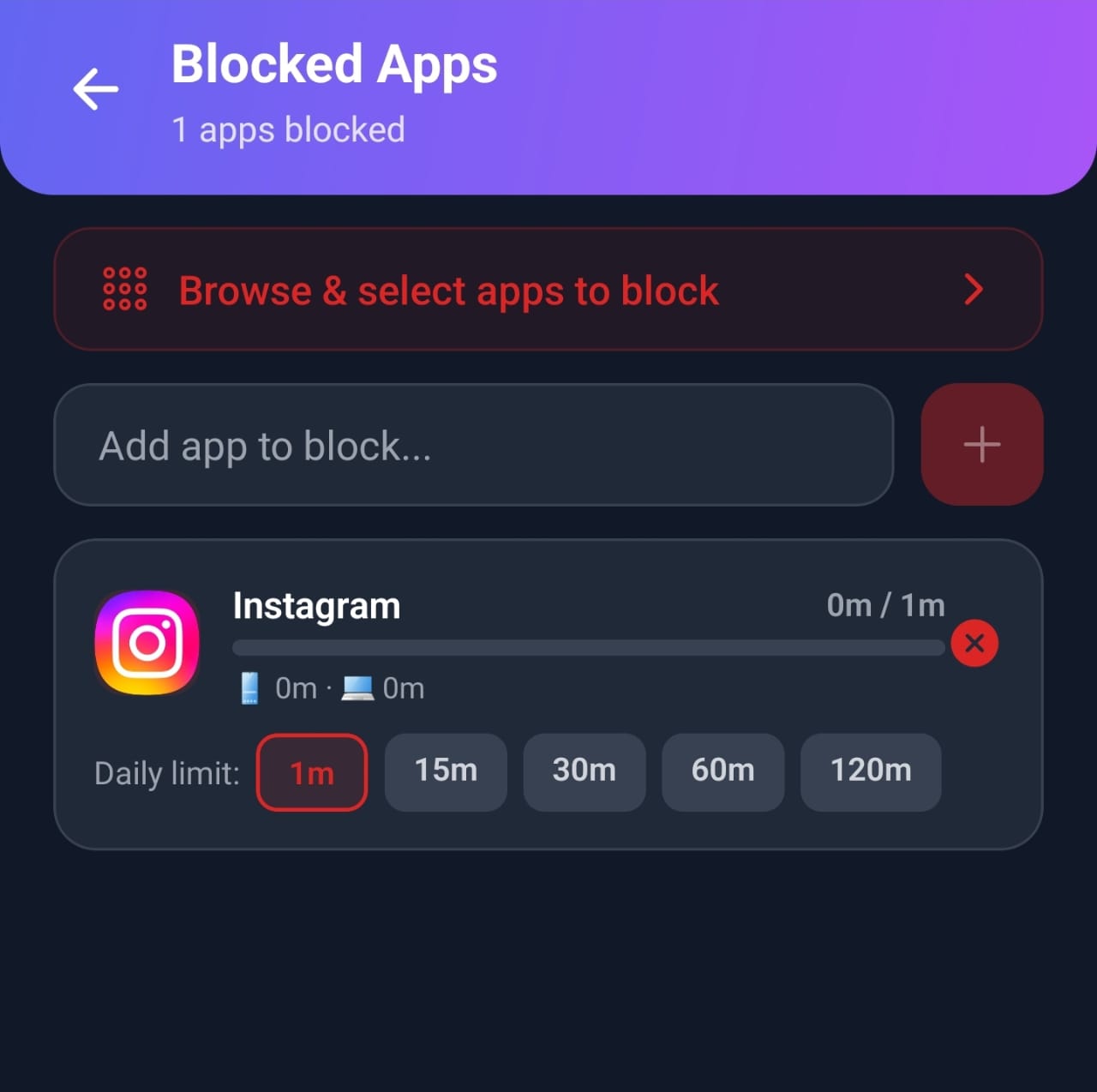
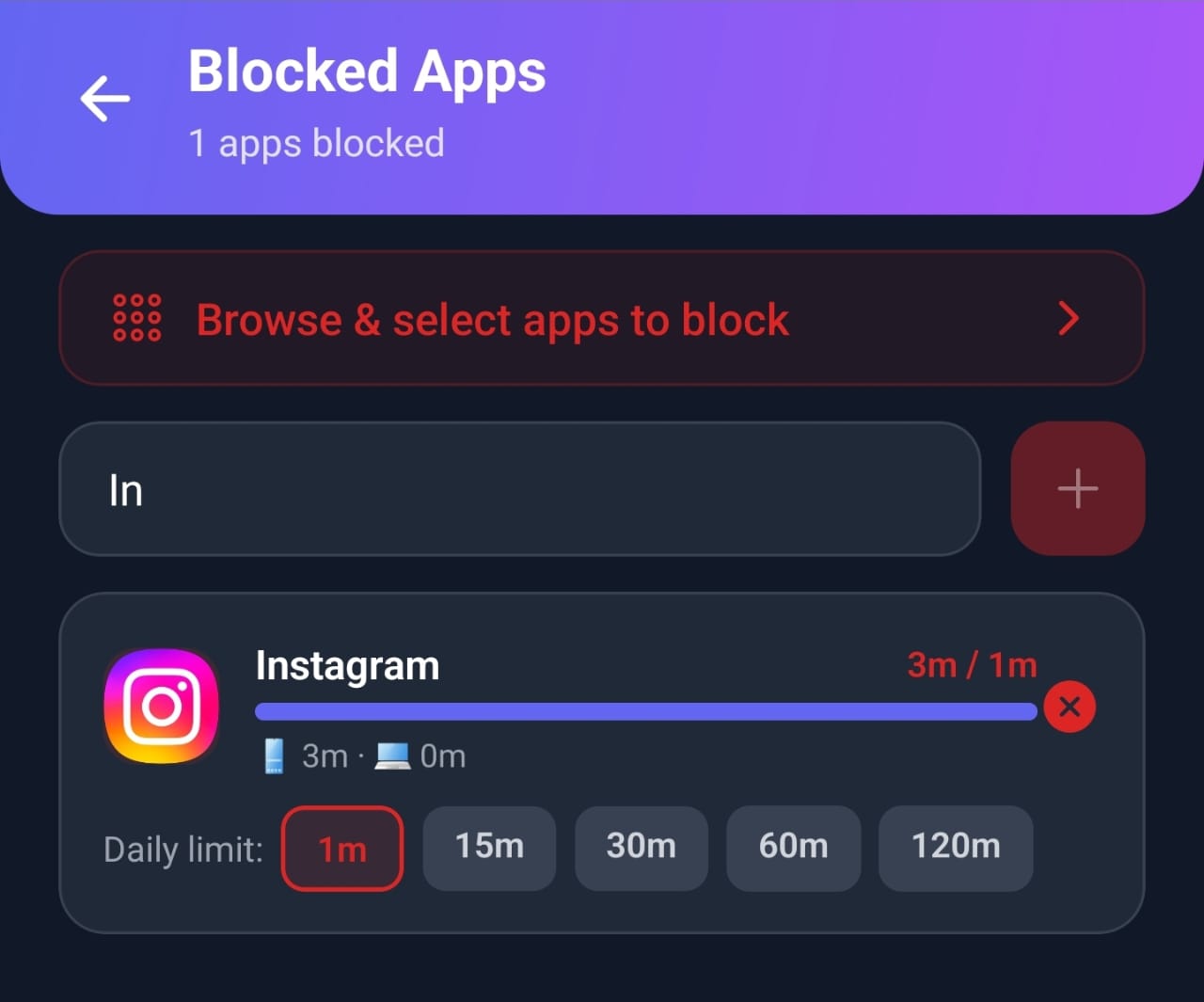
What we tested: we gave Instagram a one-minute daily limit. After one minute of use, Mindova showed the limit as reached and interrupted access to the app.
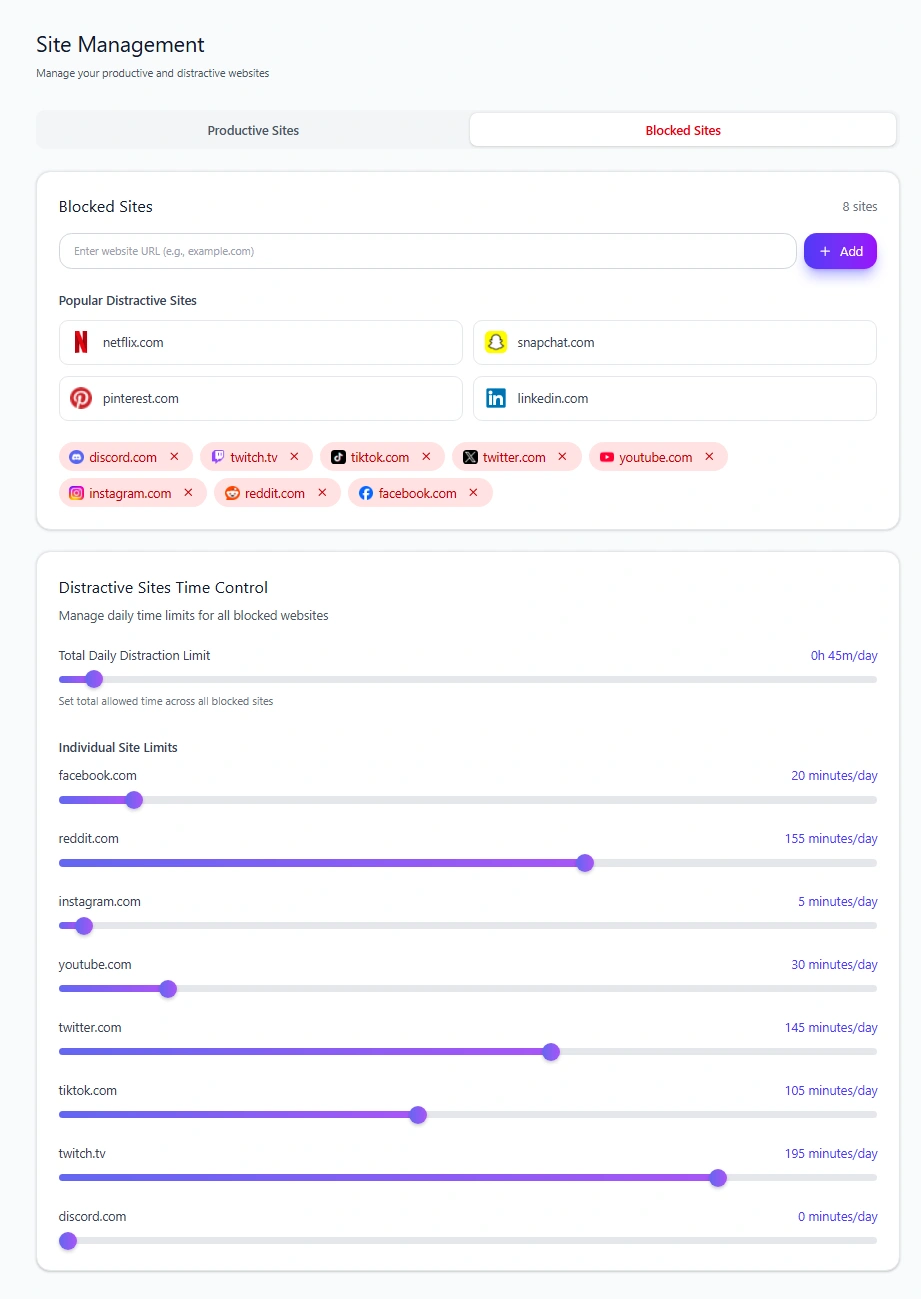
On your computer: the browser extension blocks distracting websites or gives each one a daily limit, with Focus Sessions, browsing insights, and optional AI Nudges.
Best for: people who jump from app to app, and people whose distraction moves between phone and laptop.
Limitations: not a parental control tool.
Pricing: Free plan with no credit card required (up to 3 blocked apps or sites and 10 Focus Sessions a month). Mindova Pro removes the limits for $4.99/month or $39.99/year, with a 7-day free Pro trial. See Mindova pricing.

Block distractions. Stay focused with Mindova.
Block distracting websites and apps, set limits, and protect your focus time across your browser and phone.
Free plan, no credit card • Try Pro free for 7 days
4. ScreenZen: Best Free App for Mindful Pauses
ScreenZen shows a short pause before a distracting app opens and asks if it is important. You can also limit how many times a day you open an app. It is free and donation-supported.
Best for: people who open apps on autopilot.
Limitations: after the pause, the app opens. It adds friction, not a hard block.
5. one sec: Best for Breaking the Habit Loop
one sec shows a short intervention, such as a deep breath, every time you try to open a distracting app, then asks if you still want to continue.
Best for: breaking the habit of opening Instagram or TikTok without thinking.
Limitations: the free version covers one app; it does not block apps.
6. StayFree: Best for Detailed Usage Stats
StayFree tracks your app and website usage across your phone and browser, and lets you set usage limits and block apps.
Best for: people who want to understand their habits in detail before they limit anything.
Limitations: it is built around tracking first; blocking is less strict than dedicated blockers.
7. AppBlock: Best for Scheduled and Strict Blocking
AppBlock offers quick blocking, schedules for work or study, an allowlist for essential apps, statistics, and a Strict Mode that prevents you from turning blocks off during a session.
Best for: people who need firm rules at specific times.
Limitations: the strongest features are in the paid plan.
8. Opal: Best for Focus Sessions and Analytics
Opal combines focus sessions that block distracting apps with detailed usage analytics.
Best for: people who are motivated by charts, scores, and streaks.
Limitations: the free tier is limited; most features need a subscription.
9. Forest: Best for Gamified Focus
Forest lets you plant a virtual tree that grows while you stay off your phone. Leave to open a distracting app and the tree dies.
Best for: students and people motivated by rewards.
Limitations: it covers focus sessions, not daily limits.
10. Freedom: Best for Blocking Every Device at Once
Freedom blocks apps and websites on your phone, tablet, and computer at the same time, on a schedule or on demand.
Best for: people who get distracted on several devices.
Limitations: the free plan only runs Start Now sessions of up to 2 hours; schedules, Locked Mode and longer sessions need Premium (Freedom Help Center). It is built around sessions rather than daily limits.
Which Screen Time App Should You Choose?
| Your problem | Best choice |
|---|---|
| You only want to limit one or two apps | Digital Wellbeing or Screen Time (free) |
| You open apps without thinking | ScreenZen or one sec |
| You limit one app and switch to another | Mindova (one Daily Distraction Limit) |
| You need strict blocking during work hours | AppBlock or Freedom |
| You do not know where your time goes | StayFree, or your phone's built-in report |
| You get distracted on phone and laptop | Mindova or Freedom |
| You are motivated by games and streaks | Forest or Opal |
On Android specifically, see our detailed comparison of the best app blockers for Android.
Tips to Make Any Screen Time App Work
An app only helps if the limit holds. A few habits make a big difference:
- Start with your top two or three apps, not everything at once.
- Set realistic limits, then lower them a little every week. Our free screen time calculator shows how much time each small cut frees up over a year.
- Turn off notifications for the apps you limit.
- Make the limit hard to undo: a passcode, strict mode, or a limit someone else set up with you.
- Plan what you will do instead, especially at night and during breaks.
For a complete plan, see how to reduce screen time.
Frequently Asked Questions
What is the best app to limit screen time?
It depends on your problem. Built-in Digital Wellbeing and Screen Time are best for simple limits. ScreenZen and one sec are best for automatic opening. Mindova is best for one daily limit across several apps on Android and your computer. AppBlock and Freedom are best for strict blocking.
What is the best free app to limit screen time?
Digital Wellbeing (Android) and Screen Time (iPhone) are free and already on your phone. ScreenZen is free and donation-supported. Mindova, StayFree, and AppBlock also have free plans with fewer features.
Is there an app that will limit screen time for adults?
Yes. All the apps in this guide are made for adults who want to limit their own screen time. Parental control apps like Google Family Link are designed for children's devices.
Do screen time apps actually work?
They work when they match your problem and when the limit is hard to undo. Tracking alone rarely changes behavior. Pauses, daily limits, and blocks work better, especially for your most-used apps.
Can I limit screen time without an app?
Yes. Use your phone's built-in timers, turn off notifications, move apps off your home screen, and keep your phone out of the bedroom.
Is there a screen time app for both Android and iPhone?
Yes. ScreenZen, one sec, StayFree, AppBlock, Opal, Forest, and Freedom are available on both. Mindova is available on Android, iPhone, and desktop browsers.
Pick One App and Try It for Two Weeks
There is no perfect screen time app. Choose the one that matches how you lose time, use it on your top two or three apps for two weeks, and check whether your numbers go down.
If you jump between apps or between your phone and laptop, try Mindova and set one daily limit for all your distractions.
Less scrolling. More focused time.
Use Mindova to block distracting websites and apps, set daily limits, and create protected time for studying, working, or deep focus.
- Android AppBlock and limit distracting apps on Android.
- Browser ExtensionChrome, Edge, Brave, Opera & Vivaldi
- iPhone AppControl distracting apps and protect your focus on iPhone.


Start free — no credit card needed. Try Pro free for 7 days whenever you like.
Mouhsine
Admin
Passionate about helping people achieve peak mental performance through evidence-based strategies and mindful technology use.
Related Articles
How to Block the YouTube App on Android Without Deleting It
Block the YouTube app on your Android phone without deleting it. Use Digital Wellbeing app timers, Focus Mode, YouTube's Shorts limit, or Mindova.
How to Block X (Twitter) on Android Without Deleting It
Block the X (Twitter) app on Android without deleting it. Use App timers, Focus Mode, Mindova or Private DNS, with step-by-step instructions.
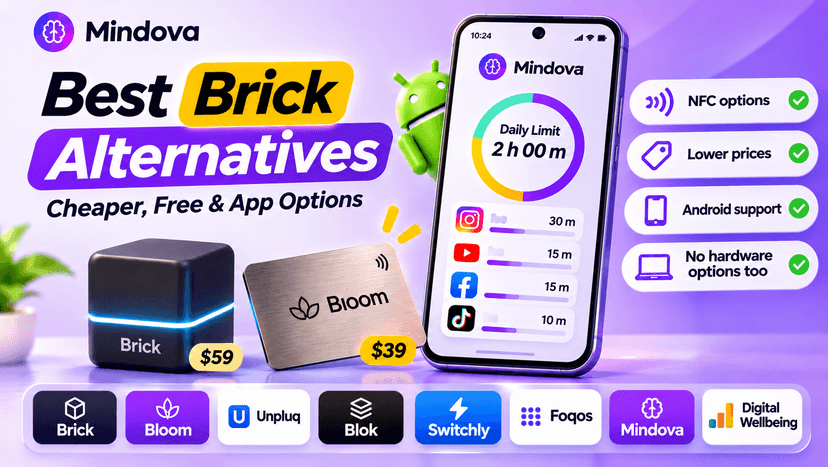
Brick Alternatives (2026): Cheaper and Free Ways to Block Apps on Android
Brick costs $59 and needs a puck you tap. Compare cheaper NFC cards, free open-source blockers and app-only options for Android, with official prices and honest trade-offs.
Comments
Be the first to comment.