How to Lock Apps on iPhone and Android for Focus or Privacy
Written by Mouhsine
Admin
Published August 23, 2026 · Updated August 29, 2026
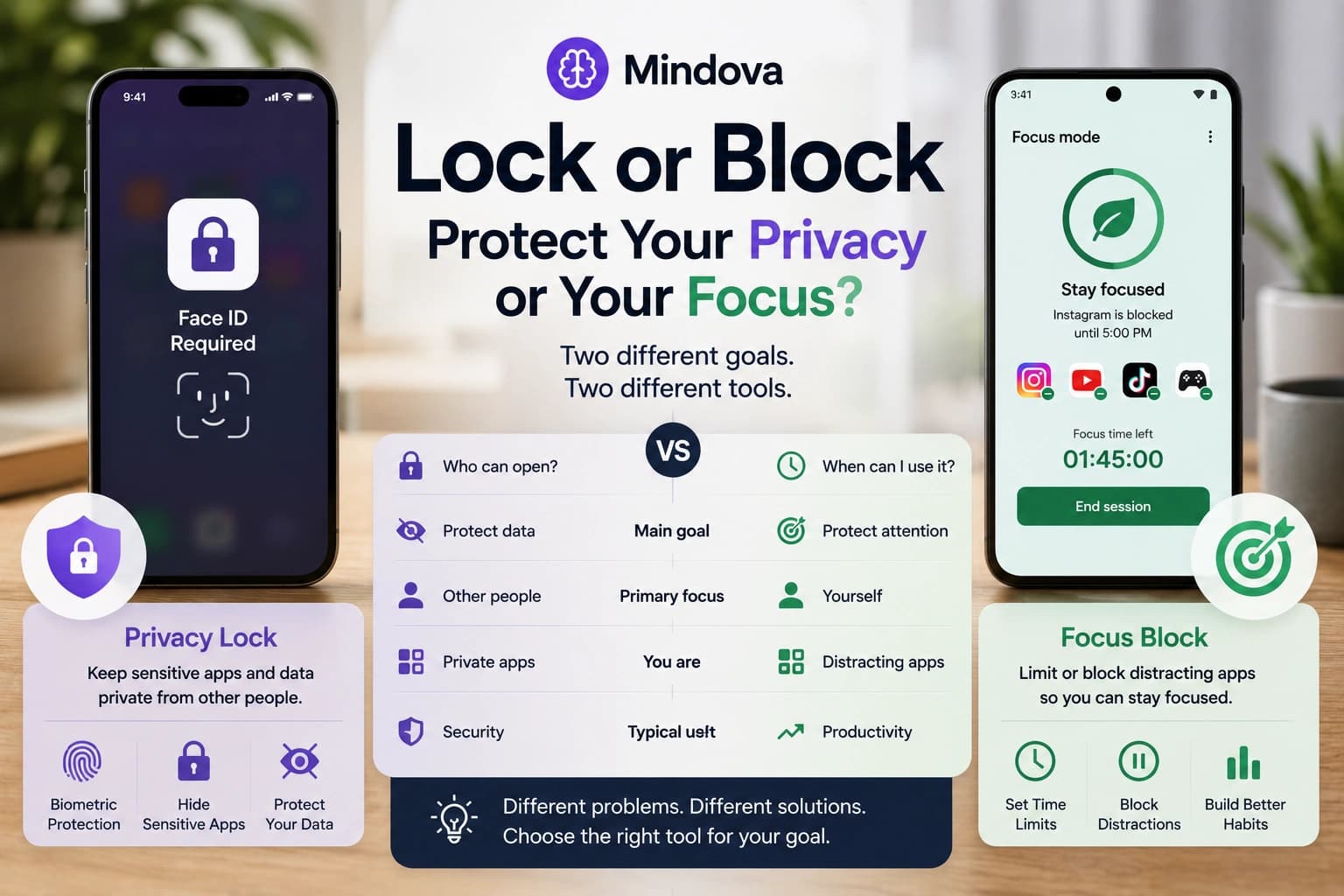
“Lock an app” can mean two completely different things.
You may want to stop another person from opening your messages, photos, banking app, or another sensitive app.
Or you may want to stop yourself from automatically opening Instagram, TikTok, YouTube, games, or another distraction when you should be working.
Those problems look similar, but they require different tools.
A privacy lock answers:
Who is allowed to open this app?
A focus restriction answers:
When, or for how long, should I be able to use this app?
Using the wrong type of lock often creates frustration. Face ID can protect a private app from someone borrowing your phone, but it will not meaningfully stop you from opening Instagram—you can authenticate yourself immediately. A focus timer can reduce your own app use, but it is not designed to protect banking data from another person.
This guide separates the two jobs and shows the current built-in options on iPhone and Android.
Quick answer: privacy lock vs focus block
| Your goal | Better type of control |
|---|---|
| Stop another person opening an app | Biometric/passcode app lock |
| Hide sensitive apps from casual view | Hidden apps or Private Space |
| Limit your own daily app use | App timer |
| Pause distracting apps while working | Focus Mode / Downtime |
| Make a distraction completely unavailable to yourself | Stronger blocking tool or stricter device controls |
| Block distracting websites on a desktop browser | Website blocker |
The first question therefore is not:
Which app locker should I install?
It is:
Am I protecting my privacy or protecting my attention?
How to lock an app for privacy on iPhone
Current iPhones provide a built-in way to require authentication before certain apps can open.
On supported versions of iOS, touch and hold an app on the Home Screen and choose Require Face ID, Require Touch ID, or Require Passcode, depending on the device.
After that, opening the app requires authentication.
Apple also notes that information from a locked app is kept out of some other areas, including notification previews, search, Siri suggestions, and certain other system surfaces. Some built-in Apple apps cannot be locked. (Apple Support)
This is useful for apps containing things such as:
- private conversations;
- financial information;
- personal photos;
- health information;
- documents;
- work accounts.
You can also hide some iPhone apps
For downloaded apps, iPhone can go a step further.
Instead of only requiring Face ID, you can choose Hide and Require Face ID.
The app is moved from the normal Home Screen into the Hidden area of the App Library and still requires authentication to open.
There are limitations. Apple says downloaded apps can be hidden, while certain built-in apps cannot, and hidden status applies only to that device rather than automatically syncing as a lock across your other Apple devices. (Apple Support)
When this is useful
Imagine handing your unlocked phone to someone so they can:
- make a call;
- look at a photo;
- use Maps;
- change a song.
You may be comfortable giving them the phone without wanting them to open Messages or another private app.
That is exactly the type of problem an authentication-based app lock solves well.
It is not primarily a productivity feature.
You already have the Face ID or passcode required to bypass it.
How to protect private apps on Android
Android's exact options vary more because manufacturers can add their own privacy features.
On supported devices running Android 15 or later, Android includes Private Space.
Private Space creates a separate area for sensitive apps. It can use the same device lock or a separate lock, and you can choose to hide the Private Space container when it is locked. Apps inside the space are stopped when the space is locked, including foreground and background activity. Google notes that availability depends on Android version, device support, manufacturer settings, and whether the device is managed. (Google Help)
This makes Private Space useful when privacy matters more than simply hiding an icon.
For example, you could keep:
- a banking app;
- a private messaging app;
- personal documents;
- a second account;
- another sensitive app
inside the protected space.
Do not assume every Android phone works identically
Samsung, Google Pixel, Xiaomi, OnePlus, and other Android manufacturers may provide different security or app-locking features.
Menu names can also change between Android versions.
So if you cannot find Private Space, check:
Settings → Security & privacy
and then check your phone manufacturer's documentation before installing an unknown third-party “app lock” simply because a tutorial told you to.
How to limit distracting apps on iPhone
Privacy protection is only half of the problem.
Suppose the person you are trying to keep out of the app is you.
Face ID will not provide much resistance because you can authenticate instantly.
For that problem, iPhone's Screen Time controls are more relevant.
Use App Limits for daily usage
Screen Time lets you create daily time limits for:
- individual apps;
- groups of apps;
- categories such as Social Networking or Games.
For example, you might choose:
Instagram → 20 minutes/day
or place several social apps under a shared daily limit.
This works better when your goal is not:
Nobody should ever open this app.
but:
I do not want this app consuming two hours without noticing.
Use Downtime for specific periods
Screen Time also includes Downtime, which creates scheduled periods when selected apps are restricted.
Apple currently allows users to enable Block at Downtime so restricted apps cannot simply be opened normally during that period. You can also define apps and contacts that remain available. (Apple Support)
That can be useful for a recurring boundary such as:
Work hours
Keep entertainment apps unavailable.
Bedtime
Reduce access to apps that keep you scrolling.
Study period
Leave learning and communication tools available while limiting everything else.
A Screen Time limit is not automatically an irreversible lock
This distinction matters.
A limit that you configured yourself is still a control you ultimately manage.
If your goal is extreme enforcement—something deliberately difficult for you to undo—verify exactly how the restriction can be changed before assuming a built-in timer is impossible to bypass.
“Adds useful friction” and “cannot be bypassed” are very different claims.
How to limit distracting apps on Android
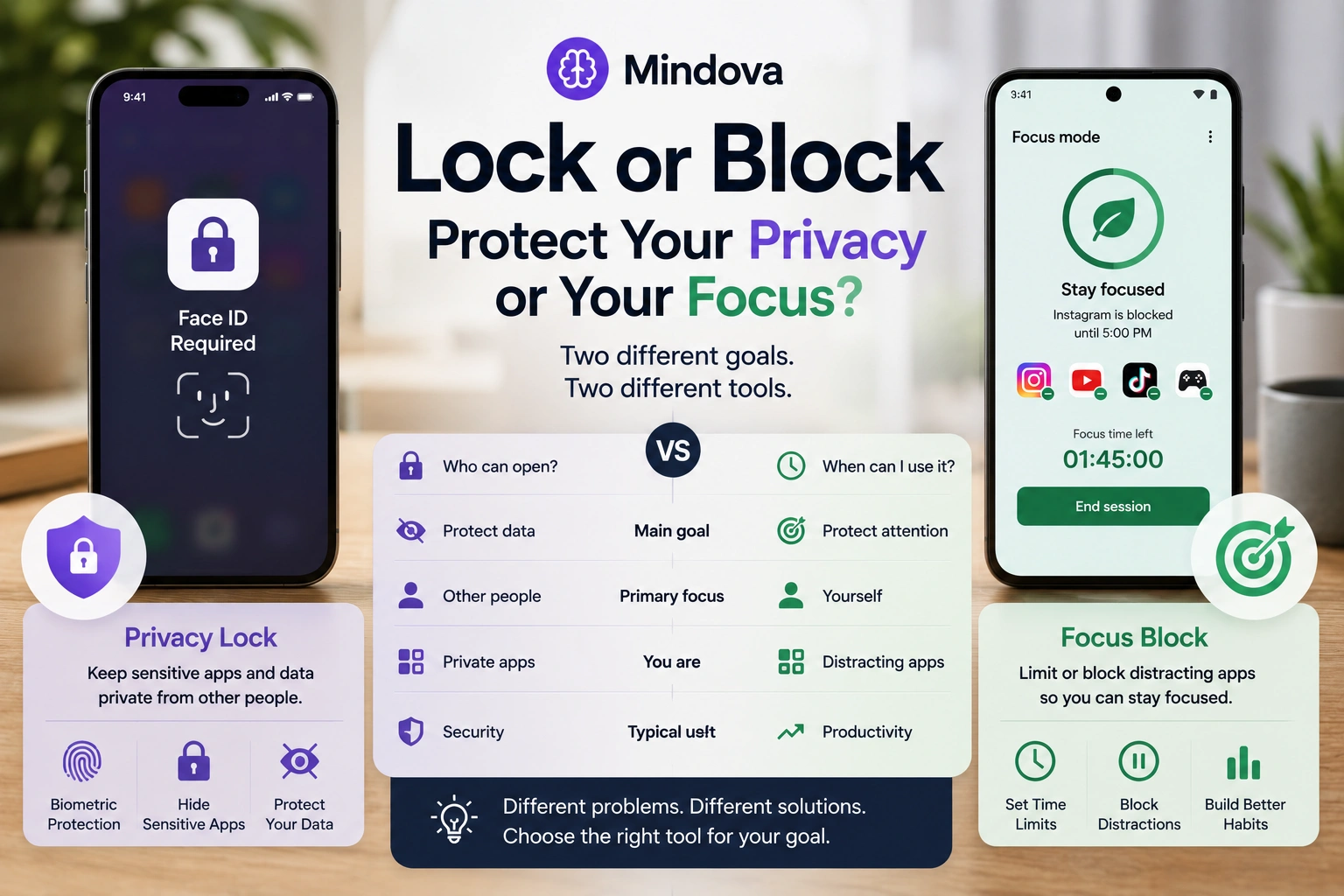
Android offers similar tools through Digital Wellbeing on supported devices.
Open:
Settings → Digital Wellbeing & parental controls
From there, two features are particularly useful.
App timers
App timers let you choose how much time you can spend in an app each day.
When the allowed time runs out, Google says the app closes and its icon dims. The timer normally resets at midnight.
However, you can also return to the settings and delete the timer.
So again, this is a useful boundary—not necessarily a hard lock against a determined version of yourself. (Google Help)
Focus Mode
Android's Focus Mode solves a slightly different problem.
Instead of asking:
How much Instagram should I use today?
it asks:
Which apps should stop interrupting me right now?
Choose distracting apps and activate Focus Mode. While it is active, those apps are paused and their notifications are stopped.
Google's current implementation can also support scheduling Focus Mode, and you can temporarily take a break from it when needed. Availability and exact behavior can vary between devices. (Google Help)
That makes Focus Mode useful for periods such as:
- studying;
- writing;
- coding;
- meetings;
- reading;
- deep work.
What if you want to lock yourself out of apps?
This is where the difference between a limit and a lock becomes important.
A daily timer might be enough if your problem is:
I lose track of time.
It may be less effective if your problem is:
The moment the restriction appears, I disable it.
Think of app restrictions as levels of friction.
Level 1: remove obvious triggers
Disable notifications.
Move distracting apps away from your Home Screen.
This helps when the problem is mostly automatic checking.
Level 2: add a daily limit
Use Screen Time or Digital Wellbeing.
This creates awareness around how much time you are spending.
Level 3: pause apps during focus periods
Use Downtime or Focus Mode.
Now the distracting app is less available during a defined period.
Level 4: use stronger enforcement
Some third-party app blockers add additional mechanisms designed to make changing the restriction harder.
Before installing one, check carefully:
- what permissions it requires;
- what data it collects;
- whether restrictions are genuinely harder to change;
- which platforms it supports;
- what happens if you uninstall it;
- whether blocking works offline;
- whether its privacy policy explains its permissions.
Do not assume that an app is a “hard blocker” just because its marketing page uses words such as lock, strict, or unbreakable.
Why do Android app blockers ask for “Usage Access”?
This is worth understanding before pressing Allow.
Some Android app blockers need to know which app is currently being used or how long particular apps have been active.
Android provides usage-history APIs through UsageStatsManager.
Google's developer documentation says most methods that access usage statistics require the PACKAGE_USAGE_STATS permission, and the user still has to grant Usage Access explicitly through Android Settings. (Android Developers)
In practical terms, Usage Access can allow an app to work with information about app usage.
That does not automatically mean the blocker can read everything inside your messages, photos, or banking app.
But you should still ask:
Why does this blocker need the permission, and does its privacy policy explain what it does with the resulting data?
That question matters more than simply seeing a permission and assuming it is either completely harmless or automatically malicious.
What about Accessibility permission?
This one deserves even more attention.
Android Accessibility Services can receive information about changes in the user interface. Depending on how a service is configured, Android documentation says it can also request capabilities such as retrieving active window content or performing gestures.
An Accessibility Service must be explicitly enabled by the user in device settings. (Android Developers)
That does not mean every blocker requesting Accessibility permission is unsafe.
It means the permission is powerful enough that you should not approve it blindly.
Before enabling it for an app blocker, verify:
- who develops the app;
- why the permission is required;
- whether the feature can work without it;
- what information the app says it processes;
- whether that explanation matches the functionality you expect.
If an app says only:
We need this permission to work.
with no useful explanation, that is a reason to investigate further.
Privacy lock and focus block are not interchangeable
A simple way to remember the difference is:
Privacy
Threat: another person.
Question: Can they open this?
Useful controls: Face ID, Touch ID, passcode, Private Space.
Focus
Threat: your own habit.
Question: Should I be using this right now?
Useful controls: app timers, Downtime, Focus Mode, stronger blockers.
This distinction also prevents overlocking your device.
There is little benefit in adding a complicated productivity restriction to your banking app if you never waste time there.
Likewise, requiring Face ID for TikTok may protect TikTok from another person, but it probably will not protect your afternoon from TikTok.
Should you use built-in controls or a third-party app blocker?
Start with the built-in option.
iPhone Screen Time and Android Digital Wellbeing are already integrated with their operating systems and may be enough for:
- daily limits;
- scheduled focus periods;
- notification reduction;
- basic app restrictions.
Consider a third-party blocker only when you can identify a specific limitation you are trying to solve.
For example:
I keep overriding the built-in timer.
or:
I need a blocking feature the operating system does not provide.
That is a better reason to install another app than simply:
This blocker has more features.
Every extra blocking app also introduces another developer, another privacy policy, another permission set, and another piece of software you need to trust.
Where Mindova fits
Mindova belongs to a different layer of this setup.
Mindova does not currently lock native iPhone or Android apps.
Its current public product is a website blocker and focus extension for supported desktop browsers including Chrome, Edge, Brave, Opera, and Vivaldi. Native iOS and Android applications are still in development. (Mindova)
That means Mindova is relevant when the distraction is something such as:
youtube.comreddit.cominstagram.comx.com- another distracting website
inside your desktop browser.
For example, you can give a useful-but-distracting website a daily allowance or set its Individual Site Limit to zero when you do not want access.
If that is the problem you are trying to solve, read our guide to blocking distracting websites and staying focused.
If you want to compare dedicated browser-blocking tools instead, see our guide to the best website blockers for focus.
What if both your phone and browser distract you?
Treat them as two separate surfaces.
For example:
Phone
- Screen Time or Digital Wellbeing
- app timers
- Focus Mode/Downtime
Desktop browser
- website blocker
- website limits
- deliberate Focus Sessions
The important part is not whether one company controls every device.
It is whether the distracting route you actually use has an appropriate boundary.
If you repeatedly bypass a desktop website block by grabbing your phone, then your phone needs its own restriction.
Do not describe browser sync as cross-device blocking when the actual enforcement does not exist on the other device.
For a broader browser setup, our comparison of the best Chrome extensions for focus and productivity covers tools for website distraction, tabs, tasks, time tracking, and focus sessions.
A practical setup for focus and privacy
You do not need to lock everything.
Try separating your apps into three groups.
Sensitive
Examples:
- banking;
- private messages;
- private photos.
Use authentication or a protected space.
Distracting
Examples:
- TikTok;
- Instagram;
- games;
- YouTube.
Use time limits, Focus Mode, Downtime, or another focus restriction.
Necessary
Examples:
- authenticator;
- Maps;
- work communication;
- calendar.
Keep them available unless there is a specific reason not to.
That approach is easier to maintain than placing restrictions on every app you own.
Frequently asked questions
Can I lock individual apps on iPhone?
On supported iPhones, yes. You can require Face ID, Touch ID, or the device passcode before opening many apps. Some built-in apps cannot be locked. (Apple Support)
Can I hide an app on iPhone?
Downloaded apps can be hidden using Apple's app-hiding feature on supported versions of iOS. They move to the Hidden area of App Library and require authentication. Some apps cannot be hidden. (Apple Support)
Can I lock apps on Android?
Options depend on the phone. Android 15 introduced Private Space on supported devices, while some manufacturers provide additional app-locking features. (Google Help)
How do I block myself from using an app?
Use Screen Time App Limits or Downtime on iPhone, or App Timers and Focus Mode on supported Android devices. If you repeatedly override those restrictions, a stronger third-party blocker may provide more friction.
Can I permanently block an app so I cannot undo it?
Be cautious with the word “permanent.” Many self-imposed controls can ultimately be changed, disabled, or removed by the device owner. Check the exact enforcement mechanism before relying on claims that a blocker is impossible to bypass.
Why does an Android app blocker need Usage Access?
Usage Access can allow an app to query device usage statistics, such as information about application usage. Android requires the user to grant this access through Settings for APIs that require it. (Android Developers)
Is Usage Access the same as Accessibility Access?
No. They are different Android capabilities. Usage Access relates to usage statistics, while Accessibility Services can receive UI events and, depending on configuration, may have broader interaction capabilities. (Android Developers)
Can Mindova block iPhone or Android apps?
Not currently. Mindova's publicly available blocker currently works inside supported desktop browsers. Native mobile apps are in development. (Mindova)
Use the right lock for the right problem
A private app and a distracting app do not need the same protection.
If the concern is another person opening something sensitive, use authentication or a protected space.
If the problem is your own attention, use time limits, focus periods, or stronger self-imposed restrictions.
And if the distraction is happening inside your desktop browser rather than a native phone app, treat it as a website-blocking problem instead.
Choosing the right layer of control is more useful than installing the strictest-looking blocker you can find.
For more ways to reduce digital interruptions while working, see our work-from-home productivity tips.
Mouhsine
Admin
Passionate about helping people achieve peak mental performance through evidence-based strategies and mindful technology use.
Related Articles
How to Focus on Writing Without Digital Distractions
Learn how to stay focused while writing by separating drafting from research, reducing digital distractions, and keeping the online tools you actually need
Creative Block: How to Get Unstuck and Start Creating Again
Feeling creatively stuck? Learn what creative block can look like, how to identify what is stopping you, and practical ways to generate ideas and move forward
How to Avoid Distractions While Working: 10 Practical Strategies
Learn how to avoid distractions while working by reducing digital triggers, managing notifications, limiting distracting websites, and protecting focused work time.
Comments
Be the first to comment.
Ready to protect your focus?
Block distracting sites, set daily limits, and run focus sessions. Mindova is free.