How to Take a Social Media Break: A Practical Detox Guide
Written by Mouhsine
Admin
Published August 27, 2026
You open Instagram to answer one message. Fifteen minutes later, you are watching a video from someone you do not follow.
Or you stop using TikTok for a week, only to notice that the missing time has quietly moved to YouTube, Reddit, or X.
That is why a useful social media break starts with a better question than “How do I quit social media?”
Ask:
What exactly am I trying to change?
Maybe you want to stop automatic checking. Maybe one platform is swallowing too much time. Maybe you want a clean break from every feed for a while. Or maybe social media is useful for work and relationships, but you want clearer boundaries around when you use it.
Those situations need different solutions.
Quick answer: A social media break is a temporary, voluntary pause from one or more social platforms. You can stop completely or reduce access, depending on what you are trying to change. There is no proven “perfect” detox length, so choose a clear scope, remove easy triggers, decide what will replace the scrolling, and review what actually changed before bringing platforms back.
What is a social media break?
A social media break — often called a social media detox — is a temporary decision to step away from social media.
That can mean stopping one platform or several. It can also involve different devices: perhaps you remove Instagram from your phone but still allow yourself to check messages from a desktop browser.
Research on social media abstinence similarly treats a detox as a voluntary, temporary break from one or more social platforms rather than requiring everyone to disappear from every network at once.
That distinction matters.
If Facebook is the only platform causing a problem, you do not automatically need to quit YouTube, Reddit, Instagram, and every messaging service with it.
But if the habit simply migrates from one endless feed to another, a broader break may make more sense.
The goal is not to create the strictest detox possible.
It is to create one that addresses the behavior you actually want to change.
Social media break vs digital detox vs digital minimalism
These terms overlap, but they are not exactly the same.
A social media break focuses specifically on social platforms such as Instagram, Facebook, TikTok, X, Reddit, or other feeds you use socially.
A digital detox can be broader. It may include reducing phones, screens, news, gaming, email, or technology more generally.
Digital minimalism is different again. It is a longer-term approach to deciding which technologies deserve a place in your life and how you want to use them.
A social media break can therefore be a useful experiment inside a larger digital-minimalist system.
If you are looking for that longer-term approach rather than a temporary reset, see our guide to digital minimalism.
Step 1: Decide what problem you are actually trying to solve
Do not start by deleting apps.
First identify the problem.
For example:
Automatic checking
You open a social platform before you consciously decide to.
Time loss
A five-minute check repeatedly becomes 30 minutes.
Task avoidance
You reach for a feed whenever work becomes difficult or boring.
Constant interruption
Notifications and messages keep pulling your attention away.
Feed migration
You remove one platform and immediately spend more time on another.
A specific platform
Most social media use feels fine, but one service consistently causes trouble.
These are different patterns.
Your break should target yours.
If Instagram is the problem, a week without every social platform may be unnecessary.
If the real problem is having any feed available whenever you feel bored, blocking Instagram alone may simply move the behavior somewhere else.
Step 2: Measure your baseline before changing anything
Before the break starts, look at what you currently do.
You do not need a complicated tracking system.
On iPhone, Screen Time can show how much time you spend in apps and websites, along with pickups and notifications. Android's Digital Wellbeing provides similar information about screen time, how often apps are opened, and notifications received.
Look at several days if possible.
Write down:
- which social platforms you use;
- roughly how much time each gets;
- which one you open most often;
- when you tend to check;
- what usually happens immediately before you check.
The trigger is often more useful than the total.
You might discover that you rarely use social media while actively working — but spend 45 minutes jumping between feeds after lunch.
Or that your total Instagram time is not enormous, but you open it dozens of times and repeatedly break your concentration.
Those are different problems.
Step 3: Choose what you are actually taking a break from
Now sort your platforms.
A simple approach is:
Pause
These are the platforms you want completely unavailable during the break.
Perhaps they provide little value, or perhaps you need temporary distance before deciding whether they deserve to come back.
Limit
These are useful enough to keep but easy to overuse.
You might need YouTube for tutorials, Reddit for a specific community, or Instagram for certain contacts.
The platform stays. Unlimited access does not.
Keep
These are services you use deliberately and do not currently need to change.
Be specific.
Do not keep something merely because you could invent a useful reason for it.
Ask what you actually use it for.
This is also where a multi-platform break can make sense. If you know from past attempts that quitting one feed just sends you to another, pause the group together.
But do not treat “quit everything” as a requirement for a legitimate detox.
Step 4: Choose a duration — without treating the number as magic
Should a social media break last three days?
A week?
Thirty days?
There is no research-backed universal number that makes a detox “work.”
A 2025 systematic review found no significant relationship between the length of social media abstinence and the well-being outcomes it examined.
So choose a duration based on what you want to learn.
A shorter break can reveal how often you reach for a platform automatically.
A longer experiment gives you more time to build alternative routines and decide what you genuinely miss.
The important part is to define the period before you start.
Avoid changing the finish line every time you feel an urge to check.
If you specifically want a structured month rather than designing your own break, use our 30-day social media detox challenge.
Step 5: Prepare the break before the urge arrives
A detox becomes much harder when every platform remains one tap away.
Set up the environment while you are still making the decision calmly.
Turn off unnecessary notifications
You do not need a notification to tell you there is new content waiting.
Disable alerts that exist primarily to pull you back into the app.
Keep genuinely important communication where necessary.
Remove the easiest shortcuts
If a platform is in your Pause group, removing the mobile app can eliminate one obvious trigger.
For something you are limiting rather than leaving, moving it off the home screen can add useful friction.
Log out where appropriate
A browser session that opens directly into the feed makes an impulsive visit almost effortless.
Logging out adds one extra decision.
Sometimes that is enough to interrupt autopilot.
Tell important people how to reach you
If friends, family, clients, or colleagues normally contact you through a platform you are pausing, give the important ones another route before disappearing.
That prevents “I might miss something important” from becoming the reason you abandon the experiment.
Decide your work exceptions now
If social media is part of your job, define exactly what work use means.
For example:
LinkedIn messages once in the afternoon.
or:
Instagram only for publishing and replying to customer messages.
“Use it when necessary for work” is vague enough to turn into normal scrolling.
Step 6: Close the browser loophole
Deleting a mobile app does not necessarily end the habit.
You may simply type the same website into your laptop.
If you want a genuine break, account for every normal route you use to reach the platform.
Mindova can help with the desktop-browser side of that setup.
Its current public extension works on supported desktop browsers and lets you give individual websites their own daily limits.
A site you want unavailable can use a 0-minute Individual Site Limit.
A useful-but-distracting site can instead receive a higher allowance.
For a broader walkthrough of browser boundaries, see how to block distracting websites.
What we tested
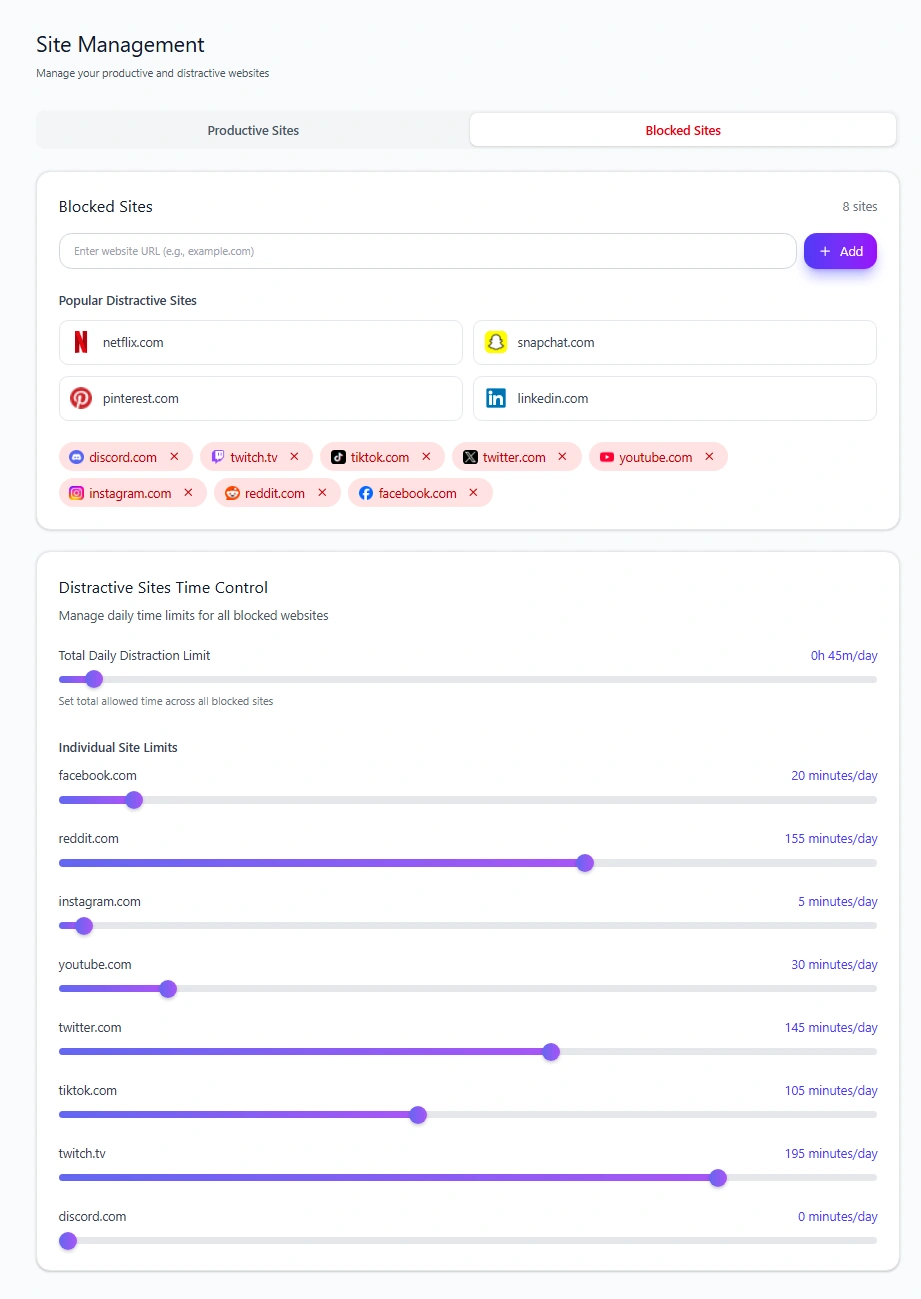
We tested Individual Site Limits in the current Mindova browser extension.
A 0-minute daily limit blocked the website by default.
With a higher Individual Site Limit, the website remained available until its configured daily allowance had been used.
That distinction is useful during a social media break because not every platform needs the same rule.
A site in your Pause group can be blocked.
A site in your Limit group can remain available within the boundary you chose.
Mindova's current blocker applies to websites in supported desktop browsers. It does not currently block native iPhone or Android apps.
Step 7: Decide what will replace the scrolling
Removing a feed creates a gap.
That gap does not automatically become focused work, reading, exercise, or meaningful conversation.
Sometimes it simply becomes another form of scrolling.
Before the break starts, decide what you will do in the situations where social media usually appears.
If you scroll because you are bored in short gaps:
- keep a book nearby;
- save a podcast;
- take a short walk;
- do nothing for a minute.
If you scroll whenever work becomes uncomfortable:
- write the next tiny action before beginning;
- keep a scratchpad for thoughts you want to look up later;
- take an actual break instead of opening a feed.
If social media provides connection:
- message one person directly;
- make a call;
- plan time with someone offline.
You are not trying to fill every free second with productivity.
You are trying to prevent the old habit from automatically choosing what fills it.
Step 8: Expect yourself to look for another feed
One of the most useful things to notice during a break is migration.
You stop Instagram.
Suddenly YouTube usage goes up.
You block TikTok.
Now you are checking Reddit every few minutes.
That tells you something important.
The habit may not have been about Instagram or TikTok specifically.
It may have been:
When I feel bored, uncomfortable, tired, or stuck, I want a rapidly changing feed.
Do not treat migration as proof that the experiment failed.
Treat it as information about the behavior you are actually working on.
You can then decide whether the new platform needs the same boundary or whether a different replacement would work better.
Step 9: What if you need social media for work?
A social media break does not have to make your job impossible.
Separate functional use from feed use.
Suppose you manage an Instagram account for work.
Your necessary job might be:
- publish a post;
- reply to specific messages;
- check comments;
- leave.
Watching Reels for 40 minutes is not automatically part of that job.
You can make the difference more concrete by:
- defining the specific tasks that require the platform;
- using the desktop version when practical;
- deciding when you will handle social activity;
- keeping personal browsing outside those work sessions;
- limiting the website rather than blocking it completely.
The point is not to invent a loophole.
It is to preserve the useful function without restoring unlimited access.
Step 10: What does the research actually say about social media detox benefits?
This is where many detox articles become more confident than the evidence allows.
You will often see promises that quitting social media will reliably improve mood, attention, sleep, anxiety, productivity, or life satisfaction.
Current research is more mixed.
A 2025 meta-analysis of 20 randomized controlled trials found a small positive effect of social media detox interventions on well-being.
A separate 2025 meta-analysis covering 32 articles and 5,544 participants also found a statistically significant improvement in subjective well-being from restricting social media, but the effect was small and heterogeneous.
Meanwhile, a preregistered systematic review and meta-analysis of ten social media abstinence studies involving 4,674 participants found no significant overall effect on positive affect, negative affect, or life satisfaction.
So the responsible conclusion is not:
A social media detox will make you happier.
It is:
Some research finds small benefits, other research finds little or no overall effect on specific well-being outcomes, and results vary between people and interventions.
There is one outcome you can measure much more directly:
What happened to the time you previously spent on social media?
Compare your usage before and during the break.
Then ask what happened to that time.
Did you use it intentionally?
Did it move to another platform?
Did you simply spend less time looking at feeds?
That tells you something useful even if your mood did not suddenly transform.
Step 11: Review what actually changed
Before the break ends, compare it with your baseline.
Look at:
- social media time;
- which platforms you missed;
- which ones you barely thought about;
- whether your checking migrated elsewhere;
- what situations still triggered the urge to scroll;
- what you did with the time you reclaimed.
Then ask a more important question:
Which parts of the break are worth keeping?
You may discover that one platform deserves to stay gone.
Another may come back with notifications disabled.
One may stay off your phone but remain available on desktop.
A useful platform may return with a daily boundary instead of unrestricted access.
The break is useful partly because it gives you information for that decision.
Step 12: Bring platforms back one at a time
Do not automatically reinstall everything at midnight when the break ends.
Bring back the things you actually chose.
One platform at a time makes it much easier to notice what changes.
When something returns, decide its rules before opening it:
- What is this platform for?
- Does it belong on my phone?
- Which notifications deserve to stay on?
- Do I need unlimited access?
- What would tell me that this is becoming a problem again?
A social media break is temporary.
The useful boundaries you discover do not have to be.
If you want to turn those decisions into a longer-term philosophy for using technology, continue with our digital minimalism guide.
Where Mindova fits into a social media break
Mindova can support the desktop-browser portion of a social media break.
In supported desktop browsers, you can use it for:
- website blocking;
- Individual Site Limits;
- Focus Sessions;
- browsing and focus insights.
Mindova currently supports Google Chrome, Microsoft Edge, Brave, Opera, and Vivaldi.
It does not currently block native mobile apps.
For mobile usage, Apple's Screen Time and Android's Digital Wellbeing can provide activity information and app-level controls on supported devices.
Frequently asked questions
How long should a social media break last?
There is no proven universal duration.
Choose a period that matches what you want to learn or change rather than assuming that seven, 14, or 30 days has a special effect.
A 2025 meta-analysis found no significant relationship between abstinence duration and the well-being outcomes it examined.
Do I need to quit every social media platform?
No.
A social media break can involve one or more platforms.
If one platform is causing the problem, start there. If your scrolling simply migrates between several feeds, a broader break may be more useful.
Should I delete my social media accounts?
Not necessarily.
Deleting an account is much more permanent than taking a break.
You can remove an app, log out, temporarily deactivate an account where the platform supports it, block the browser version, or simply reduce access depending on your goal.
Is a social media break the same as digital minimalism?
No.
A social media break is temporary.
Digital minimalism is a longer-term approach to deciding which technologies support what you value and how they should fit into your life.
Can a social media detox improve mental health?
Research does not support promising the same result for everyone.
Some meta-analyses find small improvements in well-being, while others find no significant overall effect on particular outcomes. A social media break can still be useful as a practical experiment in your own habits, but it should not be treated as a guaranteed mental-health intervention.
Can Mindova block social media apps on my phone?
No.
Mindova's current public blocker works with websites in supported desktop browsers. It does not currently block native iPhone or Android apps.
Take a break to learn what deserves to come back
A useful social media break is not a punishment for spending too much time online.
It is an experiment.
Pause what you want to understand.
Measure what happens.
Notice what you miss, what you do not miss, where your attention tries to move instead, and what fills the time you get back.
Then make the return deliberate.
Some platforms may come back unchanged.
Some may come back with limits.
Some may not deserve to come back at all.
The success of the break is not how many days you stayed away.
It is whether you understand your relationship with social media better when it ends.
Mouhsine
Admin
Passionate about helping people achieve peak mental performance through evidence-based strategies and mindful technology use.
Related Articles

Digital Detox: What Is It, and Does It Actually Help?
Learn what a digital detox really is, what research says about its benefits, and how to reduce distracting technology without quitting every screen.

How to Temporarily Deactivate Facebook Without Deleting Your Account
Learn how to temporarily deactivate Facebook on mobile or desktop, what happens to your profile and Messenger, and how to reactivate your account later.

Digital Detox Retreats: Cost, Benefits, and Are They Worth It?
What happens at a digital detox retreat, how much does one cost, and is it worth paying for? Compare retreat types, evidence, downsides, and at-home alternatives.
Comments
Be the first to comment.
Ready to protect your focus?
Block distracting sites, set daily limits, and run focus sessions. Mindova is free.