How to Use AI for Productivity Without Adding More Work
Written by Mouhsine
Admin
Published September 7, 2026
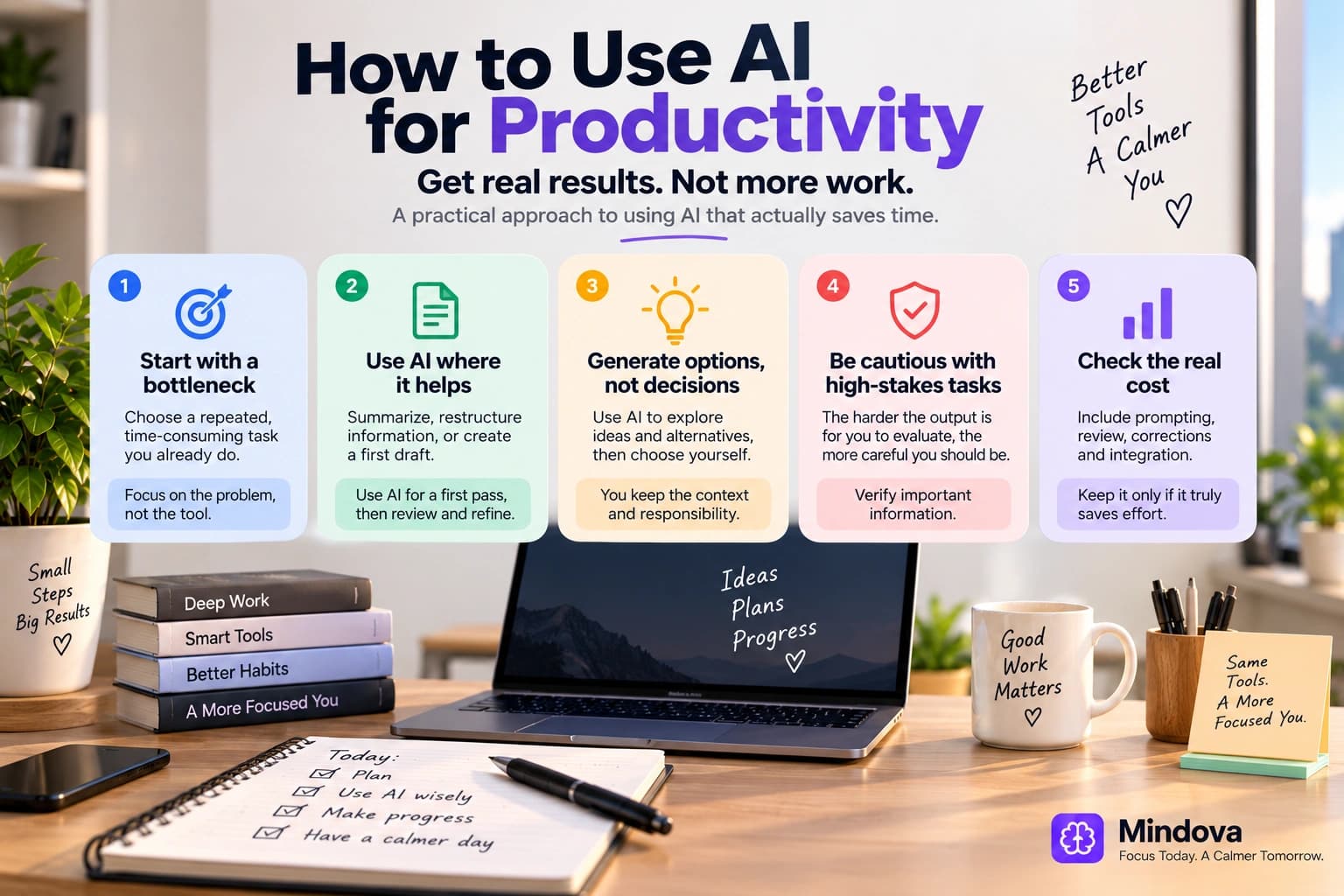
AI can save time.
It can also create a new category of work: writing prompts, correcting outputs, comparing tools, moving information between apps, and checking whether something that sounded convincing was actually true.
So the useful question is not:
“How much AI am I using?”
It is:
“Is AI reducing the total effort required to finish this task well?”
That is a much stricter test.
A productive AI workflow should remove a real bottleneck while leaving you able to judge the result. If using the tool creates more setup, review, correction, and distraction than it removes, the workflow is not productive just because AI was involved.
Quick answer: Start with one repeated task, define what a good result looks like, and use AI for a bounded part of the process such as summarizing, restructuring, drafting, or generating options. Then count the full cost: prompting, reviewing, correcting, and transferring the output into your real work. Keep the workflow only if it saves meaningful effort without creating unacceptable errors or extra complexity.
Does AI actually improve productivity?
Sometimes.
The important word is sometimes.
A study involving 758 knowledge workers at Boston Consulting Group found that AI assistance improved speed, output, and quality on a set of tasks that were within the system's capabilities. But on a task deliberately chosen outside that capability boundary, people using AI were less likely to reach the correct answer.
That uneven pattern has been described as a jagged technological frontier.
AI can be very useful for one task and surprisingly unhelpful for another task that looks similar.
Large workplace experiments show the same need for caution.
A field experiment across 66 firms and 7,137 knowledge workers found that workers who actively used an integrated generative AI tool spent less time on email. But the researchers did not detect broad changes in the quantity or composition of work simply because individuals received AI access.
So “AI improves productivity” is too broad to be useful.
The better question is:
Which task, for which person, in which workflow?
1. Start with a bottleneck, not an AI tool
Opening an AI app and asking:
“What can you do for me?”
may produce a long list of possibilities.
It does not tell you which one matters.
Start with work you already do.
Look for something that is:
- repeated;
- time-consuming;
- structured enough to describe;
- annoying without being extremely high-risk;
- easy enough for you to review.
For example:
“Every Friday I turn meeting notes into a project update.”
is a better starting point than:
“I want to use more AI.”
Other useful candidates might be:
- converting rough notes into an outline;
- summarizing a document you already have;
- extracting action items from meeting notes;
- creating a first draft from an approved brief;
- restructuring text into a different format;
- generating alternatives before you choose one;
- organizing a messy list into categories.
You already know why the task exists and what a useful result looks like.
That makes it easier to tell whether AI actually helped.
2. Use AI where the output is easy to review
One of the safest productivity advantages comes from tasks where AI can create a first pass and you can quickly judge whether it is useful.
Summarize material you already have
If you have a long internal document, meeting transcript, or set of notes, AI can help compress it into:
- key points;
- decisions;
- questions;
- action items;
- a shorter summary.
The important phrase is:
material you already have.
Summarizing a known document is different from asking a model to tell you facts about a subject and assuming everything it generates is correct.
Restructure information
You can turn:
- notes into an outline;
- an outline into a checklist;
- a long explanation into bullet points;
- a table into a narrative summary;
- scattered feedback into themes.
This is often easier to verify because the source material is in front of you.
Create a first draft
AI can help you get from an empty page to something editable.
Examples include:
- an internal email;
- a meeting agenda;
- a basic report structure;
- alternative headings;
- a rough description;
- a first-pass FAQ.
The first draft is not automatically the final answer.
Its value is that editing a rough version may sometimes be faster than creating the entire structure from zero.
3. Use AI to generate options, not automatically make the decision
AI can be useful when you want breadth.
For example:
“Give me ten ways to structure this presentation.”
“What objections might a customer have?”
“Generate five alternative explanations for this concept.”
“What questions am I missing?”
This gives you material to evaluate.
The important distinction is between:
generating possibilities
and
owning the decision.
A model can suggest:
- priorities;
- names;
- strategies;
- interpretations;
- recommendations.
But a confident recommendation is not proof that the model understands your constraints better than you do.
Use the output to expand the option set.
Keep the final judgment where the context and accountability live.
4. Be careful with tasks you cannot verify
AI becomes riskier when you cannot tell whether the answer is good.
Suppose you ask it to explain a field you know nothing about.
The answer may sound polished.
That does not give you a reliable way to distinguish:
- a correct explanation;
- an outdated statement;
- a missing qualification;
- an invented source;
- a plausible error.
This leads to a useful rule:
The harder an output is for you to evaluate, the more cautious you should be about delegating the task.
That is especially important for:
- legal decisions;
- medical information;
- financial decisions;
- security-sensitive work;
- important factual claims;
- compliance;
- high-consequence technical decisions.
AI can still assist with parts of those workflows.
But “the model gave me an answer” should not become the verification process.
5. Measure the whole workflow, not the generation speed
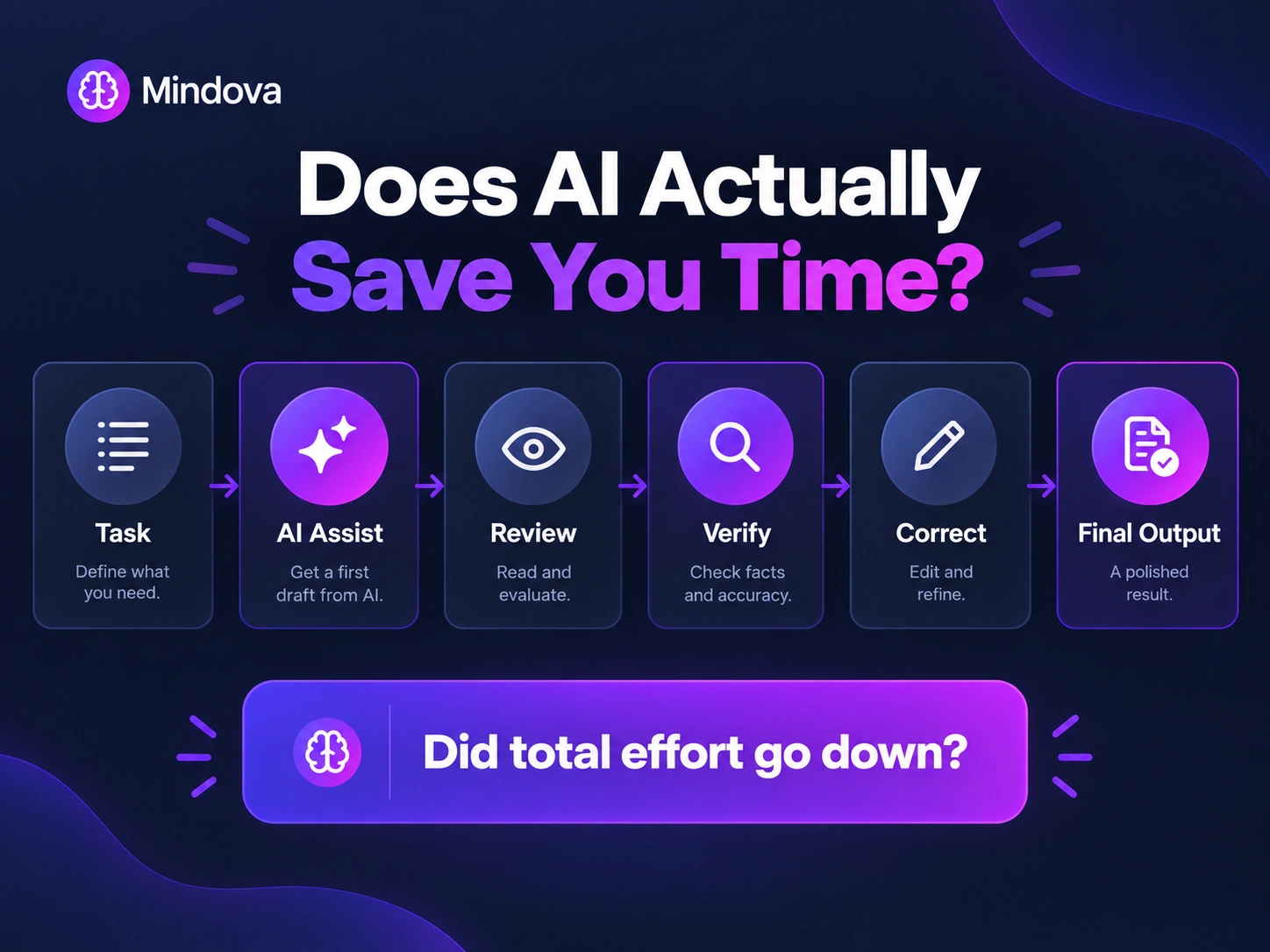
AI can produce a paragraph in seconds.
That does not mean it saved you time.
The real workflow might be:
Describe task → Provide context → Prompt → Read output → Correct mistakes → Prompt again → Verify facts → Rewrite → Move result into final system
Compare that with doing the task without AI.
The useful metric is not:
“How quickly did the AI respond?”
It is:
“How long did it take me to reach an acceptable final result?”
Include:
- setup;
- prompting;
- waiting;
- review;
- fact-checking;
- corrections;
- formatting;
- transferring the result;
- fixing downstream errors.
This matters because perceived productivity and measured productivity are not always the same thing.
In a randomized study of experienced open-source developers working on repositories they knew well, participants expected AI to speed them up. Instead, the early-2025 AI tools used in that specific experiment increased completion time.
That study should not be generalized to all developers or all current AI tools. The technology and workflows continue to change.
The useful lesson is broader:
Do not assume a tool saved time simply because using it felt easier.
Measure the actual workflow when it matters.
6. Match the amount of verification to the consequence of being wrong
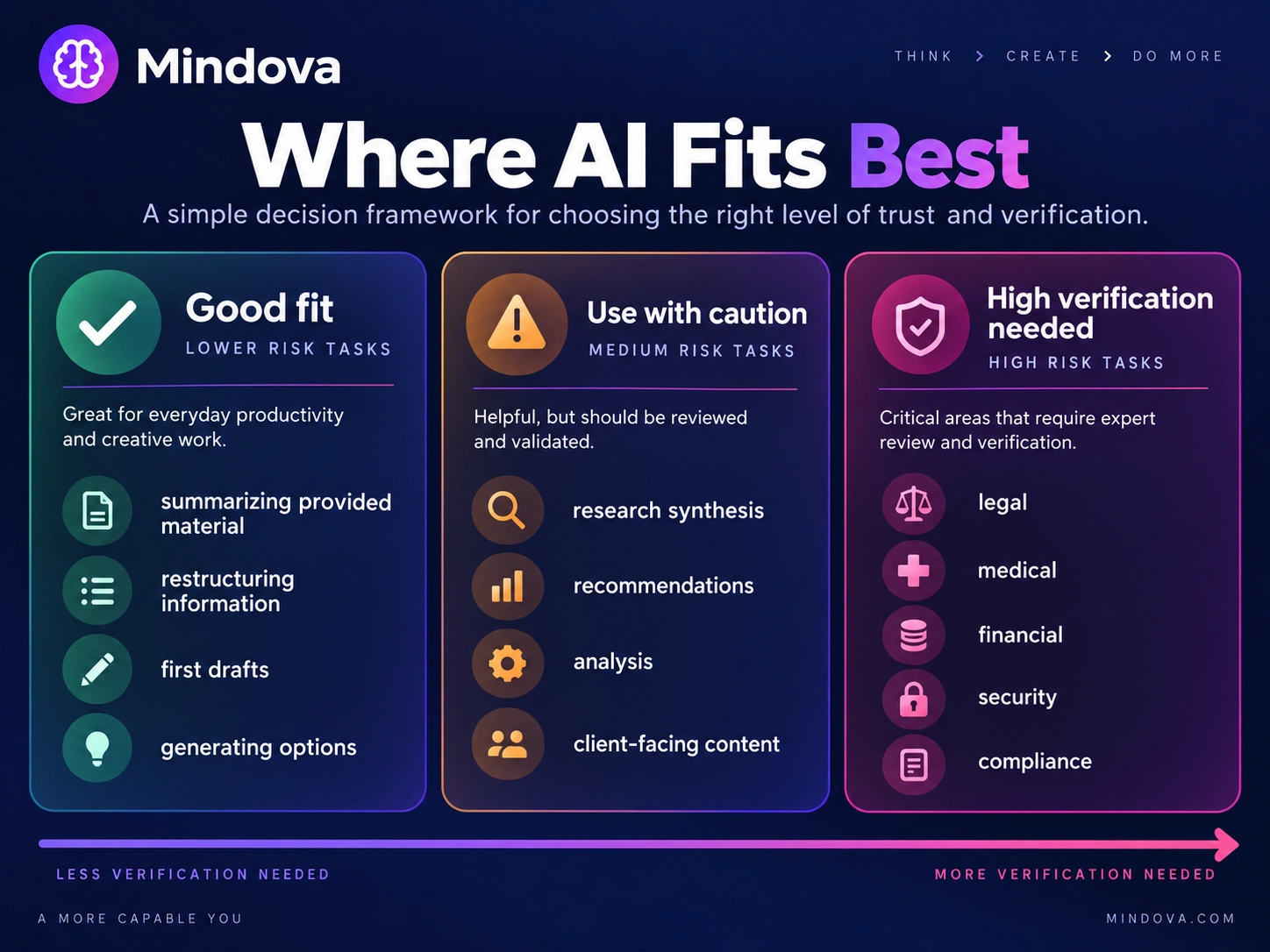
Not every AI output needs the same level of checking.
If you ask for:
“Ten possible names for an internal meeting”
the cost of an imperfect answer is tiny.
If you ask:
“Summarize the legal obligations in this contract”
the consequence can be much larger.
Think in terms of verification levels.
Low consequence
Examples:
- brainstorming;
- formatting;
- alternative headlines;
- personal notes.
A quick review may be enough.
Moderate consequence
Examples:
- client-facing draft;
- project summary;
- analysis based on provided data;
- research outline.
Review carefully and verify important claims.
High consequence
Examples:
- legal;
- medical;
- financial;
- security;
- compliance;
- decisions affecting other people significantly.
Do not rely on an unverified model output as the decision.
The productivity gain disappears quickly if an error creates more work later.
7. Do not turn research into “ask AI and trust the answer”
AI can be useful during research.
But it helps to separate research assistance from evidence.
Useful roles include:
- helping you define the question;
- suggesting search terms;
- identifying concepts to investigate;
- summarizing a source you provide;
- comparing notes from sources you have already checked;
- identifying gaps in your current research.
But when a factual claim matters, go back to the original source.
For example, if AI tells you:
“A study found X.”
the next step should not be:
“Great, publish X.”
Find the study.
Check what population was studied.
Check what was actually measured.
Check whether the conclusion matches the claim you want to make.
AI can shorten parts of research.
It does not turn verification into an optional step.
8. Watch for AI tool sprawl
A productivity stack can become another project.
One AI tool for email.
Another for notes.
Another for meetings.
Another for scheduling.
Another for writing.
Another chatbot.
Another browser extension.
Another automation layer joining everything together.
Eventually you spend time:
- configuring;
- syncing;
- maintaining;
- troubleshooting;
- choosing which tool to open.
Before adding another tool, ask:
What repeated problem does this solve that my current setup does not?
If you cannot answer clearly, wait.
The best AI productivity stack is not necessarily the one with the most AI.
It is the smallest setup that reliably removes enough work to justify itself.
For a broader workflow approach, see How to Build a Personal Productivity System That Works for You.
9. AI itself can become a distraction
A chatbot can be useful.
It can also become somewhere you go whenever the work becomes difficult.
You ask one question.
Then another.
Then rewrite the prompt.
Then compare three versions.
Then ask whether there is a better approach.
Twenty minutes later, you have generated a lot of text without moving the actual project much further.
The same test applies here:
Am I using AI to progress the task, or to avoid committing to the next step?
Try giving the AI interaction a specific job.
For example:
“I am using AI only to create three possible structures for this report.”
Once you have them:
- review them;
- choose one;
- return to the actual work.
AI does not need to stay open beside every task all day.
10. Protect sensitive information
Before pasting work into an AI service, know what you are allowed to share.
That can include:
- customer information;
- unpublished company data;
- contracts;
- internal strategy;
- credentials;
- personal data;
- confidential documents;
- proprietary code.
Your organization's policy should come first.
If you do not know whether information is allowed in a particular tool, find out before submitting it.
Productivity is not worth creating a privacy, security, contractual, or compliance problem.
11. Run a small experiment before changing your whole workflow
You do not need to “become AI-first.”
Choose one task.
Try a simple process.
Step 1 — Define the task
Example:
Turn my weekly project notes into a concise status update.
Step 2 — Define what good looks like
For example:
- under 300 words;
- decisions included;
- blockers included;
- no invented information;
- appropriate tone.
Step 3 — Use AI for one part
Ask it to create the first draft from your notes.
Step 4 — Review the result
Check:
- accuracy;
- omissions;
- tone;
- unnecessary additions.
Step 5 — Compare the total effort
Did the process actually make the final update easier or faster?
Step 6 — Keep, change, or remove it
If the workflow helps repeatedly, keep it.
If you spend more time repairing it than it saves, modify it or stop using it.
You do not need to justify keeping AI in a workflow merely because the feature exists.
AI productivity vs AI nudges
These are different uses of AI.
Most AI productivity tools help perform or transform work:
- drafting;
- summarizing;
- analyzing;
- organizing;
- generating alternatives.
A focus nudge has a narrower job.
It is intended to encourage a return toward an activity the user meant to be doing rather than creating the work itself.
Mindova's optional AI Nudges belong to this second category.
They are not an AI writer, research assistant, scheduler, or autonomous task manager.
For the concept in detail, see What Is a Focus Nudge? How Digital Nudges Help You Refocus.
Keeping these categories separate matters because “AI productivity” is too broad to describe one feature.
Where Mindova Fits
Mindova is not a general-purpose AI assistant.
It does not:
- write your emails;
- summarize your meetings;
- automatically schedule your day;
- research projects for you;
- choose your priorities;
- measure the quality of your work.
Its core role is helping you manage distracting websites inside supported desktop Chromium browsers.
With Mindova, you can:
- block selected websites;
- set an Individual Site Limit;
- use a 0-minute Individual Site Limit when you want a site blocked;
- use an Overall Distraction Limit across distracting sites;
- start timed Focus Sessions;
- review browsing and focus insights;
- optionally use AI Nudges as contextual reminders that can encourage a return to your intended activity.
This can complement an AI-assisted workflow.
For example, you might use an AI tool to help structure a report, then use Mindova to reduce access to unrelated websites while you review, verify, and finish it.
Mindova currently works as a desktop Chromium extension on supported browsers including Chrome, Edge, Brave, Opera, and Vivaldi.
It does not currently block native mobile or desktop applications.
Frequently asked questions
How can I use AI to be more productive?
Start with one repeated task rather than adding several AI tools at once. Use AI for a clearly defined part of the process, review the output, and compare the total effort with how you previously completed the task.
What tasks are good for AI productivity tools?
AI can be useful for tasks such as summarizing provided material, restructuring information, producing first drafts, generating options, and organizing text or notes.
Suitability depends on the task, the tool, and how easily you can verify the result.
Does AI always increase productivity?
No.
Research shows meaningful productivity gains in some tasks and settings, but the effects vary substantially. AI can also make performance worse when the task is outside the system's capabilities or when reviewing and correcting the output costs more than the tool saves.
How do I know whether AI is actually saving me time?
Measure the full workflow:
setup + prompting + reviewing + verification + corrections + final integration
Then compare that with completing the same task without AI.
Can I use AI for research?
Yes, but distinguish research assistance from evidence.
AI can help you develop questions, search terms, summaries, or research directions. Important factual claims should still be checked against reliable original sources.
How many AI productivity tools do I need?
There is no ideal number.
Use as few as necessary to solve repeated workflow problems. Adding another tool creates value only if the work it removes is greater than the setup and maintenance it introduces.
Can AI help me focus?
Sometimes indirectly.
If AI removes repetitive work, it may reduce some workflow friction. But an AI tool can also become another tab to check or another system to manage.
Focus still depends on how the tool fits into the rest of your work.
Are Mindova AI Nudges the same as a general AI assistant?
No.
Mindova's optional AI Nudges are contextual reminders that can encourage a return to the activity you intended to be doing. They do not draft content, research projects, schedule your work automatically, or decide what you should prioritize.
Make AI earn its place
The presence of AI inside a tool is not a productivity benefit by itself.
A useful AI workflow should make something meaningfully easier:
- less repetitive work;
- faster first passes;
- clearer organization;
- quicker extraction of useful information;
- more options when you need them.
And the benefit needs to survive the rest of the process:
reviewing, verifying, correcting, and finishing the real work.
Start with the task.
Keep human judgment where it matters.
Measure the total workflow instead of the speed of generation.
And if an AI feature creates more work than it removes, you do not need to keep it just because it is AI.
Mouhsine
Admin
Passionate about helping people achieve peak mental performance through evidence-based strategies and mindful technology use.
Related Articles

How to Focus on Writing Without Digital Distractions
Learn how to stay focused while writing by separating drafting from research, reducing digital distractions, and keeping the online tools you actually need
Creative Block: How to Get Unstuck and Start Creating Again
Feeling creatively stuck? Learn what creative block can look like, how to identify what is stopping you, and practical ways to generate ideas and move forward
How to Avoid Distractions While Working: 10 Practical Strategies
Learn how to avoid distractions while working by reducing digital triggers, managing notifications, limiting distracting websites, and protecting focused work time.
Comments
Be the first to comment.
Ready to protect your focus?
Block distracting sites, set daily limits, and run focus sessions. Mindova is free.