How to Build a Personal Productivity System That Works for You
Written by Mouhsine
Admin
Published September 6, 2026
You have probably tried someone else's system before.
A color-coded calendar.
A complicated Notion dashboard.
Pomodoro.
Time blocking.
A five-step morning routine.
Maybe it worked for a week. Then normal life returned, the system became another thing to maintain, and eventually you stopped using it.
That does not automatically mean you lack discipline.
Often, the problem is simpler:
You adopted a method before deciding what problem the method needed to solve.
A useful personal productivity system does not need to look impressive.
It needs to reliably answer a few practical questions:
- Where do unfinished commitments go?
- What deserves attention next?
- When will important work happen?
- How will you protect that work from predictable distractions?
- How will you know whether the system is still helping?
That is enough to build around.
What Is a Personal Productivity System?
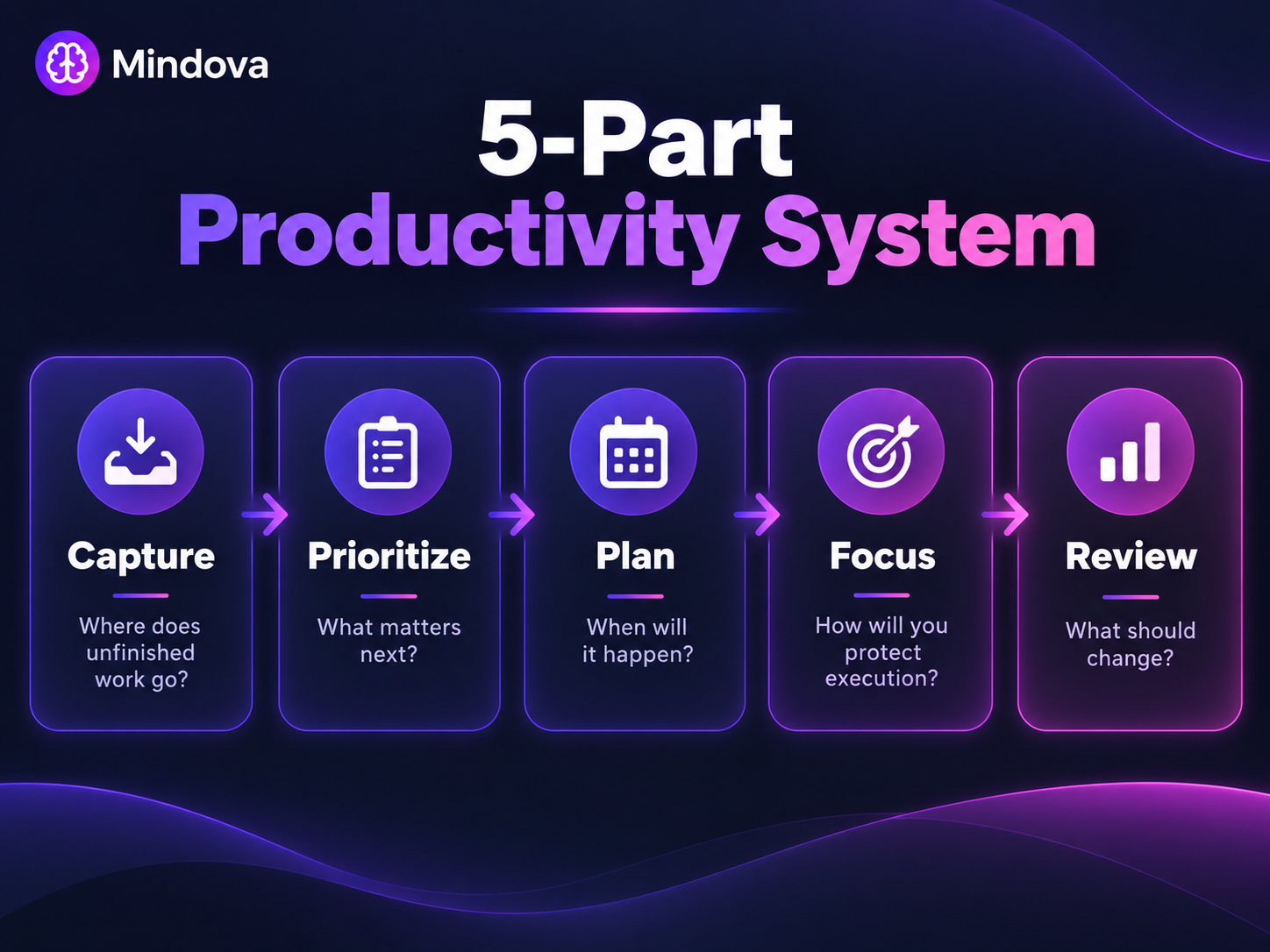
A personal productivity system is the set of rules, tools, and routines you use to move work from intention to completion.
It might include:
- one place to capture tasks;
- a way to choose priorities;
- a calendar;
- focus periods;
- distraction controls;
- a simple review.
It does not have to be one branded method.
You can use part of one method and part of another.
The important question is not:
Which productivity system is the best?
It is:
Which parts of my workflow are currently failing, and what is the simplest system that handles them?
Do Not Start With an App or a Productivity Personality
A common productivity mistake is starting with the tool.
You discover an app and immediately build:
- folders;
- tags;
- statuses;
- automations;
- dashboards;
- recurring templates.
Only later do you ask what all of it was supposed to improve.
Start in the opposite direction.
Also be cautious with the idea that you need to discover a fixed “productivity type” before you can work effectively.
You do not need to decide that you are:
- a morning productivity person;
- a visual productivity person;
- a deep-work personality;
- a multitasking personality.
Your job, schedule, environment, workload, and responsibilities may matter more than a label.
Diagnose the workflow problem first.
Then choose the tool.
Step 1: Diagnose What Is Actually Breaking
Before changing anything, identify the failure point.
You keep forgetting commitments
That is probably a capture problem.
Everything feels equally important
That is a prioritization problem.
You know what matters but never find time for it
That may be a planning problem.
You have the time but keep drifting into Reddit, YouTube, email, or other tabs
That is partly an execution environment problem.
Your system works for a week and then turns into clutter
That is a review and maintenance problem.
Different problems deserve different tools.
Trying Pomodoro when your real problem is unclear priorities will not solve the underlying issue.
Neither will buying another task manager.
Step 2: Build a Simple Capture Layer
Your first layer answers:
Where does unfinished work go?
The specific tool matters less than consistency.
It could be:
- one task list;
- a notes inbox;
- a project-management tool;
- a paper notebook.
The important part is that when something appears, you know where to put it.
For example:
Send contract to client.
Review homepage copy.
Book dentist appointment.
Prepare Thursday presentation.
If unfinished commitments are scattered across:
- email;
- Slack;
- browser tabs;
- sticky notes;
- three task apps;
- your memory;
you spend attention repeatedly trying to remember what exists.
A capture system gives those commitments a home.
But capture is only the beginning.
A longer list does not tell you what deserves attention.
Step 3: Decide How You Will Prioritize
Your system needs a rule for answering:
What should I work on first?
Do not simply label ten tasks “high priority.”
Compare them.
Useful factors include:
- consequences of delay;
- impact;
- dependencies;
- deadlines;
- the time you realistically have.
Then choose a primary priority and deliberately defer what does not fit.
For the full framework, see How to Prioritize Your Day When Everything Feels Important.
Your productivity system does not need another elaborate scoring model if a simple priority decision already works.
Step 4: Give Important Work a Place in Time
Choosing a priority does not guarantee that you will work on it.
A task can remain “important” for two weeks while meetings, messages, and small requests consume every available hour.
That is why your system needs some relationship with time.
You might:
- put a specific task on your calendar;
- protect a larger work block;
- reserve a smaller period before meetings;
- assign a task to a particular part of the day.
This is where time blocking can help.
Prioritization answers:
What deserves attention?
Time blocking answers:
When will I give it that attention?
See Time Blocking: How to Plan Your Day and Protect Your Focus.
You do not need to schedule every minute.
Use as much structure as the work requires.
Step 5: Protect Execution From Predictable Distractions
Now suppose you have:
- captured the work;
- chosen the priority;
- protected an hour for it.
Then you spend half that hour opening unrelated websites.
That is not a task-management problem anymore.
It is an execution problem.
Before the work period begins, ask:
What usually pulls me away from this type of task?
Maybe:
- Reddit;
- YouTube;
- social media;
- news;
- email;
- unnecessary browser tabs.
Reduce those distractions before relying on willpower.
For the technical setup, see How to Block Distracting Websites.
If structured work-and-break intervals help you, you may also use the Pomodoro Technique.
If the work is cognitively demanding and needs longer uninterrupted concentration, the relevant framework may be Deep Work.
These are different tools for different jobs.
You do not need all of them.
Step 6: Review the System, Not Just Yourself
A productivity system should eventually produce information.
Not necessarily charts.
Information.
For example:
- I consistently plan more work than fits.
- Morning meetings destroy the work block I keep scheduling.
- Reddit interrupts writing more than email does.
- My task list contains projects instead of next actions.
- I keep tracking a metric that never changes a decision.
Research on goal-progress monitoring has found that increasing monitoring can improve goal attainment on average, particularly when progress is physically recorded or reported.
Does Monitoring Goal Progress Promote Goal Attainment?
But that does not mean you should track everything.
Track only information that could change what you do next.
For a deeper framework, see How to Use Feedback Loops for Personal Productivity.
Which Productivity Method Solves Which Problem?
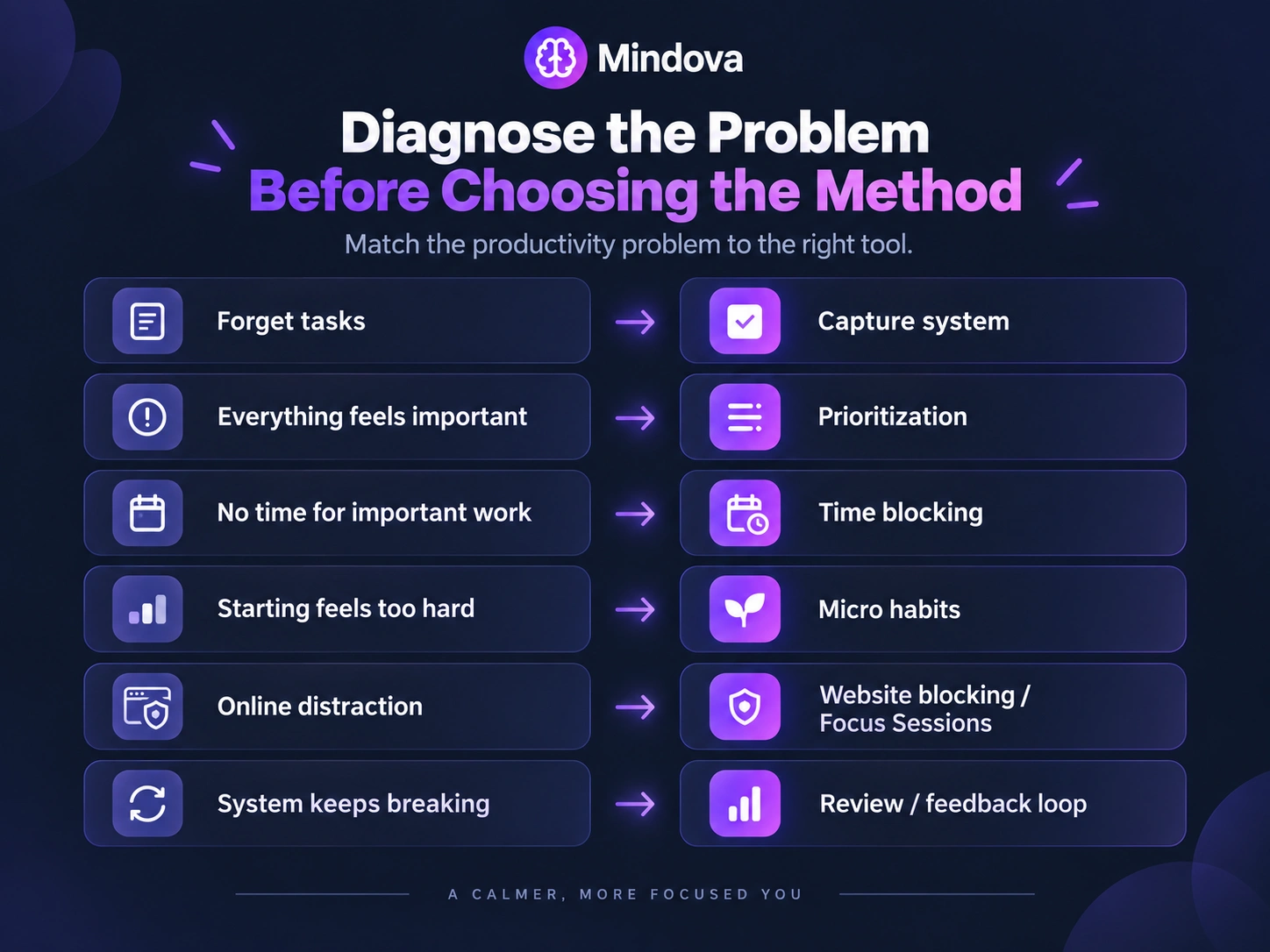
Use methods based on the job they need to perform.
| If your problem is... | Consider... |
|---|---|
| You forget tasks and commitments | A simple capture system |
| Everything feels important | Prioritization |
| Important work never finds time | Time blocking |
| Starting feels too large | Micro habits |
| You keep getting distracted online | Website blocking or Focus Sessions |
| Timed work helps you start | Pomodoro |
| You need long, demanding concentration | Deep Work |
| Your system keeps drifting or breaking | A feedback loop |
For making a starting behavior smaller, see Micro Habits: How to Start Small and Build Better Habits.
The table is not a personality test.
It is a troubleshooting guide.
Should You Combine Productivity Methods?
Yes, if each component has a different job.
For example:
Capture
One task list.
Prioritize
Choose one primary priority.
Plan
Put the priority into a protected calendar block.
Focus
Use a Mindova Focus Session to reduce predictable browser distractions.
Review
At the end of the week, check what repeatedly worked or failed.
That is already a complete system.
You do not necessarily need to add:
- GTD;
- Kanban;
- habit trackers;
- a second task manager;
- another calendar;
- six productivity automations.
Add a method only when it solves a problem you can name.
If you cannot explain what a new component is supposed to fix, leave it out.
Borrow the Principle, Not the Ritual
Popular methods often contain useful principles.
But you do not need to copy every detail.
Pomodoro
The principle may be:
Work for a defined period, then stop for a break.
You do not need to believe 25 minutes is the scientifically perfect focus duration.
Time Blocking
The principle may be:
Give important work a deliberate place in your calendar.
You do not need to schedule every 15 minutes of the day.
Micro Habits
The principle may be:
Make the starting behavior small enough to begin.
You do not need to keep every behavior tiny forever.
Deep Work
The principle may be:
Protect cognitively demanding work from unnecessary distraction.
You do not need to reproduce someone else's exact morning routine.
A method should serve the work.
The work should not become an excuse to maintain the method.
What About Your “Best Time of Day”?
You may notice that demanding work feels easier at certain times.
That is worth testing.
But be cautious about turning that observation into a rigid identity:
I am a night person, so I cannot do good work before noon.
Research on chronotype and cognition is mixed.
A systematic review of 65 studies found that many studies did not show a clear main effect of chronotype on cognitive performance, while synchrony effects appeared in some studies and depended on age, task, and context.
A better approach is practical:
If difficult work repeatedly goes better during a certain period, protect that period when your schedule allows it and see whether the pattern holds.
Observation first.
Identity second—if at all.
What About Task Switching?
Your job may require switching between tasks.
And you may prefer shorter work blocks.
But that does not mean frequent switching is free.
Research on task switching has consistently found switch costs: moving between different task rules generally takes additional time and mental reorientation, especially when tasks are complex.
So do not design a productivity system around the belief that switching constantly is simply “your style.”
Instead ask:
How much switching does my work actually require, and where can I remove switching that adds no value?
Signs Your Productivity System Is Becoming the Problem
A system should reduce friction.
Sometimes it starts producing its own friction instead.
Watch for these signs:
You spend more time organizing than doing
Your task manager becomes the main project.
The same task exists in several places
You no longer know which list is authoritative.
You rebuild the system frequently
Every few weeks:
New app. New tags. New method. Start again.
The rebuilding itself becomes avoidance.
You cannot say what today's priority is
The system contains a lot of information but does not help you make decisions.
You maintain metrics you never use
If a number never changes a future decision, ask why you are tracking it.
You need several tools open just to know what to do
Complexity may have outgrown the value it creates.
When this happens, do not automatically add another method.
Simplify first.
Test Changes Instead of Rebuilding Everything
You do not need a complete productivity reset every Monday.
If something is failing, change one meaningful part when possible.
For example:
My problem is that distracting websites keep interrupting writing.
Test a browser boundary.
Do not simultaneously change:
- your task app;
- morning routine;
- calendar structure;
- sleep schedule;
- note-taking system.
Changing fewer variables makes it easier to understand what actually helped.
There is no universal “test this for exactly seven or fourteen days” rule.
Test the change long enough to see it under reasonably normal working conditions, then review it.
Your System Is Allowed to Change
A productivity system is not a permanent identity.
A system that works when you:
- work alone;
- have few meetings;
- control your own calendar;
may stop working after:
- changing jobs;
- joining a larger team;
- becoming a manager;
- having different family responsibilities;
- travelling more;
- taking on a different type of project.
That does not mean the old system failed.
The work changed.
Adjust the system accordingly.
When Productivity Is Not a Personal-System Problem
This is an important limit.
A better personal productivity system cannot fix:
- an impossible workload;
- chronic understaffing;
- permanent emergency requests;
- unrealistic deadlines;
- a workplace culture that expects constant availability.
If ten hours of required work are being pushed into six available hours, a better task list may organize the overload without solving it.
Sometimes the appropriate question is not:
Which productivity method should I try?
It is:
Which work needs to be removed, delayed, delegated, reduced, or renegotiated?
Personal systems are useful.
They are not substitutes for realistic capacity.
Where Mindova Fits
Mindova can be one focus layer inside a broader productivity system.
It is not the whole system.
Mindova does not:
- capture all your tasks;
- decide your priorities;
- schedule your entire day;
- measure the quality of your work.
Its role is narrower:
helping reduce predictable browser distractions while you execute the work you already chose.
Mindova currently supports:
- website blocking;
- Individual Site Limits;
- an overall distraction limit;
- timed Focus Sessions;
- browsing and focus insights;
- optional AI Nudges;
- optional Cloud Sync.
For example, your system could be:
- Capture new commitments in one task list.
- Choose today's primary priority.
- Protect a work period for it.
- Start a Mindova Focus Session.
- Keep predictable distraction sites unavailable.
- Finish or meaningfully advance the task.
- Review the outcome afterward.
Mindova's browsing and focus insights can help you understand aspects of your browser behavior.
They do not tell you whether the actual work was good.
Combine them with real outcomes:
Did I finish the draft?
Did the distraction pattern improve?
Was this work setup useful enough to repeat?
Optional AI Nudges can provide contextual reminders that encourage a return to your intended activity, but they do not determine whether you are being productive or read your mental state.
Frequently Asked Questions
What is a personal productivity system?
A personal productivity system is the set of tools, rules, and routines you use to capture commitments, choose priorities, plan work, execute it, and review what happened.
What is the best productivity system?
There is no single best system for everyone.
The most useful system is usually the simplest one that reliably handles the problems your actual work creates.
Should I use one productivity method or several?
You can combine methods if each has a distinct purpose.
For example, prioritization may decide what matters, time blocking may decide when it happens, and a website blocker may reduce distraction while you work.
Avoid combining methods simply because they are popular.
How do I know which productivity method is right for me?
Start with the problem.
If everything feels important, work on prioritization.
If important work never finds time, try planning or time blocking.
If online distractions repeatedly interrupt execution, use distraction controls.
Choose the tool after identifying the failure point.
Do productivity styles really matter?
People differ in preferences, schedules, jobs, and environments.
But be cautious about treating productivity “types” as fixed scientific categories.
It is often more useful to test what works in your actual context than to build a system around a personality label.
How often should I change my productivity system?
There is no fixed schedule.
Change it when you can identify a recurring problem, when your work or responsibilities change, or when the system itself creates unnecessary friction.
How do I know if my productivity system is too complicated?
Warning signs include spending excessive time maintaining it, duplicating tasks across tools, frequently rebuilding the setup, or being unable to identify what to work on despite having a detailed system.
Can Mindova be part of a productivity system?
Yes.
Mindova can provide the browser-distraction and focus layer of a system through website blocking, limits, Focus Sessions, browsing/focus insights, and optional AI Nudges.
It does not replace task management, prioritization, or planning.
Build the Smallest System That Solves the Problem
You do not need to discover your perfect productivity personality.
You do not need the routine of the most productive person on YouTube.
And you do not need every popular method operating at once.
Start with five questions:
Where does unfinished work go?
How do I decide what matters?
When will important work happen?
How will I protect that work from predictable distraction?
How will I review whether the system helped?
Build the smallest setup that answers those questions.
Use it.
Notice where it fails.
Change the part that failed.
Keep what works.
Remove what does not.
A productivity system is successful when it becomes easier to do the work, not when the system itself becomes the most elaborate thing you manage.
Sources
Does Monitoring Goal Progress Promote Goal Attainment? — Meta-Analysis
Chronotype and Cognitive Performance — Systematic Review
American Psychological Association — Multitasking and Task Switching
Mouhsine
Admin
Passionate about helping people achieve peak mental performance through evidence-based strategies and mindful technology use.
Related Articles

How to Focus on Writing Without Digital Distractions
Learn how to stay focused while writing by separating drafting from research, reducing digital distractions, and keeping the online tools you actually need
Creative Block: How to Get Unstuck and Start Creating Again
Feeling creatively stuck? Learn what creative block can look like, how to identify what is stopping you, and practical ways to generate ideas and move forward
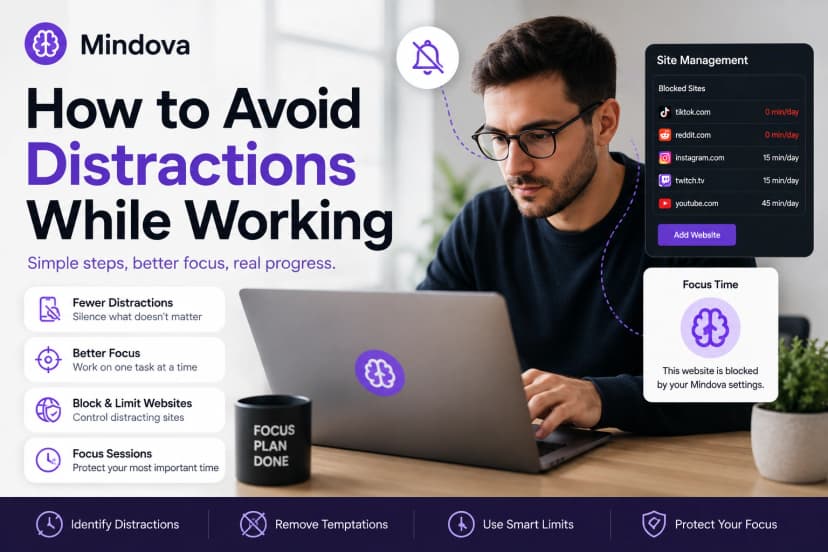
How to Avoid Distractions While Working: 10 Practical Strategies
Learn how to avoid distractions while working by reducing digital triggers, managing notifications, limiting distracting websites, and protecting focused work time.
Comments
Be the first to comment.
Ready to protect your focus?
Block distracting sites, set daily limits, and run focus sessions. Mindova is free.