Brick Alternatives (2026): Cheaper and Free Ways to Block Apps on Android
Written by Mouhsine
Admin
Published November 5, 2026 · Updated November 10, 2026
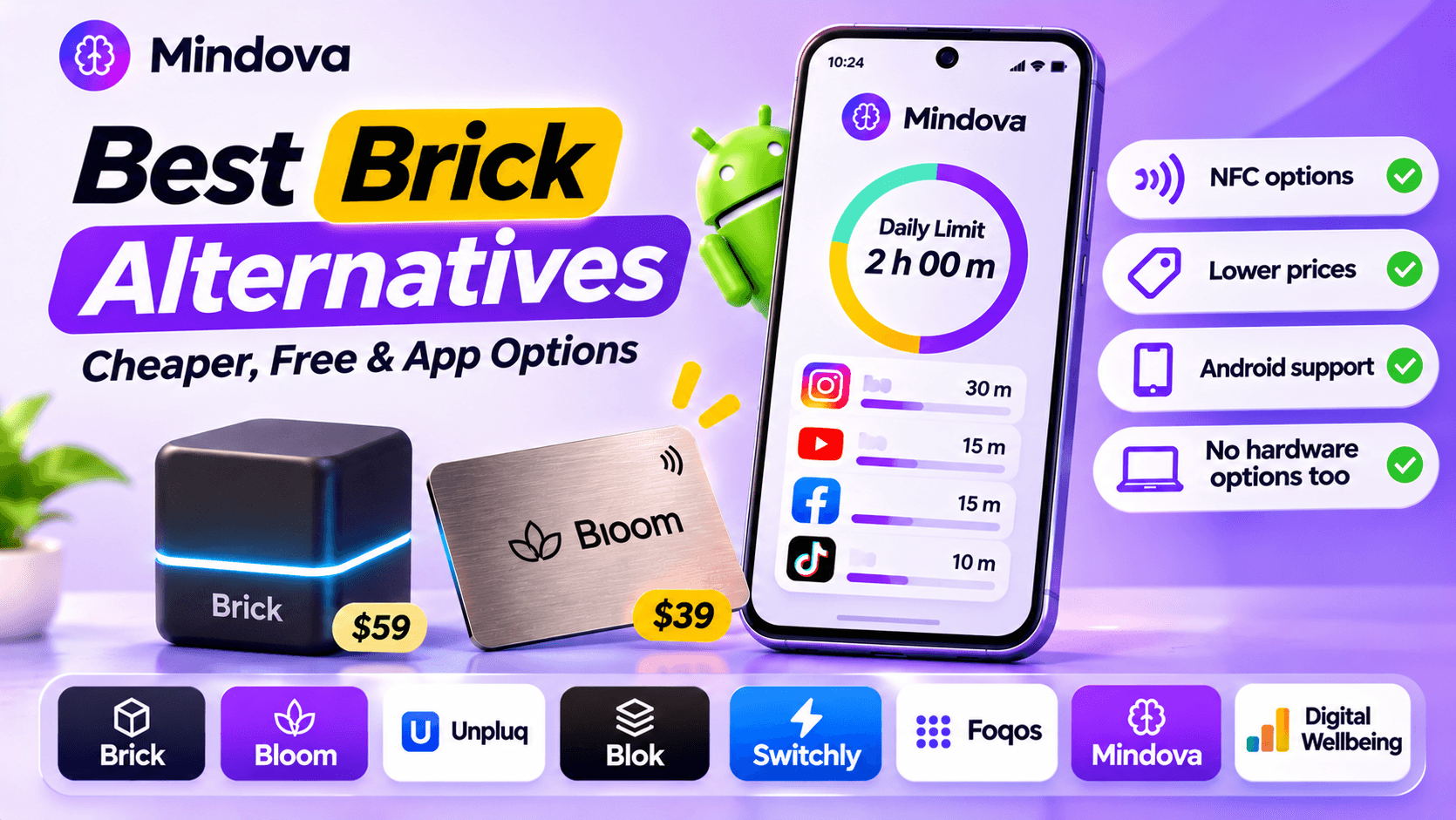
Brick made a simple idea popular: you tap your phone on a small magnetic puck to block distracting apps, and you have to tap it again to get them back. It works because the "unlock" button is physically somewhere else.
But Brick costs $59, you have to keep the puck away from you for it to work, and many people searching for an alternative just want something cheaper, free, or that does not need extra hardware. This guide focuses on Android, because most Brick alternative lists only cover iPhone.
Prices and features below come from each product's official website, checked in November 2026.
Quick answer
- Want the same "tap to unlock" ritual for less? Bloom's card starts at $39 with no subscription and works on Android and iPhone.
- Want it free on Android? Switchly is a free, open-source app blocker that can use NFC tags, QR codes and barcodes you already have.
- Do not want hardware at all? Use an app-based blocker with daily limits, like Mindova (free plan on Android) or Android's built-in Digital Wellbeing.
- On iPhone? Foqos is a free, open-source app that uses NFC tags or QR codes in the same way.
What Brick does (and what it does not)
According to Brick's official site and FAQ:
- Price: $59 for the Brick device. The Brick app itself has no subscription.
- Phones: Android 12 or later, and iPhone with iOS 18 or later.
- What you can block: on Android, any app except Phone and your launcher. You can create up to 10 custom modes (work, sleep, gym and so on).
- How unlocking works: you can start a block from the app, but ending it early requires a tap on your Brick. A scheduled block with an end time stops on its own (Brick support).
- Safety net: five Emergency Unbricks in the app; more can be requested from Brick support.
- Strict Mode: designed to stop you from deleting the app or changing settings to get around the block.
Brick also sells Brick Night, a newer Bluetooth device that blocks your chosen apps automatically when you get into bed, and Brick Break ($39), a small accessory for a temporary unbrick when your main Brick is at home.
Why people look for an alternative
- Price. $59 is a lot for many people, especially for a first try.
- The puck must be away from you. If you keep it in your bag or on your desk, the block is one tap away.
- On or off, not a time budget. Brick blocks the apps in a mode until you unbrick or a schedule ends. Its FAQ does not list daily time limits per app, so if you want 20 minutes of Instagram a day rather than zero, you need a different kind of tool.
Brick alternatives at a glance
| Option | Type | Price | Works on Android | Subscription |
|---|---|---|---|---|
| Brick | NFC puck + app | $59 device | Yes (Android 12+) | No |
| Bloom | NFC card + app | Card from $39 | Yes | No |
| Unpluq | Tag + app | Paid subscription ($29 for 3 months) | Yes | Yes |
| Blok | NFC card + app | Card listed at $29 | Yes | Check its site |
| Switchly | Free app, your own NFC tags or QR codes | Free (optional one-time Premium) | Yes | No |
| Foqos | Free app, your own NFC tags or QR codes | Free | No (iPhone only) | No |
| Mindova | App-based daily limits, no hardware | Free plan; Pro $4.99/month or $39.99/year | Yes | Optional |
| Digital Wellbeing | Built into Android | Free | Yes | No |
Prices from official sites in November 2026. They can change, so check before buying.
Alternatives that keep the physical "tap"
Bloom: the cheapest Brick-style card
Bloom is the closest match to Brick: you tap a card to block or unblock your apps. On its official site, the Bloom Card starts at $39, includes the free iOS and Android app, has no subscription, and comes with a 30-day money-back guarantee.
Choose it if: you like Brick's idea but want to spend less. For a feature-by-feature breakdown, read our Bloom vs Brick comparison.
Unpluq: a tag plus a subscription
Unpluq works on iOS and Android and also uses a physical unlock step. The difference is the business model: the full app requires a paid subscription ($29 for 3 months on its site; 6- and 12-month plans cost more).
Choose it if: you are fine paying a subscription for extra features and want the physical ritual.
Blok: a card from another hardware brand
Blok sells a card listed at $29 and an app for iPhone and Android. Check its site for which features need a membership before you buy.
Free alternatives (use any NFC tag or QR code)
The hardware is not what makes Brick work. The key is that unlocking needs something you have to physically go and get. A cheap NFC sticker or a printed QR code can do the same job.
Switchly (Android, free)
Switchly describes itself as a no-ads, open-source Android app blocker with app, website and in-app blocking, profiles, schedules, and NFC, QR and barcode actions. Put a tag or a QR code in another room and you have a free Brick setup.
Foqos (iPhone, free)
Foqos is the best-known free option on iPhone. It is open source and uses Apple's Screen Time tools with NFC tags or QR codes you scan to lock and unlock apps. It does not run on Android.
The trade-off of every free option: you set it up yourself, and the tag only helps if you keep it far from where you use your phone.
Alternatives without hardware
Not everyone needs a hard block. If your problem is "15 minutes of scrolling turns into 2 hours", a daily limit is often enough, and you never lose a puck.
Mindova (our app): daily limits for every app
Disclosure: Mindova is our product. We did not test Brick, Bloom or the other products in this guide; their details come from their official sites. The Mindova screenshots below are from our own phone.
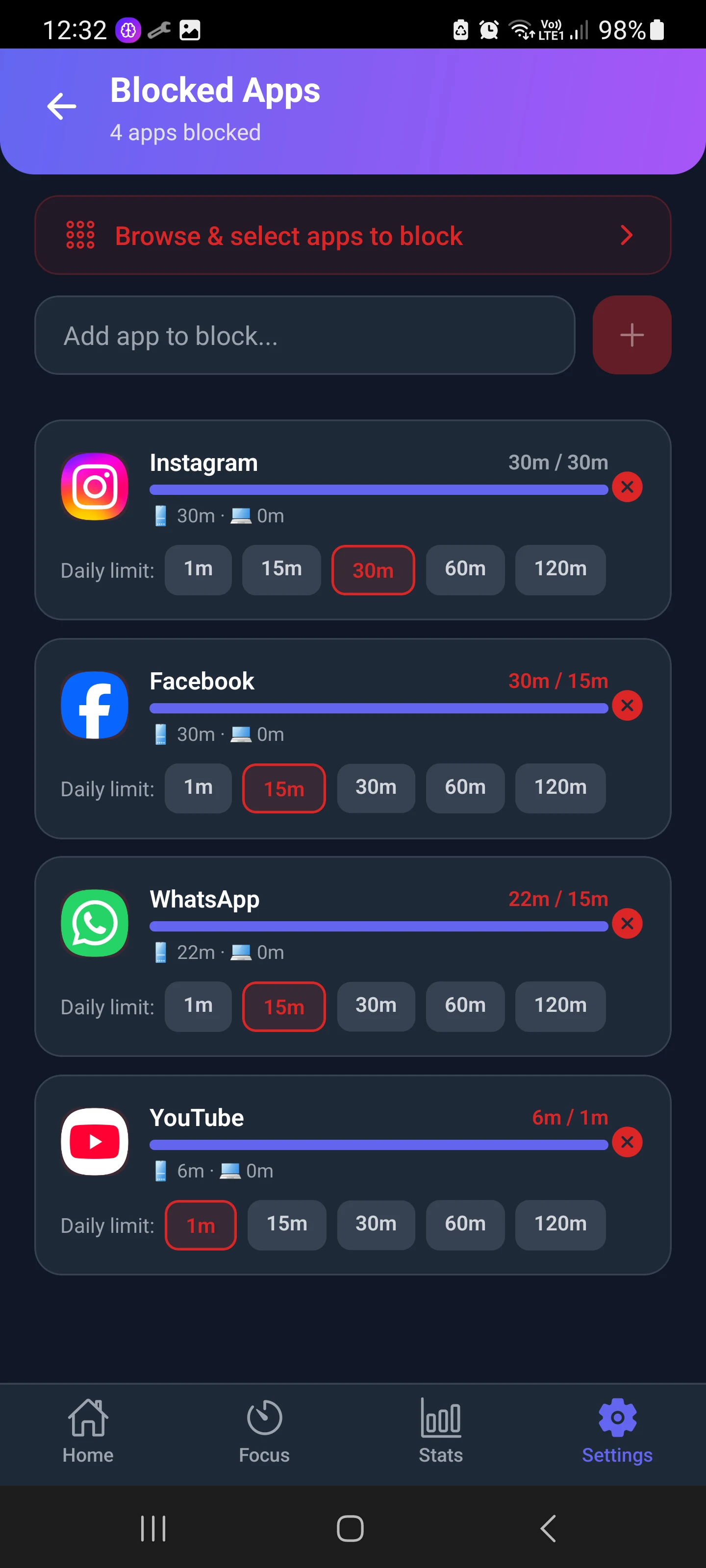
Mindova does not use NFC. Instead of an on/off switch, you give each distracting app a daily time budget. Here is a real setup: Instagram 30 minutes, Facebook 15 minutes, WhatsApp 15 minutes and YouTube 1 minute.
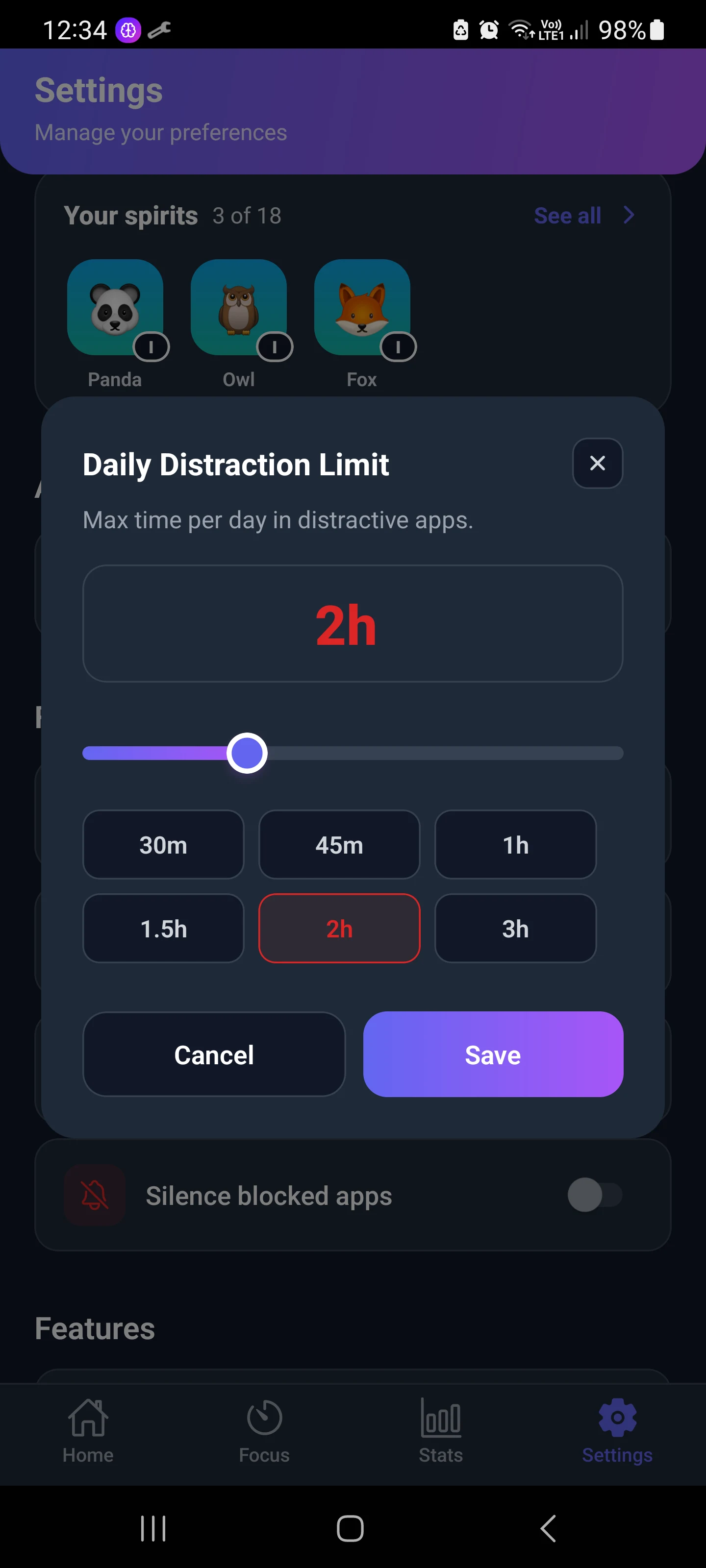
You can also set a Daily Distraction Limit, a total budget for all your distracting apps together (from 30 minutes up to 3 hours).
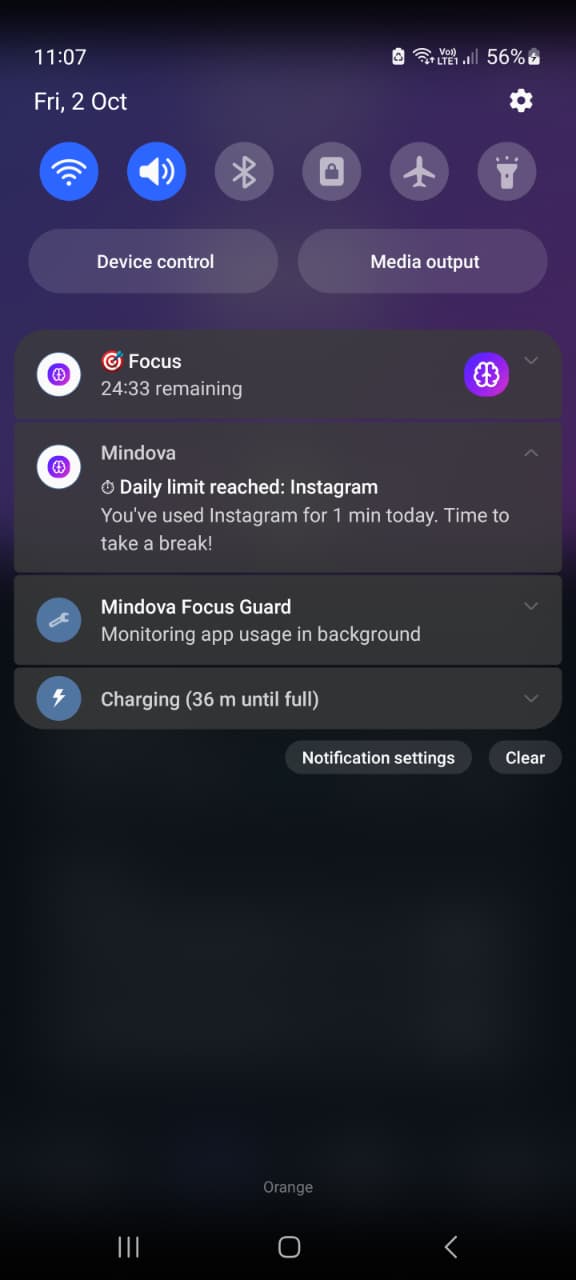
When you reach the limit, Mindova blocks the app. You can still take 5 or 10 extra minutes, but it costs energy for Nova, the focus companion inside the app. That small cost is the point: it adds friction without locking you out completely.
The Stats screen shows how your day really went: productive time, distracting time, total phone screen time and the last 7 days.
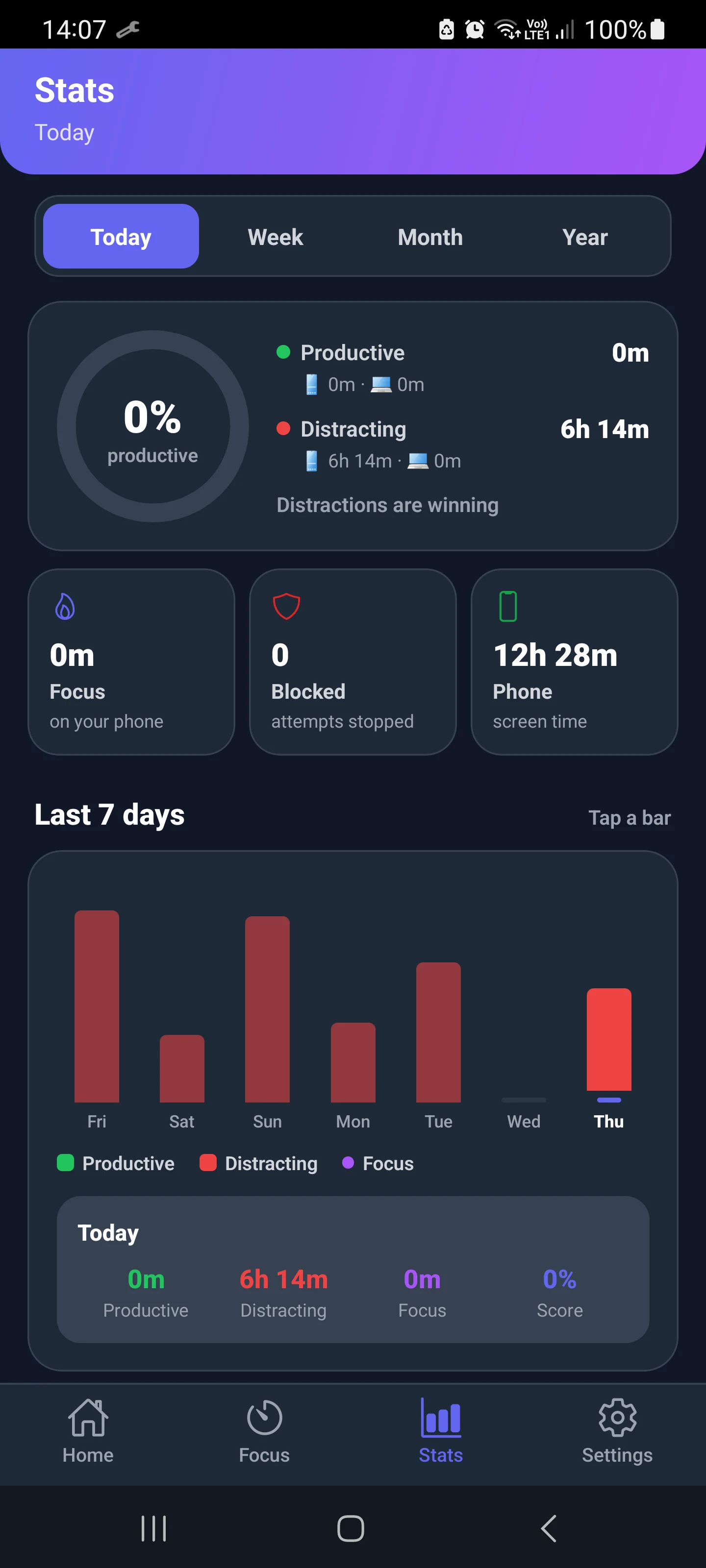
Mindova vs Brick, honestly:
- Mindova is not a hard lock. If you want zero access with very few ways out, Brick or a free NFC setup is stricter.
- Mindova lets you use apps a little instead of all or nothing, and it shows where your time goes.
- Mindova costs nothing to start: the free plan includes 3 blocked apps on Android, 10 Focus Sessions a month and 7 days of stats. Pro removes the limits for $4.99/month or $39.99/year, and you can try Pro free for 7 days. See Mindova pricing.

Block distractions. Stay focused with Mindova.
Block distracting websites and apps, set limits, and protect your focus time across your browser and phone.
Free plan, no credit card • Try Pro free for 7 days
Digital Wellbeing (built into Android)
Every recent Android phone has Digital Wellbeing, with app timers, Focus mode and Bedtime mode. It is free and already installed, but it is easy to bypass: you can change or remove a timer in a few taps, unless you set an App limits PIN (available on many phones). Our guide to the Digital Wellbeing app shows how to set it up.
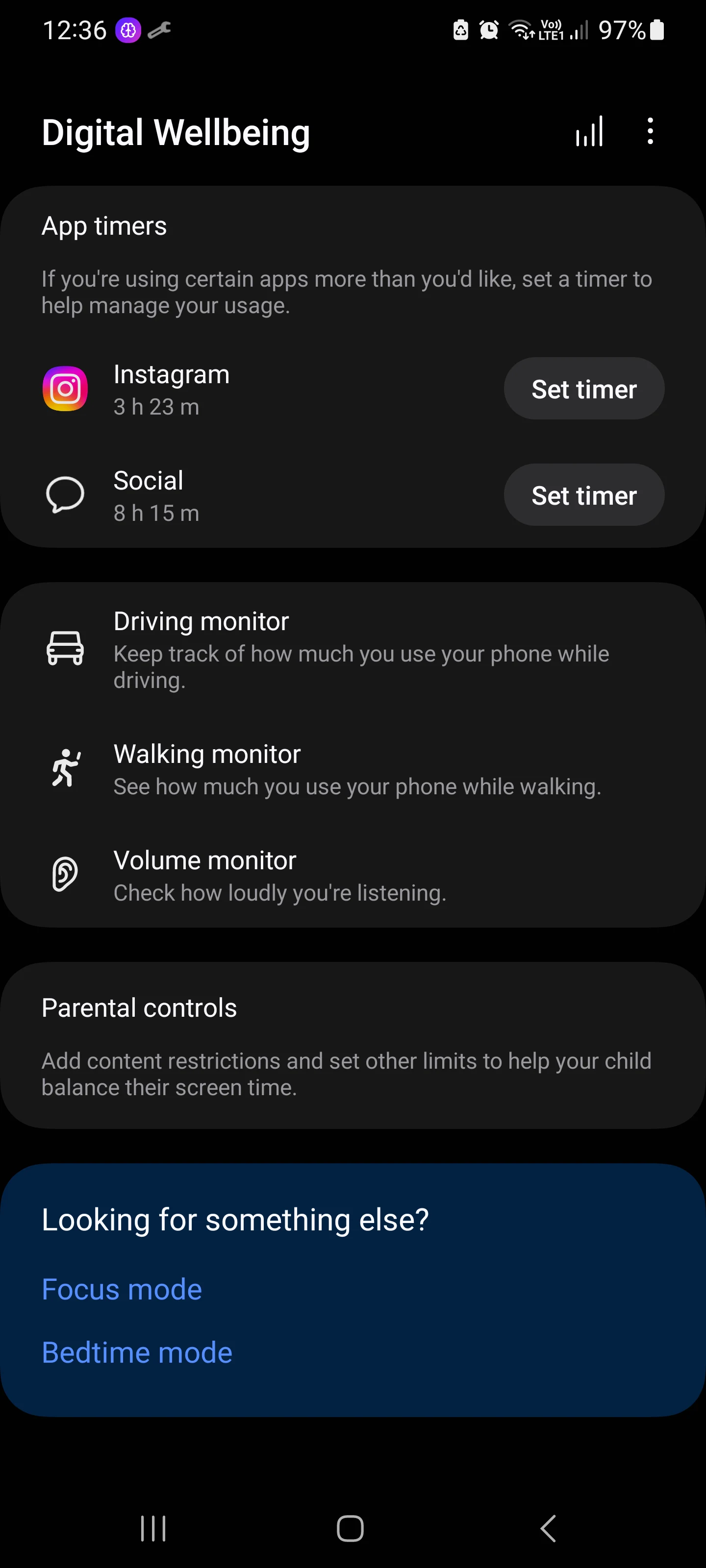
Which Brick alternative should you choose?
- You want Brick's physical ritual for less: Bloom.
- You want it free on Android and do not mind a bit of setup: Switchly with an NFC sticker or a printed QR code.
- You are on iPhone and want it free: Foqos.
- You want limits, not a full ban, and no hardware: Mindova or Digital Wellbeing.
- You want the strictest block and the price is fine: Brick itself is still a solid choice.
If you are not sure what kind of tool you need, compare more options in our guide to the best app blockers for Android, or follow our step-by-step guide on how to block apps on Android.
FAQ
Is there a free alternative to Brick?
Yes. On Android, Switchly is free and open source and works with NFC tags, QR codes and barcodes. On iPhone, Foqos is free and open source. Mindova and Digital Wellbeing are free options that use time limits instead of a physical tag.
Does Brick work on Android?
Yes. Brick's FAQ says it works with Android 12 or later and with iPhones running iOS 18 or later.
Does Brick need a subscription?
No. Brick sells the device for $59 and the app has no subscription.
What is cheaper than Brick?
Bloom's card starts at $39 with no subscription. Free apps like Switchly (Android) and Foqos (iPhone) work with any NFC tag or QR code, and an NFC sticker costs very little.
Can I make my own Brick?
Yes. Free apps like Switchly or Foqos let you use your own NFC tag or a printed QR code as the unlock key. Leave it in another room so unlocking takes real effort.
Is Brick better than an app blocker?
It depends on how you fail. If you always disable your blocker, a physical key helps. If you just want to use social apps less, daily limits like Mindova's are often easier to live with.
Bottom line
Brick is a good product, but you do not need a $59 puck to get its benefits. Bloom gives you the same ritual for less, free apps can turn any NFC tag into a Brick, and if you would rather have limits than a full ban, an app-based blocker like Mindova lets you start for free.
Less scrolling. More focused time.
Use Mindova to block distracting websites and apps, set daily limits, and create protected time for studying, working, or deep focus.
- Android AppBlock and limit distracting apps on Android.
- Browser ExtensionChrome, Edge, Brave, Opera & Vivaldi
- iPhone AppControl distracting apps and protect your focus on iPhone.


Start free — no credit card needed. Try Pro free for 7 days whenever you like.
Mouhsine
Admin
Passionate about helping people achieve peak mental performance through evidence-based strategies and mindful technology use.
Related Articles
How to Block the YouTube App on Android Without Deleting It
Block the YouTube app on your Android phone without deleting it. Use Digital Wellbeing app timers, Focus Mode, YouTube's Shorts limit, or Mindova.
How to Block X (Twitter) on Android Without Deleting It
Block the X (Twitter) app on Android without deleting it. Use App timers, Focus Mode, Mindova or Private DNS, with step-by-step instructions.
How to Block the Facebook App on Android Without Deleting It
Block or limit the Facebook app on Android without deleting it: app timers, Focus mode, disabling, archiving, and daily limits with Mindova.
Comments
Be the first to comment.