How to Focus While Studying Without Getting Distracted
Written by Mouhsine
Admin
Published September 27, 2026

You sit down to study.
Your notes are open. Your laptop is ready. You know the exam, assignment, or deadline matters.
Then something happens.
You check one notification.
You open YouTube for a tutorial and end up watching something unrelated.
You search Reddit for one answer and keep scrolling.
Or you do not open anything distracting at all—you simply stare at the material without knowing what to do next.
Staying focused while studying is not always a motivation problem.
Sometimes the task is too vague. Sometimes your study environment keeps offering easier alternatives. Sometimes your break becomes another distraction. And sometimes you are simply too tired to do good work.
The most useful approach is to fix the part of the study session that keeps breaking.
Quick answer: To focus while studying, decide exactly what you want to finish, remove the distractions you repeatedly follow, study in a defined block of time, use active recall instead of only rereading, and take breaks that make it easy to return. If you study on a laptop, keep the websites you need available and restrict the ones that repeatedly pull you away.
Why Is It So Hard to Focus While Studying?
“I'm distracted” can describe several different problems.
Before trying another productivity technique, identify which one is actually happening.
The task is too vague
There is a big difference between:
Study biology.
and:
Answer questions 1–15 from Chapter 4 without looking at my notes.
The first instruction has no obvious starting point or finish line.
The second gives you something concrete to do.
When a study session feels difficult to start, make the next action smaller and more specific.
Instead of:
Study math
try:
Complete problems 10–20 and mark anything I cannot solve.
Instead of:
Revise history
try:
Write everything I remember about the causes of the French Revolution, then check my notes for what I missed.
You do not need to plan your entire week before starting.
You need to know what the next study block is supposed to produce.
1. Decide What You Will Finish Before You Start
Before opening another tab, write one outcome for the session.
A useful study goal should be concrete enough that you can tell when it is complete.
For example:
- answer 20 practice questions;
- review one lecture and create 15 flashcards;
- solve three difficult problems without using the solution;
- summarize one chapter from memory;
- memorize 25 vocabulary words;
- draft the introduction and first section of an essay.
This is more useful than deciding only how long you will sit at your desk.
Two hours at a desk does not necessarily mean two hours of studying.
A clear task gives your attention somewhere to return when it drifts.
Try this before your next study session
Write:
For the next study block, I will: __________
Keep it visible.
When you catch yourself opening something unrelated, you have a simple question to ask:
Does this help me finish the thing I wrote down?
If the answer is no, close it.
2. Remove the Distractions You Already Know You Follow
You probably do not need to eliminate every possible distraction.
Start with the ones that repeatedly interrupt you.
That may be:
- your phone;
- WhatsApp or Discord;
- email;
- YouTube;
- Reddit;
- TikTok;
- Instagram;
- X;
- gaming sites;
- news sites;
- shopping tabs;
- or simply twenty unrelated browser tabs.
Notifications are worth taking seriously because an interruption does not need to become a ten-minute conversation to affect what you are doing. A 2026 experiment found that social-media-style notifications temporarily slowed performance on an ongoing cognitive task, although the size and duration of the effect varied.
You do not need a complicated digital detox.
Try this first:
- Silence notifications you do not need.
- Put your phone somewhere you will not automatically reach for it.
- Close unrelated browser tabs.
- Keep only the material required for the current study block.
- Make the websites you repeatedly open harder to reach.
Do not turn this into another hour-long productivity project.
The goal is simply to remove the most predictable escape routes before you begin.
3. Turn Your Laptop Into a Study Environment
Studying on a laptop creates a specific problem.
The same device may contain everything you need:
- lecture slides;
- course portals;
- Google Docs;
- academic papers;
- online textbooks;
- YouTube tutorials;
- Stack Overflow;
- research databases.
It also contains everything you do not need.
That means “just stay off the internet” is often unrealistic.
A better approach is to separate websites by role.
Websites you need for studying
Keep them available.
Examples:
- your university portal;
- Google Docs;
- Google Scholar;
- course materials;
- documentation;
- research databases.
Websites that are useful but easy to overuse
Give them boundaries.
Examples:
- YouTube;
- Reddit;
- forums;
- social platforms you sometimes use for research.
Websites you do not need during the session
Make them unavailable during the study block.
Examples might include:
- TikTok;
- Twitch;
- Netflix;
- entertainment sites;
- gaming sites.
The exact list will be different for every student.
If YouTube is necessary for your course, blocking YouTube for the entire semester would be inconvenient.
But leaving it completely unrestricted may not work either.
That is why selective blocking or time limits can be more practical than treating every website as either completely good or completely bad.
If you want to set this up more broadly, see our guide to blocking distractions without blocking the websites you need.
4. Use a Defined Study Block—but Do Not Treat 25 Minutes as a Magic Number
Timers can help because they give the session a beginning and an end.
A common starting point is the Pomodoro-style structure:
25 minutes studying → short break → repeat
That can work well.
But 25 minutes is not a biological limit for human concentration.
Different tasks need different amounts of uninterrupted time.
A short flashcard session may work well in 20 minutes.
A difficult mathematics problem, essay, programming task, or long reading may require 40–60 minutes before you are fully engaged.
Recent studies comparing fixed Pomodoro-style breaks with more flexible break strategies have not found a universal performance advantage for taking a break every 25 minutes. One 2026 study found no significant difference in learning performance between systematic short breaks and self-regulated breaks, while the flexible-break group reported some better subjective experiences such as concentration and motivation.
Another study comparing self-regulated breaks, Pomodoro, and Flowtime similarly found no overall differences in productivity, task completion, or flow.
So use the timer as structure—not as a rule you must obey.
A practical starting point
Try:
25–30 minutes if getting started is difficult.
Try:
40–50 minutes if the task needs deeper concentration.
Then adjust.
If you repeatedly lose focus after 20 minutes, shorten the block.
If the timer interrupts you just when you finally become absorbed in the work, try a longer session.
The purpose of the timer is to support studying, not constantly interrupt it.
If you want to experiment with structured sessions, read our guide to the Pomodoro Technique.
5. Stop Only Rereading—Make Yourself Retrieve the Answer
Sometimes what feels like a focus problem is partly a study-method problem.
Rereading the same paragraph again and again can become passive.
Your eyes are moving.
Your attention may not be.
A more active approach is to force yourself to retrieve information.
After reading a section, close the material and ask:
What can I explain without looking?
You can also:
- answer practice questions;
- use flashcards;
- explain the idea in your own words;
- write what you remember on a blank page;
- solve a problem before looking at the worked solution;
- teach the concept aloud as if someone else asked you to explain it.
Retrieval practice is one of the better-supported learning strategies in cognitive research. A major review concluded that practicing retrieval can slow forgetting and improve later access to learned information across different types of material and learners.
That does not mean every minute of studying should become a test.
You still need to understand new material first.
But once you have learned something, trying to produce the answer yourself can make a study session more active than repeatedly looking at the same notes.
6. Take Breaks That Make It Easy to Start Again
A five-minute break can help.
A five-minute break can also become:
I'll check TikTok for a second.
followed by thirty minutes disappearing.
The problem is not taking a break.
The problem is starting an activity with no natural stopping point.
During a short study break, choose something that is easy to leave.
For example:
- stand up;
- refill your water;
- stretch;
- walk around the room;
- look outside;
- use the bathroom;
- prepare a snack;
- rest your eyes.
Be more careful with:
- short-form video;
- social media feeds;
- gaming;
- opening a new YouTube video;
- checking an active group chat.
You do not need to ban those activities from your life.
They are simply poor choices when your goal is to return to studying in five or ten minutes.
A useful rule is:
Do not start a break activity that is harder to stop than the studying you just paused.
7. Keep a “Not Now” List for Random Thoughts
Your mind will produce other things to do.
That is normal.
You may suddenly remember:
- an email you need to send;
- something you want to buy;
- a video you want to watch;
- a question you want to search;
- a message you forgot to answer;
- a task for tomorrow.
If you follow every thought immediately, the study session fragments.
If you try to force yourself not to think about any of them, you may keep worrying that you will forget.
Use a simple capture list.
Keep a piece of paper or a small note beside you called:
Not now
When something unrelated appears, write it down in a few words.
For example:
- reply to Sam;
- order charger;
- look up internship;
- check train time;
- watch calculus video later.
Then return to the study task.
You are not saying the thought is unimportant.
You are deciding that it does not need your attention right now.
8. Study Across Multiple Sessions Instead of Saving Everything for One Marathon
Focus becomes harder when one study session is carrying the weight of an entire week.
Whenever possible, spread the work across multiple sessions.
For example, instead of trying to study one chapter for four hours on Sunday, you might:
Monday: learn the main concepts
Tuesday: retrieve them without notes
Thursday: answer practice questions
Saturday: review what you still get wrong
A 2025 meta-analysis of classroom research found a moderate advantage for distributed practice over massed practice across the included studies.
Spacing does not mean you need an elaborate revision calendar.
The basic principle is simpler:
Return to important material after some time has passed instead of trying to make one extremely long session do everything.
Shorter repeated sessions can also reduce the pressure to maintain perfect concentration for hours at a time.
9. Know When the Problem Is Tiredness, Not Distraction
Sometimes no blocker, timer, study playlist, or productivity technique is going to solve the immediate problem.
You are tired.
If you slept very little, sustained attention can suffer.
A systematic review and meta-analysis examining one night of restricted sleep found increased sleepiness and poorer sustained-attention performance, although not every cognitive measure showed impairment.
That does not mean you should abandon studying whenever you feel slightly tired.
But it does mean you should not interpret every difficult session as a character flaw.
If you keep rereading the same sentence, cannot hold information in mind, and are fighting to keep your eyes open, the problem may not be your website-blocking setup.
Consider whether you need:
- sleep;
- food;
- water;
- a real break;
- movement;
- or a less demanding task for the moment.
A productivity tool cannot replace basic recovery.
A Practical Study Setup With Mindova
If the main thing breaking your study sessions is the browser, you can create a simple study setup with Mindova.
The current public Mindova product is a browser extension for supported desktop Chromium browsers including Chrome, Edge, Brave, Opera, and Vivaldi.
The goal is not to block the entire internet.
The goal is to keep the websites you need and add friction to the ones that repeatedly pull you away.
Step 1: Keep your study websites available
Identify the websites you genuinely need.
For example:
- your university portal;
- Google Docs;
- Google Scholar;
- course resources;
- research databases;
- documentation.
During a Mindova Focus Session, mark the websites you need as Productive so they remain available during the work portion of the session.
Step 2: Limit websites that are useful but distracting
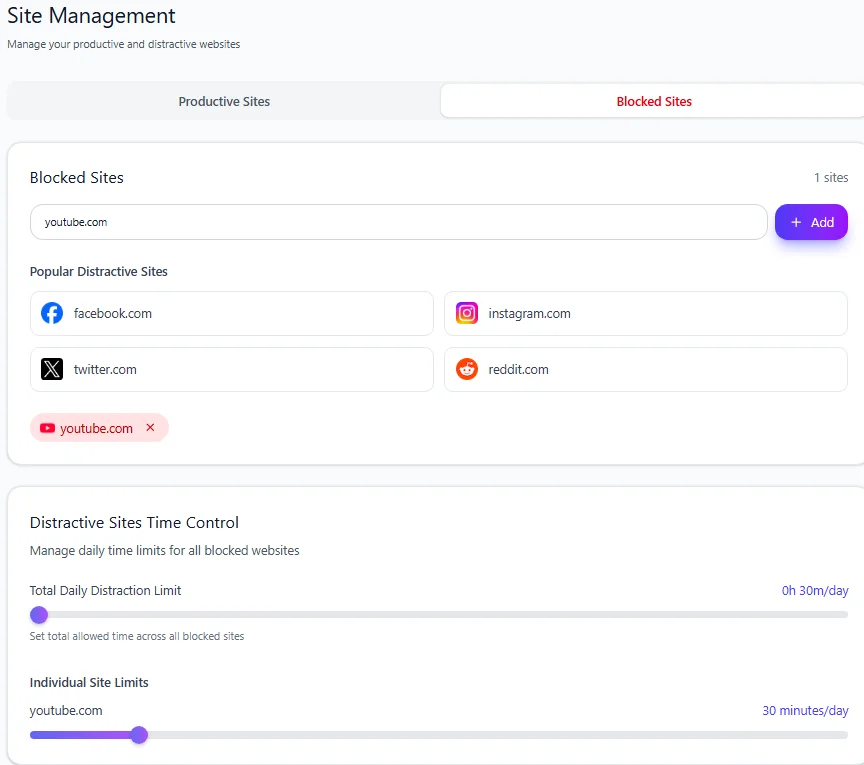
Some websites may genuinely help with studying while still being easy to overuse.
YouTube is an obvious example.
You may need a tutorial but not another hour of recommendations.
Reddit may contain a useful explanation but also endless unrelated discussions.
Instead of always blocking these sites completely, give them an Individual Site Limit.
For example:
YouTube → 30 minutes/day
Reddit → 15 minutes/day
These are examples, not universal recommendations.
Choose limits based on how much access you actually need.
If YouTube is a major distraction, see how to block or limit YouTube.
If Reddit regularly turns one research question into a long browsing session, see how to block or limit Reddit.
Step 3: Block websites you do not need during study
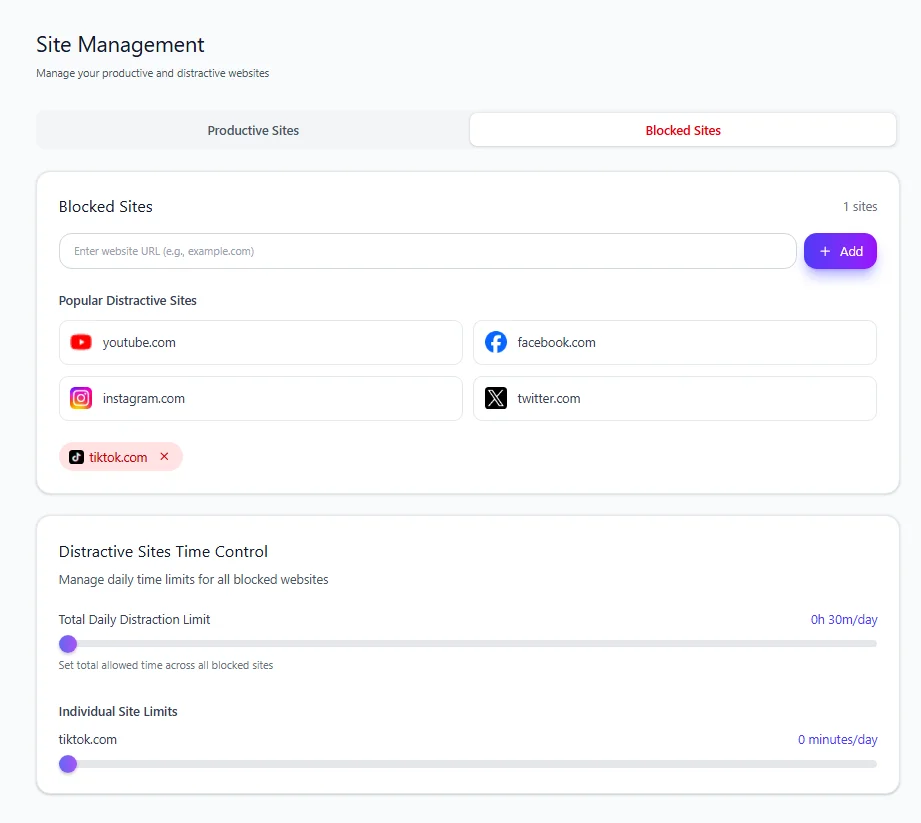
If a website has no useful role in the session, set its Individual Site Limit to:
0 minutes/day
In Mindova, a zero-minute limit means the website is blocked when you try to visit it.
That might make sense for a site such as TikTok, Twitch, or another entertainment website during a revision session.
Step 4: Start a Focus Session
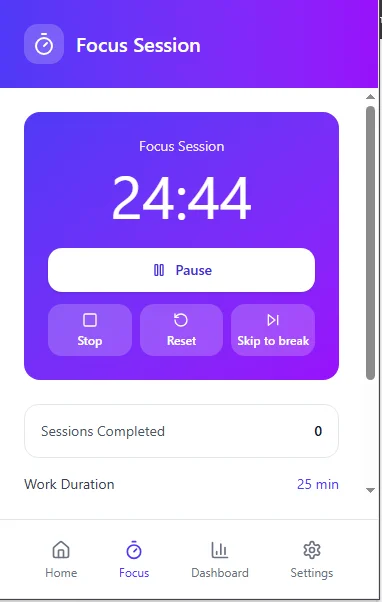
A daily limit controls how much access you allow across the day.
A Focus Session is useful when you want a specific period with fewer browser distractions.
Before starting:
- Decide what you will finish.
- Mark the websites you genuinely need as Productive.
- Close unrelated tabs.
- Start the Focus Session.
- Work until the block ends or your defined task is complete.
If you repeatedly open distracting websites while studying, you can also read our broader guide on how to block distracting websites.
7-day free trial for new users. No credit card required to start. View pricing.
What to Do When You Still Cannot Focus
If the same problem keeps happening, do not immediately add another productivity app.
Diagnose where the session breaks.
You cannot start
Make the first task smaller.
Instead of:
Study chemistry
try:
Answer the first five questions.
Starting is often easier when the first action is obvious.
You start but keep opening websites
Change the environment.
Close unnecessary tabs, silence notifications, and block or limit the sites you repeatedly open.
You keep thinking about unrelated tasks
Use a Not Now list.
Capture the thought and continue.
You can sit there, but nothing is going into your memory
Change the study method.
Stop only rereading and try retrieval, practice questions, or explaining the material without looking.
Your breaks keep becoming longer than your study blocks
Change what you do during breaks.
Choose activities with a clear ending rather than feeds designed to keep supplying new content.
You cannot concentrate even after removing distractions
Check the basics.
You may be tired, hungry, stressed, confused by the material, or trying to do a task that is currently too difficult.
Not every concentration problem is caused by technology.
A Simple 60-Minute Study Session
If you do not know where to start, try this.
Minute 0–5: Prepare
Write down one outcome.
Example:
Complete questions 1–15 and review every mistake.
Close unrelated tabs.
Silence unnecessary notifications.
Prepare the material you need.
Minute 5–35: Study
Work on the task.
When an unrelated thought appears, write it on your Not Now list.
Do not follow it.
Minute 35–40: Break
Stand up.
Get water.
Move around.
Avoid opening an endless feed.
Minute 40–55: Retrieve
Close your notes where possible.
Test yourself.
Answer questions.
Explain the material.
Identify what you still cannot remember or understand.
Minute 55–60: Close the loop
Write:
- what you finished;
- what you still do not understand;
- what you should study next.
Now the next session has a starting point.
The exact timing is not important.
You can make the blocks shorter or longer.
What matters is that the session has a goal, boundaries, active learning, and a clear finish.
Frequently Asked Questions
How can I focus while studying?
Start by choosing one concrete task instead of simply deciding to “study.”
Remove the distractions you repeatedly follow, work for a defined period, use active techniques such as practice questions or retrieval, and take breaks that make it easy to return.
How do I stay focused while studying for a long time?
Do not rely on one continuous marathon session.
Break the work into meaningful sections and take breaks when needed.
For longer-term learning, spreading study across multiple sessions can be more effective than concentrating everything into one sitting.
Is the Pomodoro Technique good for studying?
It can be useful as a structure, especially if getting started is difficult.
But 25 minutes is not a universal concentration limit, and research comparing fixed Pomodoro-style breaks with flexible breaks has not shown one schedule to be best for everyone.
Use 25 minutes as a starting point if it helps, then adjust the length to the task.
How do I stop checking my phone while studying?
Silence unnecessary notifications and put the phone somewhere you will not automatically reach for it.
If you need the phone for studying, disable the notifications that are most likely to interrupt you and keep only the necessary tools accessible.
How can I focus while studying on a laptop?
Keep the websites you need open and close unrelated tabs.
If you repeatedly open distracting websites, consider blocking them during study or giving useful-but-distracting sites a daily limit.
The aim is to make the laptop behave more like a study environment than an endless menu of alternatives.
Should I listen to music while studying?
It depends on the task and the person.
If music helps you work without pulling attention away from reading, problem-solving, or remembering material, it may be fine.
If you keep changing songs, watching videos, reading lyrics, or using the music app as another distraction, silence may work better.
Test what actually improves the quality of your study rather than assuming one rule works for everyone.
What should I do during study breaks?
Choose something easy to stop.
Walk around, stretch, refill your water, eat a quick snack, or rest your eyes.
Be cautious about opening social feeds or videos during a short break if those activities regularly make it difficult for you to return.
Is rereading enough for studying?
Rereading can help you become familiar with material, but familiarity is not the same as being able to recall or use it.
After reading, try retrieving the information without looking, answering questions, explaining the concept, or solving a problem yourself.
What if I cannot focus even after removing distractions?
Look at what else may be happening.
The task may be unclear or too difficult. You may need a break, food, sleep, or help understanding the material.
If concentration problems are persistent and significantly affect school or daily life, productivity techniques alone may not address the underlying issue.
If browser distractions are one of the main things breaking your sessions, Mindova can help you block distracting websites, set different daily limits, and protect focused study periods while keeping the websites you need available.
Mouhsine
Admin
Passionate about helping people achieve peak mental performance through evidence-based strategies and mindful technology use.
Related Articles

How to Focus on Writing Without Digital Distractions
Learn how to stay focused while writing by separating drafting from research, reducing digital distractions, and keeping the online tools you actually need
Creative Block: How to Get Unstuck and Start Creating Again
Feeling creatively stuck? Learn what creative block can look like, how to identify what is stopping you, and practical ways to generate ideas and move forward
How to Avoid Distractions While Working: 10 Practical Strategies
Learn how to avoid distractions while working by reducing digital triggers, managing notifications, limiting distracting websites, and protecting focused work time.
Comments
Be the first to comment.
Ready to protect your focus?
Block distracting sites, set daily limits, and run focus sessions. Mindova is free.